2.4.0

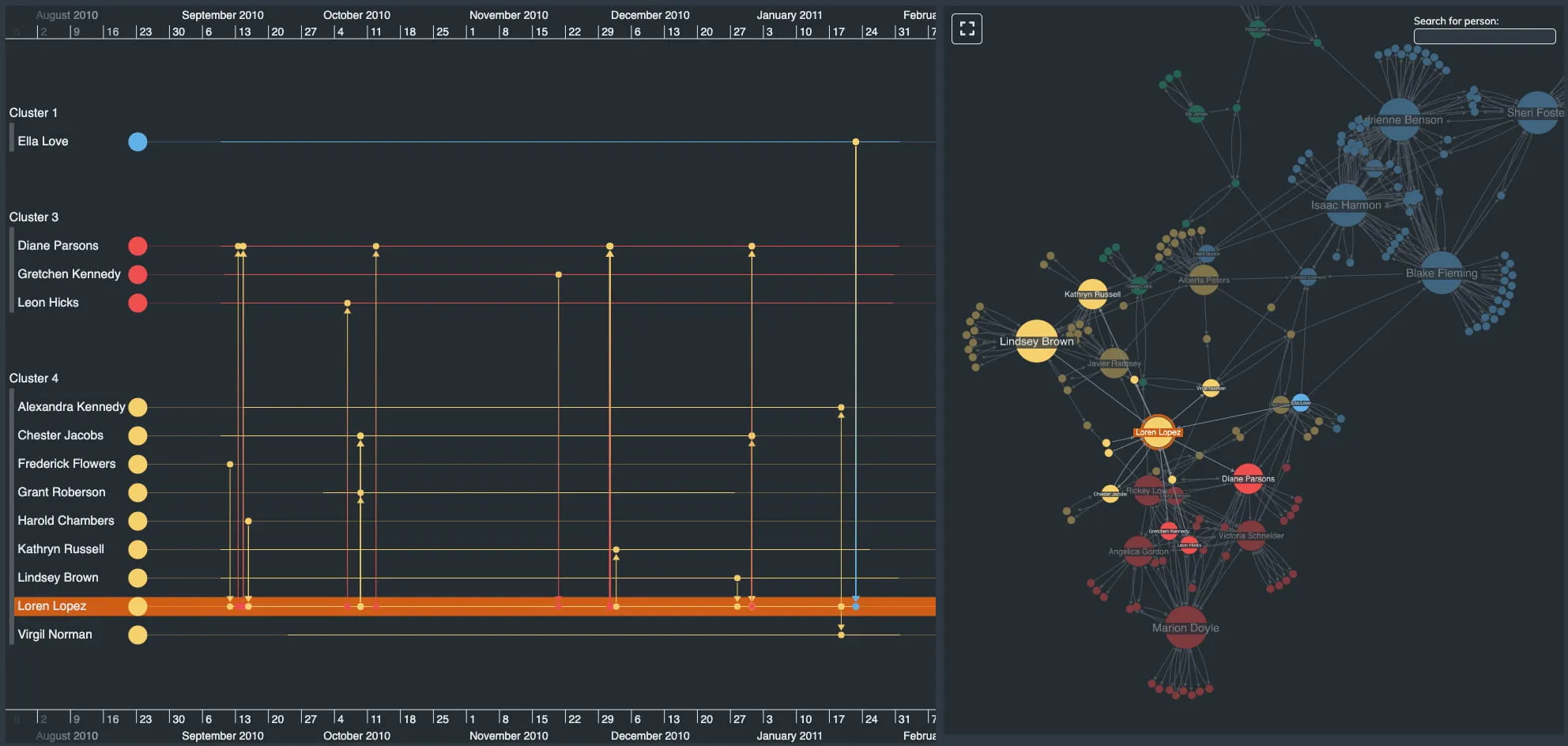
An image showing a KronoGraph and ReGraph integration

Features

  • KronoGraph is a new product for timeline visualization from Cambridge Intelligence. It can seamlessly integrate with ReGraph, unlocking even more possibilities for analysis and visualization of your data. Check out the two products working beautifully together in our new Timeline Analysis showcase.
  • More functional stories: You asked, and we have delivered! Most of our stories are now hook-based rather than class-based.

Bugs Fixed

  • Summary links can no longer have duplicate names.
  • Open parent combos now resize when closed child combos resize.
  • Switching to map mode fires only one change event.
  • The positions prop input validation has been improved.

2.3.1

  • Fixed an issue where the analysis package was encountering a 'navigator is not defined' error.
  • Fixed an issue where click events were firing twice in some circumstances.

2.3.0

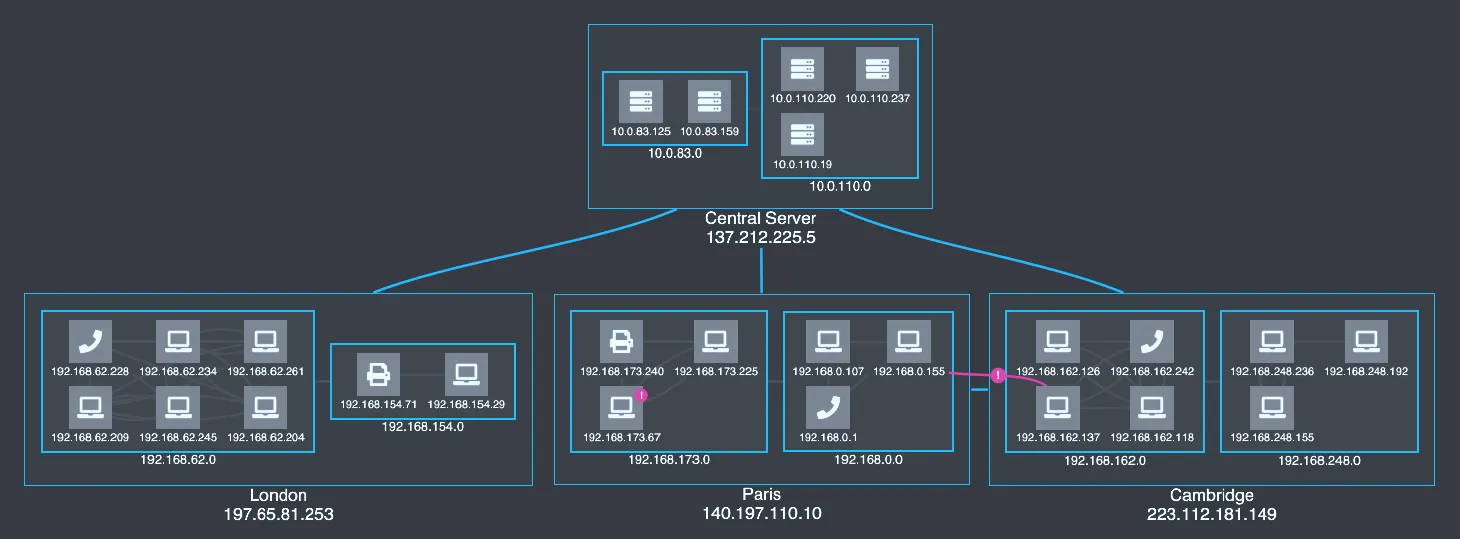
An image showing rectangular combos

Rectangular combos are here!

Our new rectangular combos provide a clear and condensed view of your data and its context. They also work particularly well with our sequential layout! Here are the technical details:

  • In the combine prop, there is a new shape property which supports 'circle' and 'rectangle'.
  • In the onCombineNodes return, there is a new 'grid' option for the arrange property. It is the default arrangement for rectangular combos.

You can try out rectangular combos for yourself in our Rectangular Combos story, or open any of our other combos stories in the playground and add shape:'rectangle' to the combine prop.

Please note: rectangular combos are in Alpha, so we don’t recommend using them in production just yet. We might still introduce breaking API changes, or change the behaviors or animations in any release until the Alpha status is removed.

We are very keen to hear from users who want to use rectangular combos. Please tell us about your experience with them by emailing [email protected].

Enhancements

  • Nested combos padding has been improved, particularly when the combo only has one other combo inside of it.
  • TypeScript users can now check that the properties included in the properties array in the combine prop are correct in the data objects of their nodes.
  • ReGraph now officially supports React 17, while retaining compatibility with v16.3 and up.

Bugs Fixed

  • Temporary dummy links are now drawn above combos.
  • The dummyLink drag return now works correctly with curved links.
  • Single page applications should no longer see a benign 'Chart has been destroyed' error.
  • The Getting Started instructions have been updated to work with Yarn 2.
  • Fixed an issue where onChartDragCancel was not firing in some circumstances.
  • Long press gestures on touch devices are now properly supported in the time bar.
  • The typing of value on the times property of items has been corrected to number.
  • Several scenarios with fit:'auto' have been improved.

2.2.0

Features

  • A new curvedLinks property for styling the links of sequential layouts. When set to true, links join nodes in the direction of the orientation property. Check out the updated Hierarchies and Impact Analysis stories.
  • A new dummyLink API returned from onChartDragStart which triggers a dummy link dragger and lets the user create a new link. See the updated Create Link story and the Breaking Changes section for more information.
  • A new Material Icons story which demonstrates how to use Material Design icons with ReGraph.
  • Improved zooming experience with smoother scrolling.
  • Improved reliability of some multi-touch gestures such as pinch-to-zoom.
  • Added support for native macOS modifier key events such as ^+click to trigger a context menu or ⌘+click to add / remove items from the current selection.
  • Implemented a new internal Static Analysis / SAST tool for testing the ReGraph source code.

Bugs Fixed

  • ReGraph no longer waits for images to load when adding new data to the chart.
  • Touch-triggered selection changes are now correctly labeled as 'user'.
  • Multi-selection of items while holding the Shift key is available for touch devices.
  • An initial dragover event of 'null' is now fired for the chart background when a node is dragged.
  • Clicking the time bar no longer triggers drag events, and vice versa.
  • Clicking the chart background no longer publishes a selection change event if the selection has not changed.
  • Some font icons using Unicode code points from outside the Basic Multilingual Plane are now supported.
  • Font icons are now supported on link end glyphs.
  • Combos are now recognized by the top property in the layout prop.

Deprecations

  • The consistent property of the layout prop has been deprecated as most of its functionality is now handled internally by ReGraph.

Breaking Changes

The selection workaround previously used in the Create Link story no longer works. The story now uses the new dummyLink API. If your app gives your users the ability to create links by dragging between nodes, you will likely need to update your code. For any help migrating to the new format, please contact support.

2.1.2

  • Fixed an issue where the Leaflet object was sometimes not passed when the map was shown on initial load.
  • Fixed an issue where fit:'auto' was not fitting properly when items were added to an empty map.

2.1.1

  • Updated endpoint for GraphQL demos.

2.1.0

Features

  • A new Combos Drag and Drop story which demonstrates how to move nodes between combos.
  • New data connection stories which demonstrate how to fetch data from a REST API or GraphQL endpoint.
  • A sidebar search box is now available on the Docs and API Reference pages.

Bugs Fixed

  • The fit property is respected when the Chart is initialized.
  • Improved the behavior of the chart in several scenarios when fit:'auto' is set.
  • Animated changes to item properties on selection change no longer cancel dragging.
  • Various sub-objects are now removed from items when set to null or undefined.
  • Unique package names resolve an issue when updating installations with yarn.

2.0.1

  • The onChartClick event now passes the subItem property when clicking on a combo.
  • The Filtering Data story info tab now links to the CSS file.
  • Improved the behavior of the chart in some scenarios when fit:'auto' is set.
  • Combos now work with falsey values, e.g. data: { group: 0 }.

2.0.0

In ReGraph 2.0 the chart is better than ever at adapting to changes in your data and state. Adaptive layout and view strategies automatically tell the story of your data and keep your users informed.

For help upgrading from ReGraph v1.X, see the Version 2 Migration Guide.

Adaptive Layouts

Layouts have been improved to be more adaptive. Components will arrange themselves more intelligently when adding or removing items from the Chart.

ReGraph uses adaptive layouts so long as the positions prop is unset. No extra layout prop options are required.

Read more about Adaptive Layouts in the Cambridge Intelligence blog.

View Improvements

We've changed the way that ReGraph handles the view. By default, we'll maximize the visibility of changes to the Chart, while minimizing the amount the view moves. This helps keep the user informed as they manipulate the state of the chart.

A new fit option lets you control this behavior, or switch it off entirely if you want to ensure the viewport won't move.

In addition, we've introduced a new set of instance methods for the Chart and Time Bar which allow direct manipulation of the view.

As a result of these changes, the String values in the view prop for the Chart have been deprecated. The Time Bar view prop has been deprecated entirely.

Enhancements

  • Adaptive layouts with improved component packing.
  • Adaptive view adjusts to chart changes.
  • The overview window background and border colors can now be customized.
  • A new stretch option for the sequential layout to adjust the spacing between levels. Check out the updated Hierarchies Story.

SDK Improvements

  • A new Mafia showcase demo has been added to the SDK site which demonstrates the new adaptive layout and view behaviors.
  • An updated Adaptive Layouts story provides more detail about the adaptive layout behaviors.
  • Each story in the Storybook now has an Info tab to provide additional context.

Bugs Fixed

  • The times object on items is now typed properly.
  • The time bar range prop now uses the expected start and end values.
  • The time bar highlight prop now handles time ranges correctly.
  • The onChartDragStart event no longer triggers when a drag starts on a link.
  • The ReGraph chart will now filter out any item that is passed with an empty id like this, in addition to logging a warning:
<Chart items={ '': { color: 'red' }})
  • ReGraph can now run without the dependency on the FontLoader component which allows the analysis package to run in web workers and other environments without browser windows.
  • Fixed a FontLoader error while running in React dev mode.
  • Fixed an issue when panning the view in Map Mode.

Breaking Changes

For details on how to handle the following breaking changes, see the Version 2 Migration Guide.

  • The default name in the layout prop is now 'organic'.
  • The default packing in the layout prop is now 'circle'.
  • The time bar range prop now uses the expected start and end properties, not dt1 and dt2.
  • The times object on items has been updated to accept a Date, number, or object containing start and end.
  • Various TypeScript changes to reflect API changes and bug fixes.

Deprecated APIs

  • The 'hierarchy' layout is now deprecated. Instead, please use:
layout={{name: 'sequential'}}
  • The string values for the Chart view prop are now deprecated. Please use the new zoom, pan, and fit instance methods instead.
  • The time bar view prop is now deprecated. Please use the range prop and the new zoom, pan, and fit instance methods instead.

Version 2.0 Migration Guide

ReGraph version 2 has a number of improvements to reduce the complexity of your code in key areas, such as the layout and view props.

Getting the most out of layouts

ReGraph's default layout options have changed to:

layout={{name:'organic', packing:'circle'}}

We believe that these options provide the best experience, but if you want things to look as they did by default in version 1, then use:

layout={{name:'standard', packing:'rectangle'}}

When using packing:'rectangle', or setting the positions prop you will not get the new adaptive layout behaviors.

The 'hierarchy' layout has been deprecated. Please use our next-generation hierarchical layout 'sequential' instead.

View changes

The options prop has a new fit property which by default automatically adjusts the viewport to show your users the changing data in the chart. It massively simplifies how the viewport is managed and in many applications it should remove the need for you to set the view prop entirely.

We recommend removing the view prop in the render function of your application and running some regression testing to see whether the fit option handles things sufficiently. We'd be happy to talk through any cases where you still need to control the view on [email protected].

To make manual viewport adjustments more robust, we have replaced the string value view properties with zoom, pan, and fit instance methods. You will want to use these instance methods if you still need to pass a string value to the view prop.

You can continue to use the deprecated view prop to preserve existing behavior.

Time bar changes

The view prop has been deprecated in favor of the updated range prop. There are also new zoom, pan, and fit instance methods to make manual viewport adjustments more robust. You will want to use these instance methods if you were passing a string value to the view prop.

Additionally, the format for the times property on items has been updated to accept a Date, number, or object containing start and end. This prevents the situation where a times value could contain both a point in time and a duration.

Terms of use

These terms do not alter or supersede any existing agreements between you (or your employer) and us.

By accessing or using any Content you agree to be bound by these Terms of Use. Please review these terms carefully before using the website.

The contents of this website, including but not limited to any text, code samples, API references, schemas, interactive tools, and other materials (collectively, the 'Content'), are made available for informational and internal evaluation purposes only. All intellectual property rights in the Content are reserved. No licence is granted to use the Content for any commercial purpose, or to copy, distribute, modify, reverse-engineer, or incorporate any part of the Content into any product or service, without our prior written consent.

This Content is provided “as is” and “as available,” without any representations, warranties, or guarantees of any kind, whether express or implied, including but not limited to implied warranties of merchantability, fitness for a particular purpose, non-infringement, or accuracy. To the fullest extent permitted by applicable law, we expressly exclude and disclaim all implied warranties, conditions, and other terms that might otherwise be implied.

We disclaim all liability for any loss or damage, whether direct, indirect, incidental, consequential, or otherwise, arising from any reliance placed on the Content or from your use of it, to the fullest extent permitted by applicable law. By continuing to access or use the Content, you acknowledge and agree to these terms.