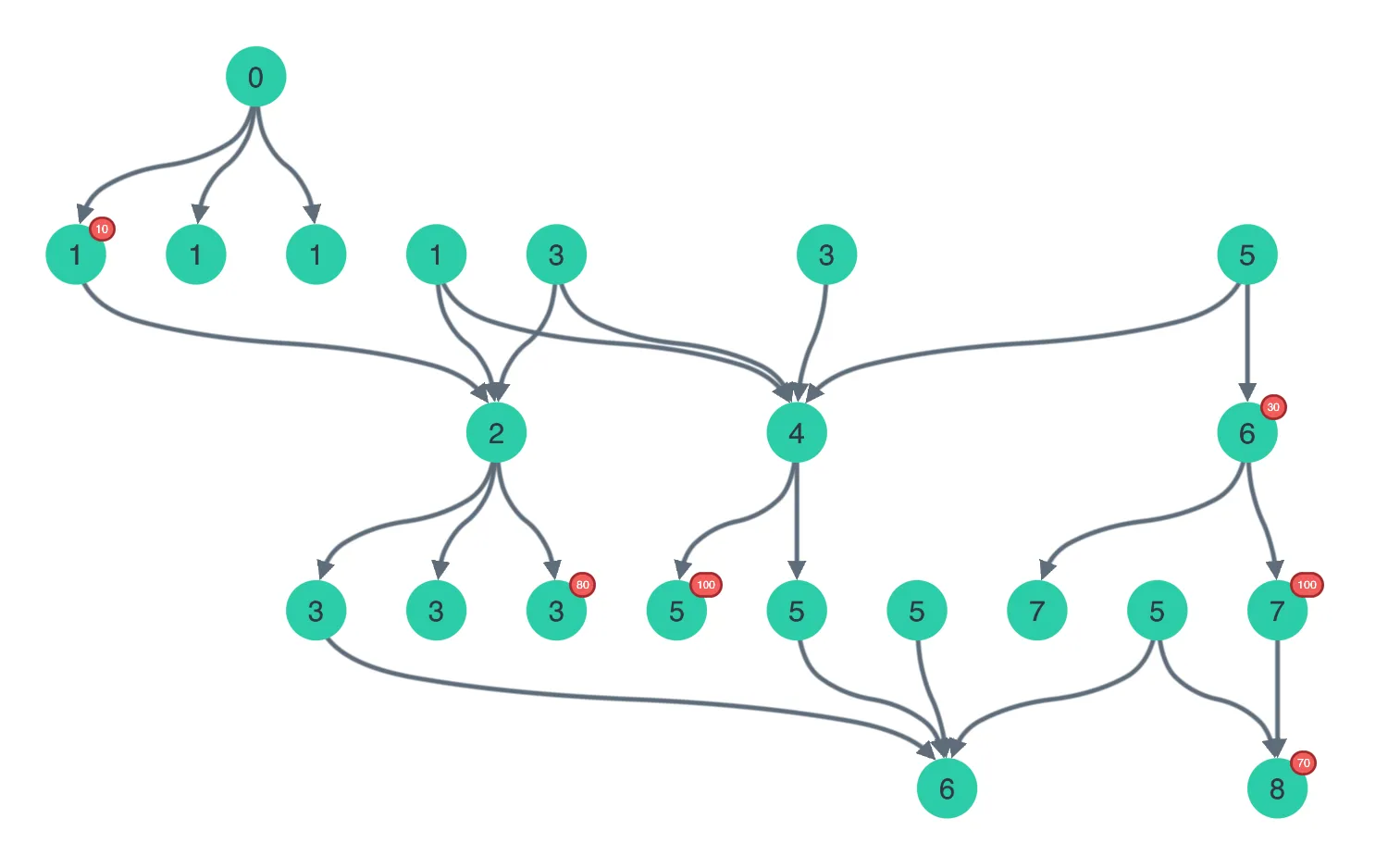
Click the buttons above the chart to control various options.
The sequential layout can automatically find the structure using arrows on links.
You can also set a custom order of levels or specify the top nodes.
See also
import React, { useCallback, useState } from "react";
import { createRoot } from "react-dom/client";

import debounce from "lodash/debounce";
import { Chart } from "regraph";

import { Generator } from "./data";

import "@ci/theme/rg/css/button.css";
import "@ci/theme/rg/css/layout.css";

const generator = new Generator();

export const Demo = () => <SequentialDemo />;

const orientations = ["Up", "Down", "Left", "Right"];

function SequentialDemo() {
  const [items, setItems] = useState(generator.generate());
  const [layout, setLayout] = useState({
    level: null,
    name: "sequential",
    orientation: "down",
    stretch: 1,
    top: null,
    linkShape: "curved",
    orderBy: null,
  });

  const [selection, setSelection] = useState({});
  const [stretch, setStretch] = useState(1);
  const debouncedSetLayout = useCallback(debounce(setLayout, 100), [debounce]);

  return (
    <div className="story">
      <div
        className="options"
        style={{ flexBasis: "auto", minWidth: 400, flexWrap: "nowrap" }}
      >
        <div style={{ width: 140 }}>
          <button
            style={{ width: "95%" }}
            type="button"
            onClick={() => {
              setItems(generator.generate());
              setSelection({});
              setLayout({ ...layout, top: layout.top == null ? null : [] });
            }}
          >
            Generate
          </button>
          <button
            style={{ width: "95%" }}
            type="button"
            className={layout.linkShape === "curved" ? "active" : ""}
            onClick={() =>
              setLayout({
                ...layout,
                linkShape: layout.linkShape === "curved" ? "direct" : "curved",
              })
            }
          >
            Curved Links
          </button>
        </div>
        <span className="separator" style={{ minHeight: 104, height: "80%" }} />
        <div>
          <div>
            <span
              style={{ display: "inline-block", width: 140 }}
              className="label"
            >
              Order of levels
            </span>
            <button
              type="button"
              className={
                layout.level == null && layout.top == null ? "active" : ""
              }
              onClick={() => setLayout({ ...layout, level: null, top: null })}
            >
              Automatic
            </button>
            <button
              type="button"
              className={layout.level === "level" ? "active" : ""}
              onClick={() => setLayout({ ...layout, level: "level" })}
            >
              Predefined
            </button>
            <button
              type="button"
              className={
                layout.level == null && layout.top != null ? "active" : ""
              }
              onClick={() =>
                setLayout({
                  ...layout,
                  level: null,
                  top: Object.keys(selection),
                })
              }
            >
              Selected nodes first
            </button>
          </div>
          <div>
            <span
              style={{ display: "inline-block", width: 140 }}
              className="label"
            >
              Order within levels
            </span>
            <button
              type="button"
              className={layout.orderBy == null ? "active" : ""}
              onClick={() => setLayout({ ...layout, orderBy: null })}
            >
              Automatic
            </button>
            <button
              type="button"
              className={
                layout.orderBy && layout.orderBy.sortBy === "descending"
                  ? "active"
                  : ""
              }
              onClick={() =>
                setLayout({
                  ...layout,
                  orderBy: {
                    property: "weight",
                    sortBy: "descending",
                  },
                })
              }
            >
              Descending
            </button>
            <button
              type="button"
              className={
                layout.orderBy && layout.orderBy.sortBy === "ascending"
                  ? "active"
                  : ""
              }
              onClick={() =>
                setLayout({
                  ...layout,
                  orderBy: {
                    property: "weight",
                    sortBy: "ascending",
                  },
                })
              }
            >
              Ascending
            </button>
          </div>
          <div>
            <span
              style={{ display: "inline-block", width: 140 }}
              className="label"
            >
              Orientation
            </span>
            {orientations.map((orientation) => (
              <button
                className={
                  layout.orientation === orientation.toLowerCase()
                    ? "active"
                    : ""
                }
                key={orientation}
                type="button"
                onClick={() =>
                  setLayout({
                    ...layout,
                    orientation: orientation.toLowerCase(),
                  })
                }
              >
                {orientation}
              </button>
            ))}
          </div>
          <div>
            <span
              style={{ display: "inline-block", width: 80 }}
              className="label"
            >
              Stretch
            </span>{" "}
            0{" "}
            <input
              type="range"
              min={0}
              step={0.1}
              max={2}
              value={stretch}
              style={{ padding: 0, verticalAlign: "middle" }}
              onChange={({ target }) => {
                debouncedSetLayout({ ...layout, stretch: target.value });
                setStretch(target.value);
              }}
            />{" "}
            2
          </div>
        </div>
      </div>
      <Chart
        animation={{ time: 500 }}
        items={items}
        layout={layout}
        options={{ navigation: false, overview: false }}
        selection={selection}
        onChange={({ selection: newSelection }) => {
          if (!newSelection) {
            return;
          }
          if (layout.top != null) {
            setLayout({ ...layout, top: Object.keys(newSelection) });
          }
          setSelection(newSelection);
        }}
      />
    </div>
  );
}

const root = createRoot(document.getElementById("regraph"));
root.render(<Demo />);import keyBy from "lodash/keyBy";
import groupBy from "lodash/groupBy";
import { style } from "@ci/theme/rg/js/storyStyles";
export class Generator {
constructor(seed = 10115) {
this.seed = seed;
}
nextID = 1;
pseudoRandom() {
const x = Math.sin((this.seed += 1)) * 10000;
return x - Math.floor(x);
}
randInt(n) {
return Math.floor(this.pseudoRandom() * n);
}
randIntBetween(min, max) {
return min + this.randInt(max + 1 - min);
}
makeLink(a, b, direction, long) {
const link = {
id: `${a.id}-${b.id}`,
id1: a.id,
id2: b.id,
...style.link,
end1: {},
end2: {},
};
if (direction) {
link.end1.arrow = direction === "in";
if (direction === "out") {
if (this.pseudoRandom() < 0.7 || long) {
link.end2.arrow = true;
} else {
link.end1.arrow = true;
}
}
}
return link;
}
generateLongLinks(map) {
const links = [];
// only add links on every odd level
for (let i = 1; i < Object.keys(map).length; i += 2) {
if (map[i + 3]) {
const thisLayer = map[i];
const from = thisLayer[this.randIntBetween(0, thisLayer.length - 1)];
const nextLayer = map[i + 3];
const to = nextLayer[this.randIntBetween(0, nextLayer.length - 1)];
const link = this.makeLink(from, to, "out", true);
links.push(link);
}
}
return links;
}
makeNode(level) {
this.nextID += 1;
const weight =
this.pseudoRandom() > 0.75
? Math.ceil(this.randInt(100) / 10) * 10
: null;
const glyphs = [];
if (weight !== null) {
glyphs.push({
...style.selectMain,
border: { color: style.colors.red3 },
label: { text: weight, color: "#fff" },
position: "ne",
size: 1.1,
});
}
return {
id: this.nextID,
...style.primary1,
data: { level, weight },
glyphs,
label: {
...style.primaryLabel1,
text: level,
fontSize: 25,
},
};
}
generateInOutNodes(targetNode, direction) {
const nodes = [];
const links = [];
let num = this.randInt(3);
// bias to having more outputs than inputs (helps create longer chains)
if (direction === "out") {
num += this.randInt(3);
}
const level =
direction === "in"
? targetNode.data.level - 1
: targetNode.data.level + 1;
for (let k = 0; k < num; k += 1) {
const node = this.makeNode(level);
nodes.push(node);
links.push(this.makeLink(targetNode, node, direction, false));
}
return { nodes, links };
}
// This generates random hierarchical data
generateChainedComponent(min, max) {
let nodes = [];
let links = [];
let parentTransaction;
const topNode = this.makeNode(0);
nodes.push(topNode);
// indices into nodes indicating range of parent nodes
let levelStart = 0;
let levelEnd = nodes.length;
// loop around each level we want to create
for (let i = 1; i < max; i += 1) {
// loop around the transaction nodes created in the previous level
for (let j = levelStart; j < levelEnd; j += 1) {
parentTransaction = nodes[j];
if (j !== 0) {
const inputs = this.generateInOutNodes(parentTransaction, "in");
nodes = nodes.concat(inputs.nodes);
links = links.concat(inputs.links);
}
}
const outputsStart = nodes.length;
do {
for (let j = levelStart; j < levelEnd; j += 1) {
parentTransaction = nodes[j];
const outputs = this.generateInOutNodes(parentTransaction, "out");
nodes = nodes.concat(outputs.nodes);
links = links.concat(outputs.links);
}
} while (i < min && outputsStart + 3 > nodes.length);
// Loop around the outputs in the previous level
const outputsEnd = nodes.length;
do {
for (let j = outputsStart; j < outputsEnd; j += 1) {
const inOutNode = nodes[j];
if (this.randInt(10) > 4) {
const transactionNode = this.makeNode(2 * i);
const link = this.makeLink(transactionNode, inOutNode, "in");
nodes.push(transactionNode);
links.push(link);
}
}
} while (i < min && outputsEnd === nodes.length);
// Get the range of transactions to loop over next
levelStart = outputsEnd;
levelEnd = nodes.length;
}
const levelMap = groupBy(nodes, "data.level");
const longLinks = this.generateLongLinks(levelMap);
// Finally, return all items
return [...nodes, ...links, ...longLinks];
}
generate() {
this.nextID = 1;
// Bias towards smaller charts, but make a small number of them a bit bigger
let max = 4;
if (this.randInt(10) < 3) {
max += 1;
} else if (this.randInt(10) <= 1) {
max += 2;
}
const items = this.generateChainedComponent(3, max);
this.seed += 1;
return keyBy(items, "id");
}
}<!doctype html>
<html>
<body>
<div id="regraph" style="height: 100vh"></div>
<script type="module" src="./code.jsx"></script>
</body>
</html>