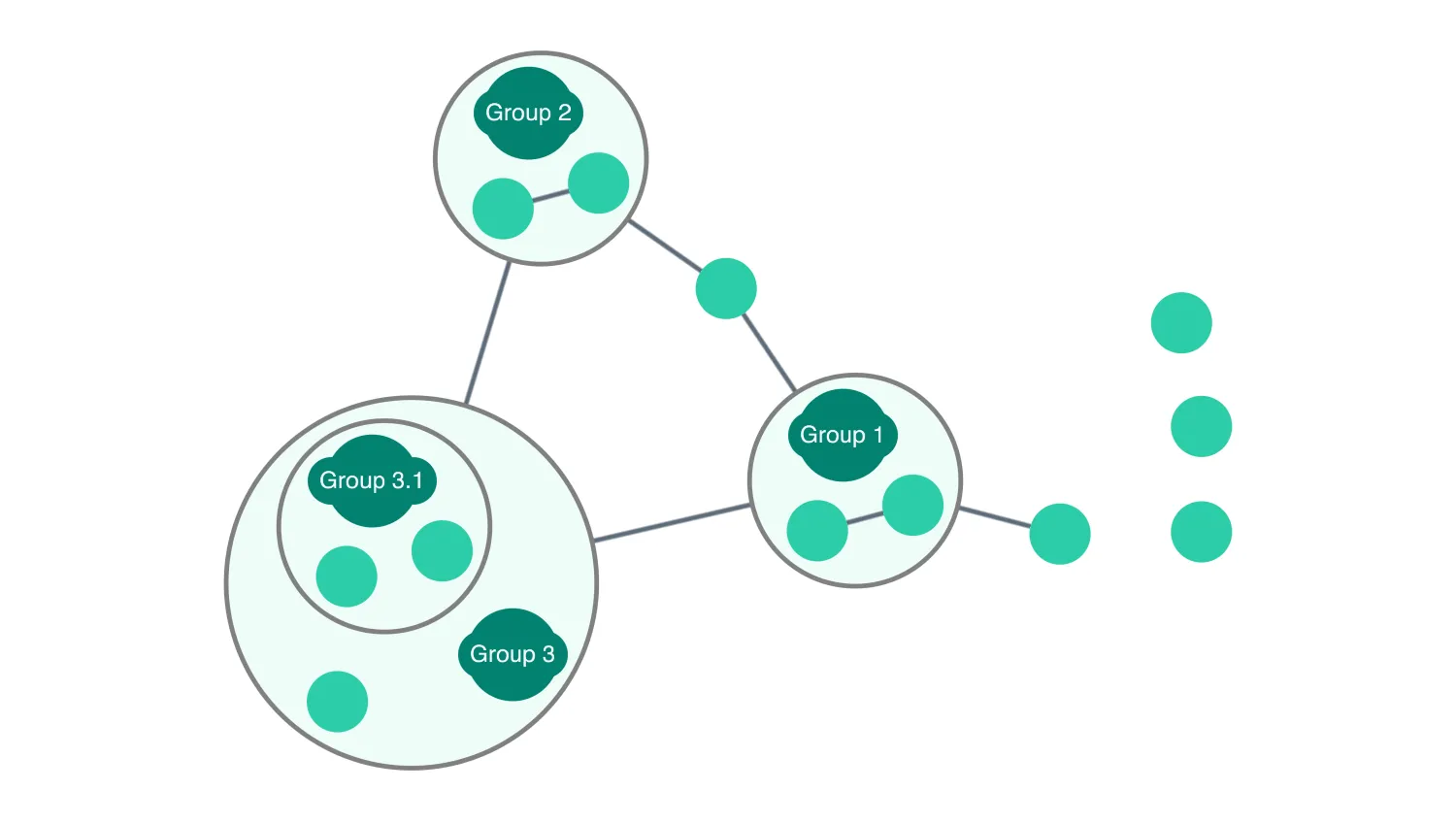
Drag nodes into, out of and between combos, to change which combo they are part of. Combos can not be dragged into, out of or between combos.
Changing the data properties used in combine, changes the combo that nodes are assigned to.
See also
import React, { useState } from "react";
import { createRoot } from "react-dom/client";

import { concat, join, keys, last, values } from "lodash";
import { Chart } from "regraph";

import { data } from "./data";
import { style } from "@ci/theme/rg/js/storyStyles";

// These options configure the appearance of the chart
const options = {
  overview: false,
  navigation: false,
  combo: { autoSelectionStyle: false },
};

// helper functions
const isCombo = (id) => id && id.startsWith("_combonode_");
const isDummy = (id) => id && id.startsWith("dummyNode");
const getParentComboId = (item) =>
  item && values(item.data).length > 0
    ? join(concat(["_combonode"], values(item.data)), "_")
    : null;

export const Demo = () => <DragBetweenCombos items={data} />;

function DragBetweenCombos(props) {
  const { items } = props;
  const [dropTarget, setDropTarget] = useState({
    current: null,
    previous: null,
  }); // Previous tracked to remove highlighting
  const [state, setState] = useState({
    items,
    animation: { animate: false },
    selection: {},
  }); // Don't animate the first load
  const [combine, setCombine] = useState({
    properties: ["group1", "group0"],
    level: 2,
  });

  const getDropTargetId = (dropTargetId) => {
    // If dropped onto a node/dummy node convert to parent combo id
    return !isCombo(dropTargetId)
      ? getParentComboId(state.items[dropTargetId])
      : dropTargetId;
  };

  // Highlight combos as they are dragged over
  const applyHighlighting = () => {
    if (dropTarget === null) return;
    const { current, previous } = dropTarget;
    if ((isCombo(current) && previous !== "initial") || isCombo(previous)) {
      setCombine((currentCombine) => ({ ...currentCombine })); // Set combine to style combos
    }
  };

  React.useEffect(applyHighlighting, [dropTarget]); // Update highlighting when drop target changes

  const handleDragStart = ({ setDragOptions, type: dragType, id }) => {
    setState((current) => {
      return { ...current, animation: { animate: false } };
    }); // Switch off animation to prevent highlighting cancelling drag
    if (dragType !== "node" || isCombo(id) || isDummy(id)) {
      setDropTarget(null);
      return; // Default drag behavior except when dragging one of the nodes
    }
    setDropTarget({
      current: getParentComboId(state.items[id]),
      previous: "initial",
    });
    // Prevents combos moving with their nodes
    setDragOptions({ includeCombos: false });
  };

  const handleDragOver = ({ id }) => {
    if (dropTarget !== null) {
      setDropTarget({
        current: getDropTargetId(id),
        previous: dropTarget.current,
      });
    }
  };

  const handleDragEnd = ({ preventDefault, draggedItems }) => {
    const draggedIds = Object.keys(draggedItems);
    if (draggedIds.length === 0) {
      return;
    }

    const id = draggedIds[0];
    if (id === null || isDummy(id) || isCombo(id)) {
      return; // If nothing or a dummy node is being dragged, do nothing.
    }

    const { current: dropTargetId } = dropTarget;
    setDropTarget({ current: null, previous: null }); // reset drop target

    const newItems = { ...state.items };
    const item = { ...newItems[id] };

    // Don't drag nodes around inside combos
    if (dropTargetId === getParentComboId(item) && dropTargetId !== null) {
      preventDefault();
      return;
    }

    item.data = {}; // Set item data to an empty object - removes it from all combos

    // If dropped onto a combo update data to include the relevant properties
    if (isCombo(dropTargetId)) {
      const comboGroups = dropTargetId.split("_").slice(2);
      // Multiple properties need to be updated to add to a sub combo
      for (let i = 0; i < comboGroups.length; i += 1) {
        item.data[`group${i}`] = comboGroups[i];
      }
    }

    newItems[id] = item;
    setState((current) => {
      return {
        ...current,
        items: newItems,
        animation: { animate: true, time: 500 },
      };
      // Switch animation back on again
    });
  };

  // Set labels, arrangement and highlighting
  const handleOnCombineNodes = ({ setStyle, ...comboDef }) => {
    setStyle({
      arrange: "concentric",
      color:
        dropTarget.current === comboDef.id
          ? style.colors.offWhite
          : style.colors.tealFaded, // Apply drag highlight color
      label: { text: "" },
    });
  };

  const handleChartChange = ({ selection }) => {
    if (selection) {
      // Prevent multiple selection
      const newSelection = {};
      newSelection[last(keys(selection))] = true;
      setState((current) => {
        return { ...current, animation: false, selection: newSelection };
      });
    }
  };

  return (
    <Chart
      animation={state.animation}
      items={state.items}
      options={options}
      selection={state.selection}
      onDragEnd={handleDragEnd}
      onDragOver={handleDragOver}
      onDragStart={handleDragStart}
      onChange={handleChartChange}
      onCombineNodes={handleOnCombineNodes}
      combine={combine}
    />
  );
}

const root = createRoot(document.getElementById("regraph"));
root.render(<Demo />);import { style } from "@ci/theme/rg/js/storyStyles";
export const data = {
a: {
...style.primary1,
},
b: {
...style.primary1,
data: { group0: 1 },
},
c: {
...style.primary1,
data: { group0: 2 },
},
d: {
...style.primary1,
data: { group0: 2 },
},
e: {
...style.primary1,
data: { group0: 1 },
},
f: {
...style.primary1,
data: { group0: 3 },
},
g: {
...style.primary1,
data: { group0: 3, group1: 1 },
},
h: {
...style.primary1,
},
i: {
...style.primary1,
},
j: {
...style.primary1,
},
k: {
...style.primary1,
},
l: {
...style.primary1,
data: { group0: 3, group1: 1 },
},
// Dummy nodes to prevent the combos disappearing if all draggable nodes are removed.
dummyNode1: {
...style.primary2,
data: { group0: 1 },
size: 1.5,
glyphs: [
{
label: { text: "Group 1", color: style.colors.offWhite },
...style.primary2,
radius: 0,
position: 0,
size: 1.5,
},
],
},
dummyNode2: {
...style.primary2,
data: { group0: 2 },
size: 1.5,
glyphs: [
{
label: { text: "Group 2", color: style.colors.offWhite },
...style.primary2,
radius: 0,
position: 0,
size: 1.5,
},
],
},
dummyNode3: {
...style.primary2,
data: { group0: 3 },
size: 1.5,
glyphs: [
{
label: { text: "Group 3", color: style.colors.offWhite },
...style.primary2,
radius: 0,
position: 0,
size: 1.5,
},
],
},
dummyNode4: {
...style.primary2,
data: { group0: 3, group1: 1 },
size: 1.5,
glyphs: [
{
label: { text: "Group 3.1", color: style.colors.offWhite },
...style.primary2,
radius: 0,
position: 0,
size: 1.5,
},
],
},
"a-b": {
id1: "a",
id2: "b",
...style.link,
},
"a-c": {
id1: "a",
id2: "c",
...style.link,
},
"a-d": {
id1: "a",
id2: "d",
...style.link,
},
"c-d": {
id1: "c",
id2: "d",
...style.link,
},
"a-e": {
id1: "a",
id2: "e",
...style.link,
},
"b-e": {
id1: "b",
id2: "e",
...style.link,
},
"b-h": {
id1: "b",
id2: "h",
...style.link,
},
"b-f": {
id1: "b",
id2: "f",
...style.link,
},
"c-f": {
id1: "c",
id2: "f",
...style.link,
},
};<!doctype html>
<html>
<body>
<div id="regraph" style="height: 100vh"></div>
<script type="module" src="./code.jsx"></script>
</body>
</html>