Right-to-Left Text

Features

Introduction

KeyLines supports multiple languages, including right-to-left (RTL) and bidirectional (BIDI) writing systems such as Arabic and Hebrew.
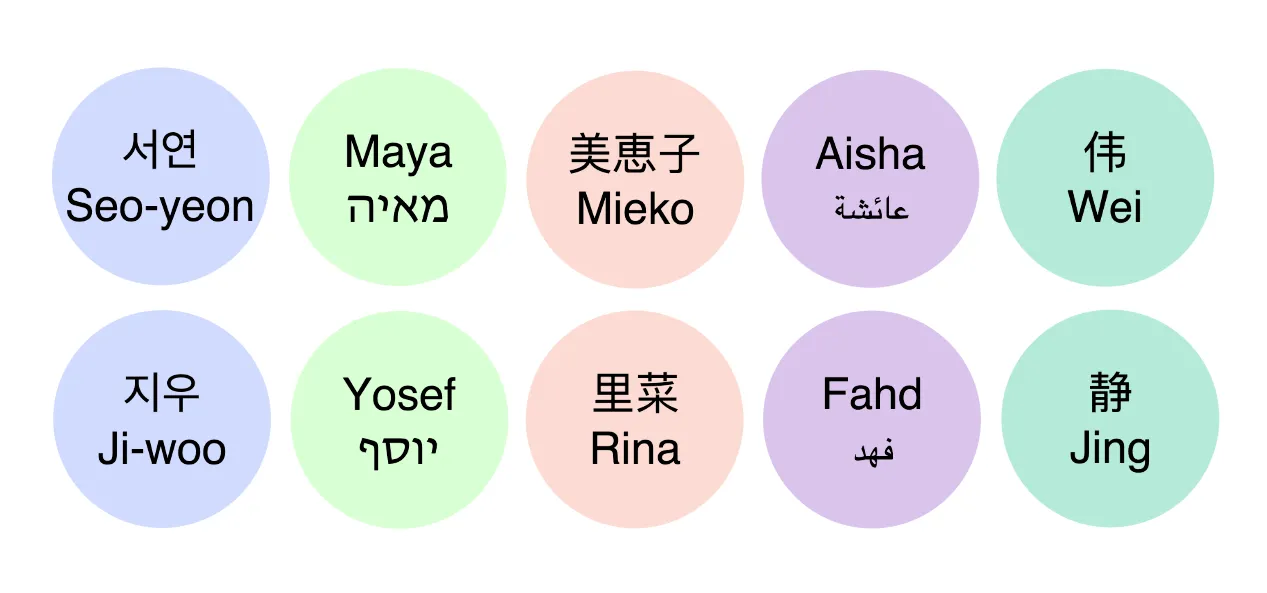
Various nodes with labels in international languages

When KeyLines detects RTL characters, it automatically applies RTL auto support in both WebGL and Canvas to correctly display any RTL and BIDI content.

Take a look at our Multiple Languages demo to see a KeyLines chart with multiple languages.

RTL auto support mode

RTL auto support, which is applied by default in KeyLines, is a reliable approach for a large scope of cases including:

  • Mixed-system texts with both LTR and RTL characters
  • Complex examples containing punctuation, numbers, emojis or other special characters
  • Strings with symbols in strict functional order such as e-mail addresses or URLs

This is because RTL will analyse the individual characters and assign the order dynamically so that only the identified RTL characters are in a RTL direction.

This produces the most correct output even for texts with complex combinations of characters.

Forced RTL mode in KeyLines 6.3 and earlier

Before KeyLines 6.4, forced RTL was the recommended approach in both WebGL and Canvas. This was done in one of two ways:

  • By setting the HTML dir attribute to rtl on the KeyLines chart element
  • By using CSS to set the direction property

While you can continue using forced RTL mode in cases where you always wish to reverse the order of the whole text, we do not recommend forced RTL for more complex texts which combine multiple direction systems with numbers and special characters. For the most versatile and reliable solution, we recommend relying on the default KeyLines RTL auto mode.

Terms of use

These terms do not alter or supersede any existing agreements between you (or your employer) and us.

By accessing or using any Content you agree to be bound by these Terms of Use. Please review these terms carefully before using the website.

The contents of this website, including but not limited to any text, code samples, API references, schemas, interactive tools, and other materials (collectively, the 'Content'), are made available for informational and internal evaluation purposes only. All intellectual property rights in the Content are reserved. No licence is granted to use the Content for any commercial purpose, or to copy, distribute, modify, reverse-engineer, or incorporate any part of the Content into any product or service, without our prior written consent.

This Content is provided “as is” and “as available,” without any representations, warranties, or guarantees of any kind, whether express or implied, including but not limited to implied warranties of merchantability, fitness for a particular purpose, non-infringement, or accuracy. To the fullest extent permitted by applicable law, we expressly exclude and disclaim all implied warranties, conditions, and other terms that might otherwise be implied.

We disclaim all liability for any loss or damage, whether direct, indirect, incidental, consequential, or otherwise, arising from any reliance placed on the Content or from your use of it, to the fullest extent permitted by applicable law. By continuing to access or use the Content, you acknowledge and agree to these terms.