ReGraph comes with several powerful graph analysis functions which you can use to quickly add insight to your data. Using analysis functions, you can:
- Find the neighbors of a given node
- Find the shortest path between nodes
- Discover clusters of tightly connecting nodes
- Identify connected components
- Find important nodes in the network using centrality measures
For more details and inspiration, see the API Reference and Graph Analysis examples.
Using the graph engine
To use the graph functions, you must import them first from the 'regraph/analysis' package. As an example, let's import the neighbors function:
import { neighbors } from "regraph/analysis";We can then call the function that runs through the chart data and returns the neighboring items of a node represented by 'nodeId':
const neighboringItems = await neighbors(data, "nodeId");
// returns a dictionary of items, e.g.
// { nodeA: { / ... / }, nodeB: { / ... / }, 'linkA-B': { / ... / } }
We can pass the returned object with the neighboring items directly into our selected state and redraw:
this.setState({ selection: neighboringItems });

// in our render() function
const { items, selection } = this.state;
<Chart items={items} selection={selection} />;
By default, graph functions run on nodes and links in the underlying chart level, which means that they ignore combos, summary links and aggregate links, which are present at the top level. The Combo Path Finding example shows how to include items at the top chart level.
Fading and foregrounding
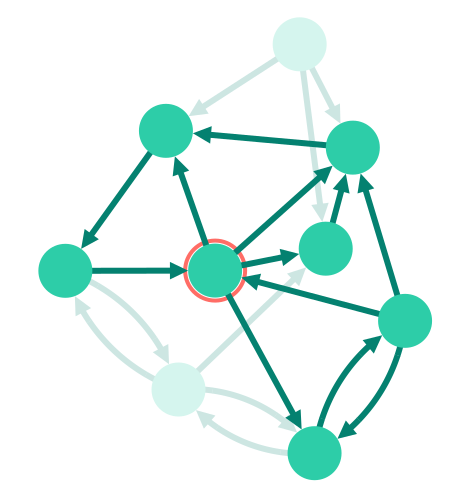
You can highlight key items and connections in the chart by fading the unimportant items into the background.
The fade property can be set for nodes, links and open and closed combos. Aggregate links are faded automatically if all their child links are also faded. Combos are faded automatically if all their child nodes are also faded.
You can use fade in the setStyle function passed to onItemInteraction to foreground items hovered or selected by the user. To include items directly connected to the hovered or selected items, use the neighbors function. See the Neighbors story for an example.
Centrality
Social network analysis (SNA) or centrality measures are a vital tool for understanding the behavior of networks and graphs. These algorithms use graph theory to calculate the importance of any given node in a network.
Each centrality measure has strengths and weaknesses in identifying features of a network, so it is important to choose the right one.
The examples below shows different centrality measures against a directed graph, which means that the centrality calculations take the directions of links into account:

ReGraph Example
Log in to view live examplesDegrees
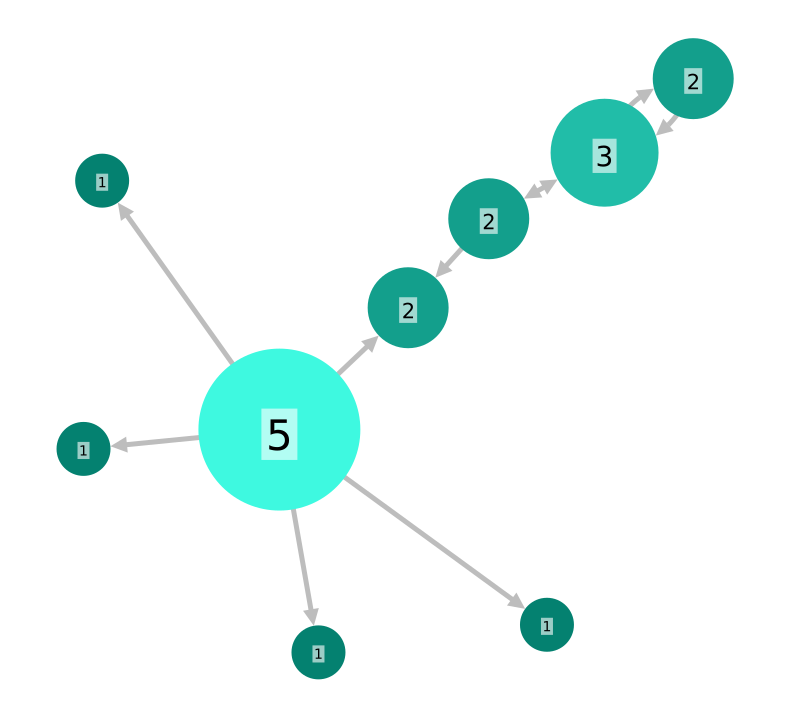
Degree is the simplest form of centrality, and assigns scores to nodes based purely on the number of links held by each node. It tells us how many direct, ‘one hop’ connections each node has to other nodes within the network.
It is used for finding very connected individuals, popular individuals, individuals who are likely to hold most information or individuals who can quickly connect with the wider network.
Betweenness
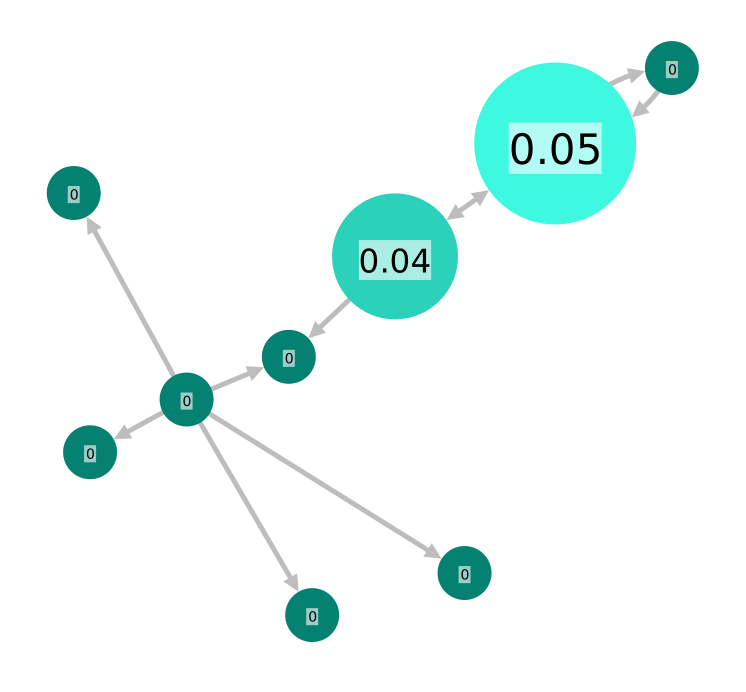
Betweenness centrality measures the number of times a node lies on the shortest path between other nodes.
This measure shows which nodes act as ‘bridges’ between nodes in a network. In other words, which nodes would have the greatest impact on the connectivity of the network if they were removed.
It is used for finding the nodes who influence the flow around a system. Betweenness is useful for analyzing communication dynamics in a network. A high betweenness count could indicate authority over, or controlling collaboration between, otherwise unconnected groups in a network; or indicate being on the edge of multiple groups.
Closeness
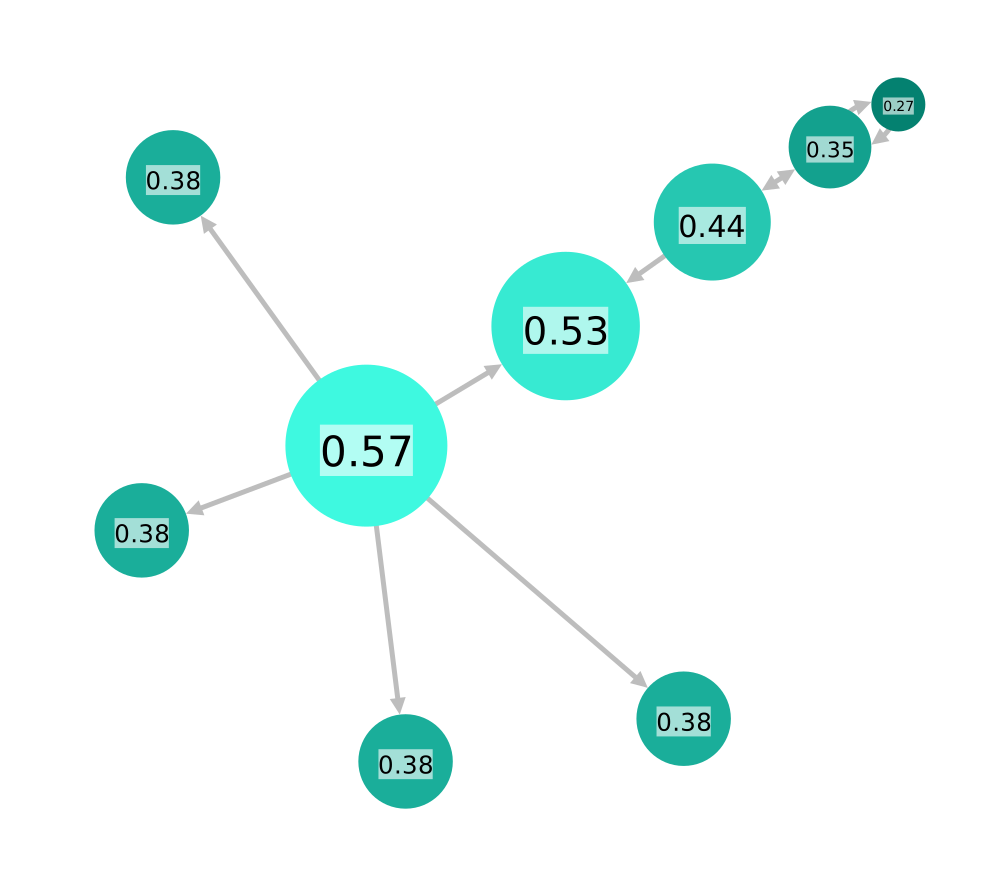
Closeness calculates the shortest paths between all nodes and then assigns each node a score based on the total length of shortest paths from that node. This measure scores each node based on its ‘closeness’ to all other nodes within the network.
In a fully connected graph, where there is a path from any node to any other node, closeness is calculated as the reciprocal of 'farness'; the farness of a node is the sum of the distances to each other node.
Closeness can help find good ‘broadcasters’, i.e., individuals in positions of influence. However, in a highly connected network, you will often find all nodes have a similar score. In this case closeness may be more useful at finding influencers within a single cluster.
Closeness with Multiple Components
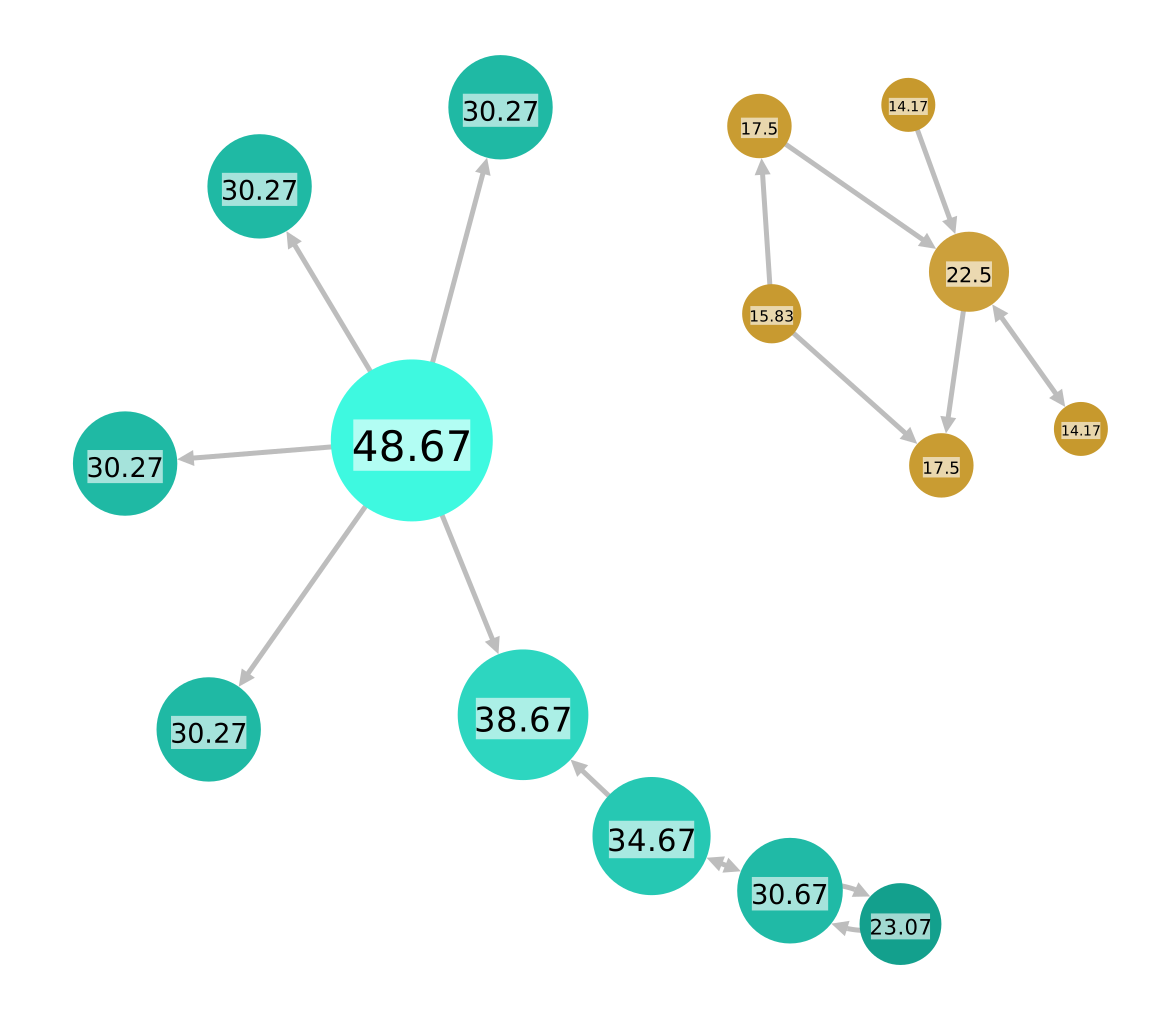
For fully connected graphs ReGraph adds up the values of the paths to all other nodes in the network (the 'farness') and then takes the reciprocal as the closeness.
For disconnected components, as some paths have infinite length, the algorithm instead takes the reciprocal of each path individually and then sums the values. This stops infinite values from producing an infinite closeness.
Eigencentrality
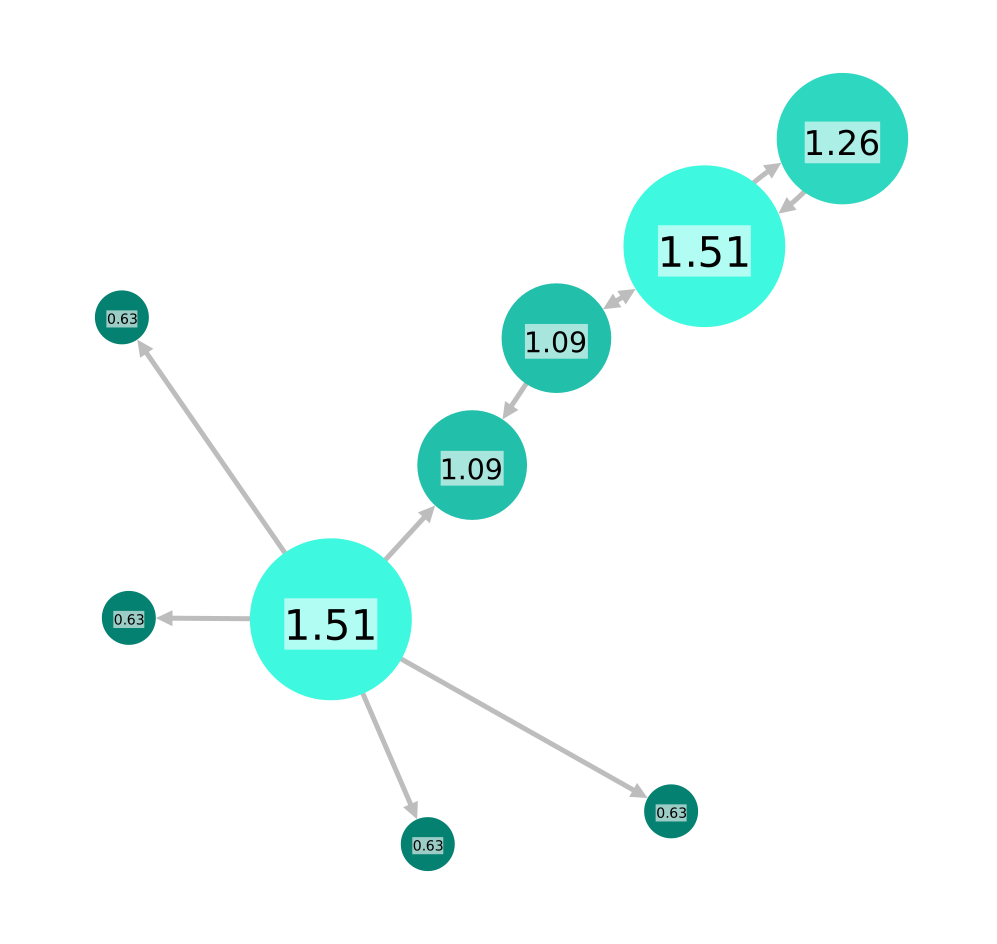
Like degree centrality, eigencentrality measures a node's influence based on the number of links it has to other nodes within the network. Eigencentrality then goes a step further by also looking at how many links their connections have, and so on through the network.
By calculating the extended connections of a node, eigencentrality can identify nodes with influence over the whole network, not just those directly connected to it.
Eigencentrality is a good ‘all-round’ SNA score, and is useful for understanding human social networks, but also for understanding networks like malware propagation.
Page Rank
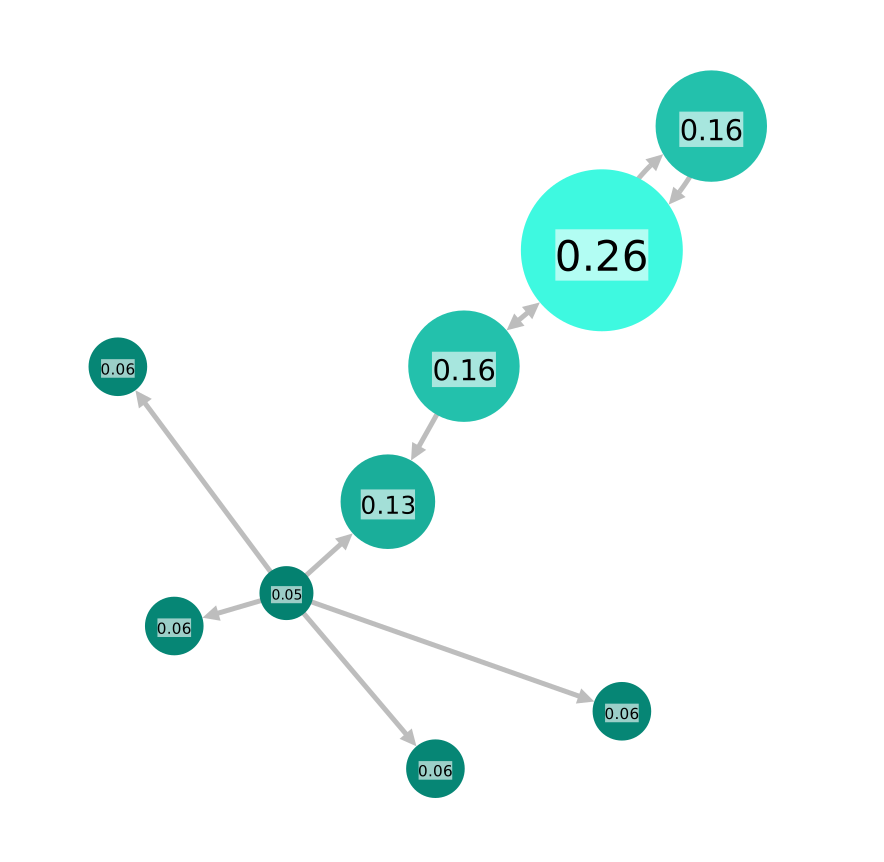
PageRank is a variant of eigencentrality, assigning nodes a score based on their connections, and their connections’ connections. The difference is that PageRank also takes link direction into account – so links can only pass influence in one direction, and pass different amounts of influence.
PageRank is famously one of the ranking algorithms behind the original Google search engine (the 'Page' part comes from creator and Google founder, Larry Page).
This measure uncovers nodes whose influence extends beyond their direct connections into the wider network.
Because it factors in directionality and connection weight, PageRank can be helpful for understanding citations and authority.