General troubleshooting tips
Before contacting KeyLines Support about an issue, you may want to consider the following:-
- What version of KeyLines are you using? Is it the latest?
- Has your license expired?
- Are you running in WebGL or Canvas mode?
You can find the answers to these questions using the KeyLines.info() function, and it's worth having this information to hand if you do contact Support.
My chart has gone blank - what might be causing this?
Your evaluation version of KeyLines may have expired. If your evaluation period is extended you should download the latest version from the download page and clear your caches. It's a good idea to check in the development tools that the right version of KeyLines is appearing in the browser - you can check the version number in the comment at the head of the file.
Why am I seeing a license expired watermark?
Your PoC or subscription license may have expired. There is a grace period where the license expired watermark will be displayed to enable you to renew or purchase a license for KeyLines to avoid interruption to your service.
Why do my SVG icons fail to load in some browsers?
If some browsers fail to load your SVG icons while others work correctly, it's likely a browser issue. One of the causes might be the size of the SVG file. To improve cross-browser compatibility, set the width and height attributes in your SVG files or optimise the size of your SVG using an optimiser such as SVGO.
How do I stop nodes moving around when I add data?
You can do this is using the chart.expand() function with the fix option set to 'adaptive' (default option), which adds new items to the chart and then lays them out while keeping existing nodes fixed.
For the organic layout, an alternative approach is to use chart.merge() and then in the promise apply chart.layout() with the mode option set to 'adaptive' - this will adjust the position of existing nodes slightly to make space for the new nodes.
Browser issues
As a general troubleshooting step, if KeyLines won't load, make sure that JavaScript is enabled in your browser settings.
Firefox on Windows
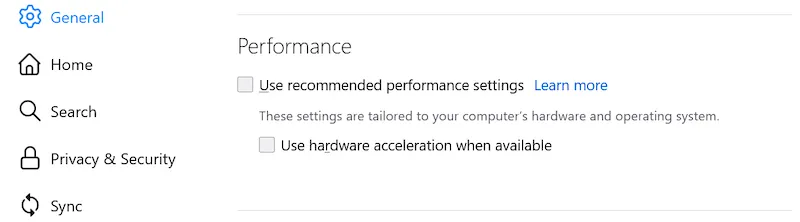
If you turn on hardware acceleration, font rendering in HTML5 Canvas may look blurred. To fix this, turn it off:
- Click on the Firefox Application Menu icon and click on Settings.
- Navigate to the General tab and scroll to the Performance section.
- Uncheck Use recommended performance settings. Additional settings will appear.
- Uncheck Use hardware acceleration when available.
Firefox and context menus
You can configure Firefox to prevent JavaScript overriding standard context menus.
To do this, you need to ask your users to disable the right-click in the Configuration page.
- In address bar, type
about:configand press Enter. When prompted, confirm that you wish to continue to change advanced configuration preferences. - Navigate to the Search bar and start typing
dom.event.contextmenu.enabled. - Once the contextmenu event appears in the list, toggle it to to "false".
