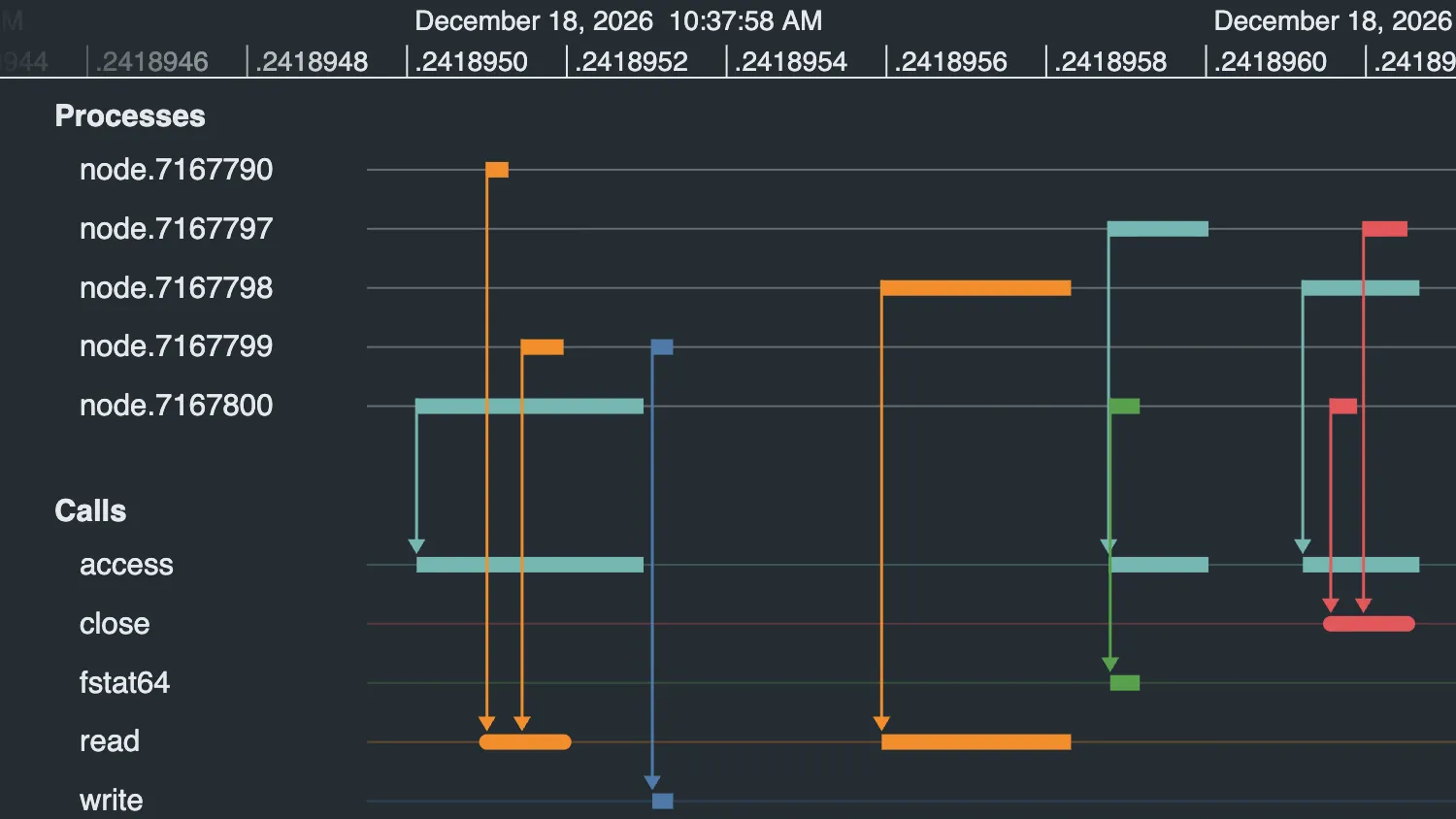
The data in this timeline uses timeNanoseconds, because the time values are smaller than a thousandth of a second.
See the fractions of seconds marked on the scale and zoom in and out to change the resolution. Notice that the range and pointer values beneath the timeline also show the nanosecond values.
See also:
The data in this timeline uses timeNanoseconds, because the time values are smaller than a thousandth of a second.
See the fractions of seconds marked on the scale and zoom in and out to change the resolution. Notice that the range and pointer values beneath the timeline also show the nanosecond values.
See also:
import { createTimeline } from "kronograph";
import { year, month, day, logData, callColors } from "./data";

const rangeSpan = document.getElementById("range");
const pointerTimeSpan = document.getElementById("pointertime");

const nanosecondsPerSecond = 1000000000;
const nanosecondsPerMillisecond = 1000000;

function convertData() {
  const entities = {};
  const events = {};

  const entityTypes = {
    process: { color: "white", typeLabel: "Processes", order: 1 },
    call: { typeLabel: "Calls" },
  };

  const eventTypes = { default: { color: "to" } };

  logData.forEach(
    ([timeString, callName, durationString, processId], index) => {
      if (entities[processId] === undefined) {
        entities[processId] = { type: "process" };
      }
      if (entities[callName] === undefined) {
        entities[callName] = { type: "call", color: callColors[callName] };
      }
      const [hms, fraction] = timeString.split(".");
      const [hours, minutes, seconds] = hms.split(":").map(Number);
      const start = Date.UTC(year, month, day, hours, minutes, seconds);
      const startNanoseconds = Number(fraction);
      const durationNanoseconds = Math.round(
        parseFloat(durationString) * nanosecondsPerSecond,
      );
      const endNanoseconds = startNanoseconds + durationNanoseconds;

      const eventId = `event${index}`;
      events[eventId] = {
        entityIds: { from: processId, to: callName },
        time: { start, startNanoseconds, end: start, endNanoseconds },
      };
    },
  );

  return {
    entities,
    events,
    entityTypes,
    eventTypes,
    ordering: "alphabetical",
  };
}

function timeText(date, nanoseconds) {
  const milliseconds = date.getMilliseconds();
  // Subtract any millisecond value from the date to get the nearest whole second
  const dateToWholeSecond = new Date(date.getTime() - milliseconds);
  // Compute the total additional time in nanoseconds
  const totalNanoseconds = Math.round(
    milliseconds * nanosecondsPerMillisecond + nanoseconds,
  );
  // Get a text representation of the date to the nearest second
  let text = dateToWholeSecond.toLocaleString();

  if (totalNanoseconds !== 0) {
    // Ensure the nanoseconds value has the right number of decimal places
    let nanosecondsText = totalNanoseconds.toString().padStart(9, "0");

    // but trim any trailing zeros
    nanosecondsText = nanosecondsText.replace(/0+$/, "");

    text += `.${nanosecondsText}`;
  }

  return text;
}

function updateRange({ start, startNanoseconds, end, endNanoseconds }) {
  const startText = timeText(start, startNanoseconds);
  const endText = timeText(end, endNanoseconds);
  rangeSpan.innerHTML = `Range: ${startText} - ${endText}`;
}

function updatePointerTime({ time, timeNanoseconds }) {
  if (time === undefined) {
    pointerTimeSpan.innerHTML = "";
  } else {
    const pointerTimeText = timeText(time, timeNanoseconds);
    pointerTimeSpan.innerHTML = `Pointer time: ${pointerTimeText}`;
  }
}

function setup() {
  const timelineData = convertData();
  const timeline = createTimeline("my-timeline");
  timeline.on("range", updateRange);
  timeline.on("pointer-move", updatePointerTime);
  timeline.set(timelineData);
  timeline.fit();
}

setup();export const year = new Date().getFullYear();
export const month = 11; // December, 0-based
export const day = 18;
export const logData = [
["10:37:58.241895012", "access", "0.000000284", "node.7167800"],
["10:37:58.241895100", "read", "0.000000027", "node.7167790"],
["10:37:58.241895144", "read", "0.000000052", "node.7167799"],
["10:37:58.241895307", "write", "0.000000026", "node.7167799"],
["10:37:58.241895594", "read", "0.000000237", "node.7167798"],
["10:37:58.241895878", "access", "0.000000125", "node.7167797"],
["10:37:58.241895880", "fstat64", "0.000000037", "node.7167800"],
["10:37:58.241896121", "access", "0.000000146", "node.7167798"],
["10:37:58.241896156", "close", "0.000000033", "node.7167800"],
["10:37:58.241896197", "close", "0.000000055", "node.7167797"],
];
export const callColors = {
access: "#76b7b2",
close: "#e15759",
fstat64: "#59a14f",
read: "#f28e2c",
write: "#4e79a7",
};<!doctype html>
<html>
<head>
<link rel="stylesheet" href="@ci/theme/kg/css/examples.css" />
<link rel="stylesheet" href="./style.css" />
</head>
<body>
<div class="story">
<div class="story__timeline" id="my-timeline"></div>
<div class="story__controls story__controls--column">
<div class="stack">
<div class="story__controls__item">
<span id="range">Range:</span>
</div>
<div class="story__controls__item">
<span id="pointertime">Pointer time:</span>
</div>
</div>
</div>
</div>
<script type="module" src="./code.js"></script>
</body>
</html>.story__controls {
flex: 0 1;
min-height: var(--s4);
}import React, { useState } from "react";
import { createRoot } from "react-dom/client";
import Timeline from "kronograph/react/Timeline";
import { year, month, day, logData, callColors } from "./data";
const nanosecondsPerSecond = 1000000000;
const nanosecondsPerMillisecond = 1000000;
function convertData() {
const entities = {};
const events = {};
const entityTypes = {
process: { color: "white", typeLabel: "Processes", order: 1 },
call: { typeLabel: "Calls" },
};
const eventTypes = { default: { color: "to" } };
logData.forEach(
([timeString, callName, durationString, processId], index) => {
if (entities[processId] === undefined) {
entities[processId] = { type: "process" };
}
if (entities[callName] === undefined) {
entities[callName] = { type: "call", color: callColors[callName] };
}
const [hms, fraction] = timeString.split(".");
const [hours, minutes, seconds] = hms.split(":").map(Number);
const start = Date.UTC(year, month, day, hours, minutes, seconds);
const startNanoseconds = Number(fraction);
const durationNanoseconds = Math.round(
parseFloat(durationString) * nanosecondsPerSecond,
);
const endNanoseconds = startNanoseconds + durationNanoseconds;
const eventId = `event${index}`;
events[eventId] = {
entityIds: { from: processId, to: callName },
time: { start, startNanoseconds, end: start, endNanoseconds },
};
},
);
return { entities, events, entityTypes, eventTypes };
}
function timeText(date, nanoseconds) {
const milliseconds = date.getMilliseconds();
// Subtract any millisecond value from the date to get the nearest whole second
const dateToWholeSecond = new Date(date.getTime() - milliseconds);
// Compute the total additional time in nanoseconds
const totalNanoseconds = Math.round(
milliseconds * nanosecondsPerMillisecond + nanoseconds,
);
// Get a text representation of the date to the nearest second
let text = dateToWholeSecond.toLocaleString();
if (totalNanoseconds !== 0) {
// Ensure the nanoseconds value has the right number of decimal places
let nanosecondsText = totalNanoseconds.toString().padStart(9, "0");
// but trim any trailing zeros
nanosecondsText = nanosecondsText.replace(/0+$/, "");
text += `.${nanosecondsText}`;
}
return text;
}
const { entities, events, entityTypes, eventTypes } = convertData();
export const Demo = () => {
const [rangeText, setRangeText] = useState("Range:");
const [pointerTimeText, setPointerTimeText] = useState("Pointer time:");
function updateRange({ start, startNanoseconds, end, endNanoseconds }) {
const startText = timeText(start, startNanoseconds);
const endText = timeText(end, endNanoseconds);
setRangeText(`Range: ${startText} - ${endText}`);
}
function updatePointerTime({ time, timeNanoseconds }) {
if (time === undefined) {
setPointerTimeText("");
} else {
const text = timeText(time, timeNanoseconds);
setPointerTimeText(`Pointer time: ${text}`);
}
}
return (
<div className="story">
<Timeline
entities={entities}
events={events}
entityTypes={entityTypes}
eventTypes={eventTypes}
ordering={"alphabetical"}
onTimelineChange={({ range }) => {
if (range) {
updateRange(range);
}
}}
onTimelinePointerMove={updatePointerTime}
/>
<div className="story__controls story__controls--column">
<div className="stack">
<div className="story__controls__item">
<span>{rangeText}</span>
</div>
<div className="story__controls__item">
<span>{pointerTimeText}</span>
</div>
</div>
</div>
</div>
);
};
const root = createRoot(document.getElementById("my-timeline"));
root.render(<Demo />);export const year = new Date().getFullYear();
export const month = 11; // December, 0-based
export const day = 18;
export const logData = [
["10:37:58.241895012", "access", "0.000000284", "node.7167800"],
["10:37:58.241895100", "read", "0.000000027", "node.7167790"],
["10:37:58.241895144", "read", "0.000000052", "node.7167799"],
["10:37:58.241895307", "write", "0.000000026", "node.7167799"],
["10:37:58.241895594", "read", "0.000000237", "node.7167798"],
["10:37:58.241895878", "access", "0.000000125", "node.7167797"],
["10:37:58.241895880", "fstat64", "0.000000037", "node.7167800"],
["10:37:58.241896121", "access", "0.000000146", "node.7167798"],
["10:37:58.241896156", "close", "0.000000033", "node.7167800"],
["10:37:58.241896197", "close", "0.000000055", "node.7167797"],
];
export const callColors = {
access: "#76b7b2",
close: "#e15759",
fstat64: "#59a14f",
read: "#f28e2c",
write: "#4e79a7",
};<!doctype html>
<html>
<head>
<link rel="stylesheet" href="@ci/theme/kg/css/examples.css" />
<link rel="stylesheet" href="./style.css" />
</head>
<body>
<div id="my-timeline" style="height: 100vh"></div>
<script type="module" src="./code.jsx"></script>
</body>
</html>.story__controls {
flex: 0 1;
min-height: var(--s4);
}