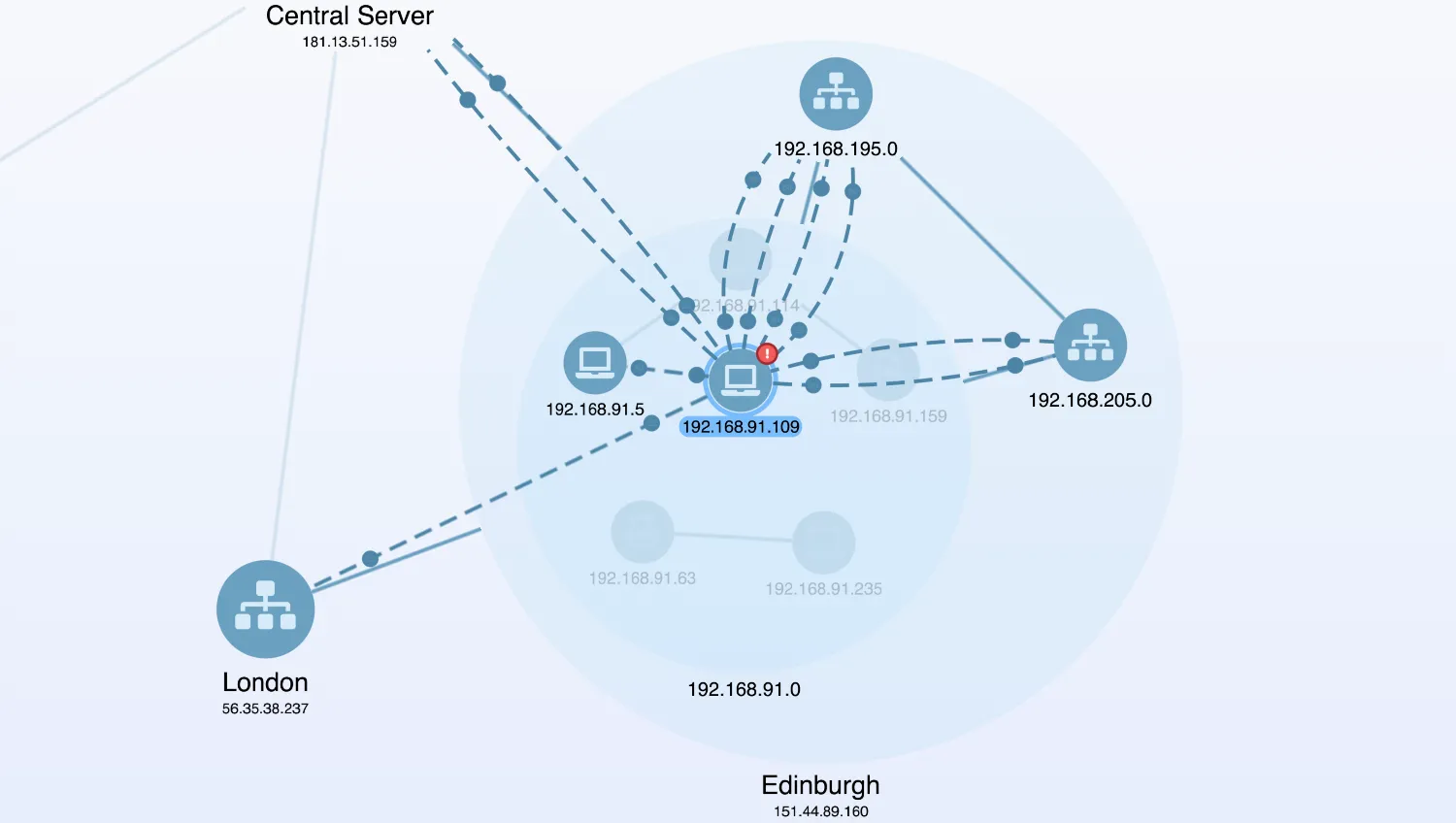
This fictional demo of a company IT network displays a number of offices at different locations and subnets within them, all speaking to a central server through which common services are accessed. Links represent communication between machines.
The data includes the machine's IP address, details about the device within the network and the ports through which inbound and outbound data flows.
Alerts
IT network visualisations often need to identify alerts on particular machines. Alerts might be raised manually or generated from detectable behaviours such as traffic to blacklisted addresses or downtime within the network. This chart displays two alerts and uses several techniques to highlight them:
- Glyphs on nodes and links
- Automatic pan and zoom to the area
- Pings to focus attention after movement
- Contrasting colours on important nodes and links
Structure
This demo uses open combos to provide a 'semantic zoom' over the network data. Using combos lets you browse the chart at different levels of detail. For example, it is as useful to know that there is a dangerous link between the Paris and Cambridge offices as it is to know there's insecure data travelling between 10.0.203.101 and 192.168.247.168.
When nodes are combined, links connecting nodes inside the combo to nodes outside it are also combined. This reduces clutter, but sometimes it's useful to see the links between nodes directly. This demo uses the chart.combo().reveal() function to always show links with an associated alert, and to show links from the currently selected node.
Key functions used:
import KeyLines from "keylines";
import { data, colours } from "./data.js";

let chart;
let graph;

// State tracking
let alwaysRevealedLinks = [];
const openCombos = {};
let visiblePorts = [];

// Map data values to strings for the Details panel
const osMap = {
  win: "Windows",
  mac: "macOS",
  linux: "Linux",
  phone: "Android",
};

const typeMap = {
  linux: "Computer",
  win: "Computer",
  mac: "Computer",
  printer: "Printer",
  phone: "Smartphone",
  server: "Server",
};

function getComboShape() {
  return document.querySelector('input[name="shape"]:checked').value;
}

function getComboArrangement() {
  const comboShape = getComboShape();
  const isCircle = comboShape === "circle";
  return isCircle ? "concentric" : "grid";
}

// Find all the links that have alerts attached.
function getAlertLinks() {
  const alerts = [];
  chart.each({ type: "link" }, (link) => {
    if (link.d.alert) {
      alerts.push(link.id);
    }
  });
  return alerts;
}

function getComboList() {
  const comboIds = [];
  chart.each({ type: "node", items: "all" }, ({ id }) => {
    if (chart.combo().isCombo(id)) {
      comboIds.push(id);
    }
  });
  return comboIds;
}

function decorateAlertLinks(linkIds) {
  chart.setProperties(
    linkIds.map((id) => ({
      id,
      c: colours.alertRed,
      g: [
        {
          c: colours.alertRed,
          b: colours.glyphBorder,
          fi: { t: "fas fa-exclamation", c: colours.glyphFontColor },
          e: 1.5,
        },
      ],
    })),
  );
}

// Update the Details panel with details of a given item.
function updateUI(item) {
  // hide any details that are already shown
  document.querySelectorAll(".details").forEach((detail) => {
    detail.classList.add("hide");
  });

  let root;
  if (item) {
    const { type } = item.d;
    // For combo nodes, just display some very basic information
    if (chart.combo().isCombo(item.id)) {
      root = document.querySelector(".combo.details");

      // display the type of item
      root.querySelector(".field.combo-type label").textContent =
        type || "Connection";

      // and the label, if a node, or the labels of the nodes at either end if a link
      const content =
        item.type === "link"
          ? `${chart.getItem(item.id1).t[0].t} <--> ${chart.getItem(item.id2).t[0].t}`
          : item.t[0].t;
      root.querySelector(".field.detail .value").textContent = content;
    } else {
      // For regular nodes and links, display more detailed information (including alerts).
      root = document.querySelector(`.${item.type}.details`);

      if (item.type === "node") {
        root.querySelector(".field.ip .value").textContent = item.t[0].t;

        root.querySelector(".field.type .value").textContent = typeMap[type];

        const os = item.d.type;
        root.querySelector(".field.os .value").textContent = osMap[os] || "-";

        root.querySelector(".field.host .value").textContent = item.d.network;
      } else {
        const src = chart.getItem(item.id1);
        root.querySelector(".field.from .value").textContent =
          `${src.t[0].t}:${item.d.port1}`;

        const target = chart.getItem(item.id2);
        root.querySelector(".field.to .value").textContent =
          `${target.t[0].t}:${item.d.port2}`;
      }

      root.querySelector(".field.msg .value").innerHTML =
        `<li>${item.d.alert || "None"}</li>`;
    }
    root.classList.remove("hide");
  } else {
    document.querySelector(".about.details").classList.remove("hide");
  }
}

// Update foreground state according to what is selected
// If a node: it's the node, its neighbours and the links between
// If a link: it's the link and the nodes at the ends of the link
function updateForeground(id) {
  const toForeground = {};
  const item = chart.getItem(id);
  if (item) {
    toForeground[id] = true;
    if (item.type === "link") {
      toForeground[item.id1] = true;
      toForeground[item.id2] = true;
    } else {
      const neighbours = graph.neighbours(id);
      neighbours.nodes.forEach((neighbourId) => {
        toForeground[neighbourId] = true;
      });
    }

    // Calculate foregrounding based on the nodes - the links will work themselves out.
    chart.foreground((node) => toForeground[node.id]);
  }
}

function getPortGlyph(link, port) {
  const colour = link.d.alert ? colours.alertRed : colours.links;
  return {
    g: [
      {
        t: port,
        c: colour,
        fc: colours.glyphFontColor,
        b: colour,
      },
    ],
  };
}

function showPorts(linkIds) {
  // no link glyphs when using grid arrangements because nodes are too densely
  // packed for the glyphs to be readable
  const withGlyph = getComboShape() === "circle";

  chart.setProperties(
    linkIds.map((id) => {
      const link = chart.getItem(id);
      visiblePorts.push(link);

      return {
        id,
        c: link.d.alert ? colours.alertRed : colours.links,
        t1: withGlyph ? getPortGlyph(link, link.d.port1) : null,
        t2: withGlyph ? getPortGlyph(link, link.d.port2) : null,
        flow: link.d.flow,
      };
    }),
  );

  const reveal = alwaysRevealedLinks.concat(linkIds);
  chart.combo().reveal(reveal);
}

function hidePorts() {
  chart.setProperties(
    visiblePorts.map((link) => ({
      id: link.id,
      c: link.d.alert ? colours.alertRed : colours.links,
      t1: null,
      t2: null,
      flow: false,
    })),
  );

  visiblePorts = [];
  chart.combo().reveal(alwaysRevealedLinks);
}

function select(itemId) {
  hidePorts();

  const item = chart.getItem(itemId);
  if (item) {
    updateUI(item);

    if (chart.combo().isCombo(itemId)) {
      chart.foreground(() => true);
    } else {
      if (item.type === "node") {
        showPorts(graph.neighbours(itemId, { all: true }).links);
      } else {
        showPorts([itemId]);
      }
      updateForeground(itemId);
    }
  }
}

async function setComboShape() {
  const shape = getComboShape();
  chart.options({ combos: { shape } });
  chart.setProperties({ id: ".", sh: shape === "circle" ? null : "box" }, true);

  const selection = chart.selection();
  if (selection) {
    select(selection.pop());
  }

  // Arrange all combos from innermost to outmost to size the new shape appropriately and
  // update the arrangement to take account of the new size of any nested combos
  // get list of all combos
  const comboIds = getComboList();
  await chart.combo().close(comboIds);
  await chart.combo().arrange(comboIds, { name: getComboArrangement() });
  chart.layout("organic", { tightness: 6, mode: "adaptive" });
}

async function setSelectedLabels() {
  const selections = chart.selection();
  const props = [];

  const colourLabel = (item, colour) => {
    let labels = item.t;
    if (Array.isArray(labels)) {
      labels = labels.map((label) => ({ ...label, fbc: colour }));
    } else if (typeof labels !== "string") {
      labels = { ...labels, fbc: colour };
    }

    if (item.oc) {
      item.oc = colourLabel(item.oc);
    }

    return { ...item, t: labels };
  };

  chart.each({ type: "node", items: "all" }, (e) => {
    const { id, t, oc } = e;
    const openComboProp = oc ? { oc } : {};
    const colour = selections.includes(id) ? colours.selection : "transparent";

    props.push({ id, ...colourLabel({ t, ...openComboProp }, colour) });
  });

  await chart.setProperties(props);
}

function initialiseInteractions() {
  document
    .getElementById("comboShape")
    .addEventListener("change", setComboShape);
  // Override default combo open behaviour to
  //  a) Track which combos are currently open
  //  b) Use concentric arrangement

  chart.on("double-click", async ({ id: itemId, preventDefault }) => {
    const item = chart.getItem(itemId);
    if (item && item.type === "node" && chart.combo().isCombo(itemId)) {
      if (chart.combo().isOpen(itemId)) {
        delete openCombos[itemId];
        await chart.combo().close(itemId);

        // only run layout if top-level combo is closed
        if (!item.parentId) {
          await chart.layout("organic", {
            mode: "adaptive",
            tightness: 6,
            consistent: true,
          });
        }
      } else {
        openCombos[itemId] = true;
        chart.combo().open(itemId);
      }
    }
    // disable default doubleclick behaviour
    preventDefault();
  });

  // reveal, foreground and show details for the selected item
  chart.on("selection-change", () => {
    const selections = chart.selection();
    setSelectedLabels();

    if (selections.length) {
      select(selections.pop());
    } else {
      hidePorts();
      chart.foreground(() => true);
      updateUI(null);
    }
  });

  // disable marquee dragging
  chart.on("drag-start", ({ type, preventDefault }) => {
    if (type === "marquee") {
      preventDefault();
    }
  });
}

function pingItem(ids) {
  return chart.ping(ids, { c: colours.alertRed, time: 400 });
}

// returns an array of all the combos that contain a node, starting from the innermost
function ancestors(node) {
  const result = [];
  let nodeId = node.id;
  while (nodeId) {
    const parent = chart.combo().find(nodeId, { parent: "first" });
    if (parent) {
      result.push(parent);
      nodeId = parent;
    } else {
      nodeId = null;
    }
  }
  return result;
}

function zoom(ids) {
  function firstZoomableParent(nodeId) {
    // Get an array of all the node's ancestor combos, starting with the outermost.
    const inwardsCombos = ancestors(chart.getItem(nodeId)).reverse();
    // Find the first that is closed.
    const outermostClosedCombo = inwardsCombos.find(
      (ancestor) => !chart.combo().isOpen(ancestor),
    );
    // If our node has no closed ancestor combos, we can zoom to it directly.
    return outermostClosedCombo || nodeId;
  }
  // We can't zoom to a node if it is within a closed combo.
  // So instead we'll zoom to the outermost of its containing closed parent combos.
  const zoomTargets = ids.map(firstZoomableParent);
  return chart.zoom("fit", { animate: true, time: 800, ids: zoomTargets });
}

// Check whether one or more items is visible within the viewport.
function isVisible(itemIds) {
  if (Array.isArray(itemIds)) {
    return itemIds.every(isVisible);
  }

  const item = chart.getItem(itemIds);
  const view = chart.viewOptions();

  // get the view's bounds in world coordinates (minus an offset)
  const topLeft = chart.worldCoordinates(20, 20);
  const bottomRight = chart.worldCoordinates(view.width - 20, view.height - 20);

  // Check whether the item is within that area
  return (
    item.x >= topLeft.x &&
    item.x <= bottomRight.x &&
    item.y >= topLeft.y &&
    item.y <= bottomRight.y
  );
}

// Reveal, zoom and highlight a particular item
// This 'unwraps' combos layer by layer to show the items inside
async function showAlert(itemId) {
  const layers = []; // unwrap combos one layer at a time
  const toOpen = {};

  // Add any parenting combos for an item to the list of combos to unwrap
  function addLayers(node) {
    ancestors(node).forEach((ancestor, idx) => {
      if (!layers[idx]) {
        layers[idx] = [];
      }
      layers[idx].push(ancestor);
      openCombos[ancestor] = true;
      toOpen[ancestor] = true;
    });
  }

  function arrange(comboids) {
    // Open combos have already been arranged (prior to opening).
    const closedComboIds = comboids.filter(
      (comboId) => !chart.combo().isOpen(comboId),
    );
    return Promise.all(
      closedComboIds.map((comboid) =>
        chart
          .combo()
          .arrange(comboid, { animate: false, name: getComboArrangement() }),
      ),
    );
  }

  // the item ids that we will zoom to fit in the viewport
  let zoomTo = [];
  const item = chart.getItem(itemId);

  async function done() {
    await chart.layout("organic", {
      mode: "adaptive",
      tightness: 6,
      consistent: true,
      fit: false,
      time: 400,
    });
    await zoom(zoomTo);

    if (item.type === "link") {
      return pingItem([item.id, item.id1, item.id2]);
    }
    return pingItem([item.id]);
  }

  // Unwrap one layer of combos (i.e. combos at the same depths)
  async function unwrapLayer() {
    updateForeground(itemId);

    // Get the current topmost layer
    const ids = layers.pop();

    await arrange(ids);
    await chart.combo().open(ids, { time: 800 });
    if (layers.length) {
      return unwrapLayer();
    }
    return done();
  }

  // for a link, we will unwrap and zoom to the nodes at either end
  if (item.type === "link") {
    addLayers(chart.getItem(item.id1));
    addLayers(chart.getItem(item.id2));
    zoomTo = [item.id1, item.id2];
    // for a node, we just unwrap and zoom to the node itself
  } else {
    addLayers(item);
    zoomTo = [itemId];
  }

  select(itemId);

  // Close any combos which we don't need open and clear selection
  const close = [];
  chart.selection([]);

  Object.keys(openCombos).forEach((id) => {
    if (!toOpen[id]) {
      delete openCombos[id];
      close.push(id);
    }
  });
  await chart.combo().close(close, { time: 800 });
  if (close.length > 0) {
    await chart.layout("organic", {
      tightness: 6,
      mode: "adaptive",
      fit: false,
    });
  }

  // Decide whether to zoom to the item before unwrapping the combos
  if (!isVisible(zoomTo)) {
    await zoom([itemId]);
  }
  return unwrapLayer();
}

// Populate the right-hand panel with alert information
function generateAlert(item) {
  const alertsList = document.querySelector(".alerts");
  const button = document.createElement("button");
  button.innerHTML = item.d.alert;
  button.setAttribute("value", item.d.alert);
  button.addEventListener(
    "click",
    async () => {
      const buttons = Array.from(alertsList.children);
      // disable all the buttons during the animation
      buttons.forEach((btn) => {
        btn.disabled = true;
      });
      // run the animation
      await showAlert(item.id);
      // animation is now finished - enable the buttons again
      buttons.forEach((btn) => {
        btn.disabled = false;
      });
    },
    false,
  );

  const li = document.createElement("li");
  li.appendChild(button);
  alertsList.appendChild(button);
}

function populateAlertList() {
  data.items.forEach((item) => {
    if (item.d && item.d.alert) {
      generateAlert(item);
    }
  });
}

async function startKeyLines() {
  const options = {
    drag: {
      links: false,
    },
    logo: { u: "/public/images/Logo.png" },
    selectionColour: colours.selection,
    selectionFontColour: colours.selectionFontColor,
    iconFontFamily: "Font Awesome 5 Free",
    handMode: true,
    imageAlignment: {
      "fas fa-print": { e: 0.8 },
      "fas fa-laptop": { e: 0.75 },
      "fas fa-phone": { e: 0.8 },
      "fas fa-server": { e: 0.8 },
      "fas fa-sitemap": { e: 0.75, dy: -8 },
    },
    defaultStyles: {
      comboGlyph: null,
    },
    gradient: {
      stops: [
        { c: colours.backgroundLight, r: 0 },
        { c: colours.backgroundDark, r: 1.0 },
      ],
    },
  };

  chart = await KeyLines.create({ container: "klchart", options });
  populateAlertList();
  initialiseInteractions();

  // Use a graph engine to track relations in the underlying data
  graph = KeyLines.getGraphEngine();
  graph.load(data);

  chart.load(data);
  await setComboShape();
  // reveal the links with alerts attached and make sure they stay that way
  alwaysRevealedLinks = getAlertLinks();
  chart.combo().reveal(alwaysRevealedLinks);

  // also style them dramatically...
  decorateAlertLinks(alwaysRevealedLinks);
  chart.layout("organic", { tightness: 6, consistent: true });

  updateStyling();
}

async function updateStyling() {
  const getOuterLabels = (place, ip) => [
    {
      t: place,
      position: "s",
      fbc: colours.labelBackground,
      borderRadius: 20,
      bw: 0,
      padding: "3 15 11 15",
      minWidth: 50,
    },
    {
      t: ip,
      fbc: "rgba(0,0,0,0)",
      fs: 8,
      position: "s",
      margin: { top: 18 },
    },
  ];

  const getInnerLabel = (ip) => ({
    t: ip,
    position: "s",
    fbc: colours.labelBackground,
    borderRadius: 20,
    bw: 0,
    padding: "3 5 1 5",
  });

  const props = [];
  chart.each({ type: "node", items: "all" }, ({ id }) => {
    const isCombo = chart.combo().isCombo(id);
    const isOuter = chart.combo().find(id) === null;
    const item = chart.getItem(id);
    if (!isCombo) {
      item.t[0].borderRadius = 20;
      props.push({ id, t: item.t });
      return;
    }

    if (isOuter) {
      const placeName = item.t[0].t;
      const ipAddr = item.t[1].t;
      props.push({
        id,
        t: getOuterLabels(placeName, ipAddr),
        oc: {
          ...item.oc,
          t: getOuterLabels(placeName, ipAddr),
        },
      });
    } else {
      const ip = item.t[0].t;
      props.push({
        id,
        t: getInnerLabel(ip),
        oc: {
          ...item.oc,
          t: getInnerLabel(ip),
        },
      });
    }
  });

  await chart.setProperties(props);
}

function loadFontsAndStart() {
  document.fonts.load('24px "Font Awesome 5 Free"').then(startKeyLines);
}

window.addEventListener("DOMContentLoaded", loadFontsAndStart);export const colours = {
primary: "#6AA1C1",
secondary: "#D6EBF8",
links: "#4C85A7",
labelFontColor: "black",
comboBackgroundRGB: "173, 219, 247",
alertRed: "#f15d5b",
glyphBorder: "#a3292d",
glyphFontColor: "white",
labelBackground: "transparent",
selection: "#79bdfc",
selectionFontColor: "black",
backgroundLight: "#fcfcfc",
backgroundDark: "#e6edfc",
};
export const data = {
items: [
{
type: "node",
id: "140.211.152.43",
t: [
{
t: "Cambridge",
position: "s",
},
{
t: "140.211.152.43",
},
],
fbc: "transparent",
fc: "black",
c: "#6AA1C1",
b: null,
bw: 0,
d: {
type: "network",
location: "Cambridge",
},
fi: {
t: "fas fa-sitemap",
c: "#D6EBF8",
},
e: 2,
g: null,
oc: {
c: "rgba(173, 219, 247, 0.2)",
t: "Cambridge\n140.211.152.43",
bw: 0,
},
},
{
type: "node",
id: "192.168.247.0",
t: {
t: "192.168.247.0",
},
fc: "black",
fbc: "transparent",
c: "#6AA1C1",
b: null,
bw: 0,
d: {
type: "router",
network: "140.211.152.43",
ipPattern: "192.168.247.",
},
parentId: "140.211.152.43",
e: 1.5,
fi: {
t: "fas fa-sitemap",
c: "#D6EBF8",
},
g: null,
oc: {
bs: "dashed",
bw: 0,
c: "rgba(173, 219, 247, 0.2)",
t: "192.168.247.0",
},
},
{
id: "140.211.152.43-192.168.247.0",
type: "link",
id1: "140.211.152.43",
id2: "192.168.247.0",
w: 4,
d: {
port1: 443,
port2: 80,
flow: {
velocity: 5.143400773788114,
},
},
c: "#6AA1C1",
bw: 0,
fbc: "transparent",
fc: "black",
},
{
type: "node",
id: "192.168.218.0",
t: {
t: "192.168.218.0",
},
fc: "black",
fbc: "transparent",
c: "#6AA1C1",
b: null,
bw: 0,
d: {
type: "router",
network: "140.211.152.43",
ipPattern: "192.168.218.",
},
parentId: "140.211.152.43",
e: 1.5,
fi: {
t: "fas fa-sitemap",
c: "#D6EBF8",
},
g: null,
oc: {
bs: "dashed",
bw: 0,
c: "rgba(173, 219, 247, 0.2)",
t: "192.168.218.0",
},
},
{
id: "140.211.152.43-192.168.218.0",
type: "link",
id1: "140.211.152.43",
id2: "192.168.218.0",
w: 4,
d: {
port1: 443,
port2: 8080,
flow: {
velocity: 1.789141649349486,
},
},
c: "#6AA1C1",
bw: 0,
fbc: "transparent",
fc: "black",
},
{
type: "node",
id: "192.168.16.0",
t: {
t: "192.168.16.0",
},
fc: "black",
fbc: "transparent",
c: "#6AA1C1",
b: null,
bw: 0,
d: {
type: "router",
network: "140.211.152.43",
ipPattern: "192.168.16.",
},
parentId: "140.211.152.43",
e: 1.5,
fi: {
t: "fas fa-sitemap",
c: "#D6EBF8",
},
g: null,
oc: {
bs: "dashed",
bw: 0,
c: "rgba(173, 219, 247, 0.2)",
t: "192.168.16.0",
},
},
{
id: "140.211.152.43-192.168.16.0",
type: "link",
id1: "140.211.152.43",
id2: "192.168.16.0",
w: 4,
d: {
port1: 20,
port2: 20,
flow: {
velocity: 5.636151126524869,
},
},
c: "#6AA1C1",
bw: 0,
fbc: "transparent",
fc: "black",
},
{
type: "node",
id: "192.168.143.0",
t: {
t: "192.168.143.0",
},
fc: "black",
fbc: "transparent",
c: "#6AA1C1",
b: null,
bw: 0,
d: {
type: "router",
network: "140.211.152.43",
ipPattern: "192.168.143.",
},
parentId: "140.211.152.43",
e: 1.5,
fi: {
t: "fas fa-sitemap",
c: "#D6EBF8",
},
g: null,
oc: {
bs: "dashed",
bw: 0,
c: "rgba(173, 219, 247, 0.2)",
t: "192.168.143.0",
},
},
{
id: "140.211.152.43-192.168.143.0",
type: "link",
id1: "140.211.152.43",
id2: "192.168.143.0",
w: 4,
d: {
port1: 22,
port2: 22,
flow: {
velocity: 0.6168048299616857,
},
},
c: "#6AA1C1",
bw: 0,
fbc: "transparent",
fc: "black",
},
{
type: "node",
id: "140.211.152.43::192.168.247.240",
t: {
t: "192.168.247.240",
},
fbc: "transparent",
fc: "black",
c: "#6AA1C1",
b: null,
bw: 0,
d: {
type: "win",
network: "140.211.152.43",
ip: "192.168.247.0",
},
fi: {
t: "fas fa-laptop",
c: "#D6EBF8",
},
parentId: "192.168.247.0",
e: 1.3,
},
{
id: "192.168.247.0-140.211.152.43::192.168.247.240",
type: "link",
id1: "192.168.247.0",
id2: "140.211.152.43::192.168.247.240",
w: 4,
d: {
port1: 8080,
port2: 443,
flow: {
velocity: 1.6033477650508043,
},
},
c: "#6AA1C1",
bw: 0,
fbc: "transparent",
fc: "black",
},
{
type: "node",
id: "140.211.152.43::192.168.247.198",
t: {
t: "192.168.247.198",
},
fbc: "transparent",
fc: "black",
c: "#6AA1C1",
b: null,
bw: 0,
d: {
type: "win",
network: "140.211.152.43",
ip: "192.168.247.0",
},
fi: {
t: "fas fa-laptop",
c: "#D6EBF8",
},
parentId: "192.168.247.0",
e: 1.3,
},
{
id: "192.168.247.0-140.211.152.43::192.168.247.198",
type: "link",
id1: "192.168.247.0",
id2: "140.211.152.43::192.168.247.198",
w: 4,
d: {
port1: 20,
port2: 80,
flow: {
velocity: 2.8971808260232246,
},
},
c: "#6AA1C1",
bw: 0,
fbc: "transparent",
fc: "black",
},
{
type: "node",
id: "140.211.152.43::192.168.143.193",
t: {
t: "192.168.143.193",
},
fbc: "transparent",
fc: "black",
c: "#6AA1C1",
b: null,
bw: 0,
d: {
type: "printer",
network: "140.211.152.43",
ip: "192.168.143.0",
},
fi: {
t: "fas fa-print",
c: "#D6EBF8",
},
parentId: "192.168.143.0",
e: 1.3,
},
{
id: "192.168.143.0-140.211.152.43::192.168.143.193",
type: "link",
id1: "192.168.143.0",
id2: "140.211.152.43::192.168.143.193",
w: 4,
d: {
port1: 8080,
port2: 443,
flow: {
velocity: 1.3435664831973027,
},
},
c: "#6AA1C1",
bw: 0,
fbc: "transparent",
fc: "black",
},
{
type: "node",
id: "140.211.152.43::192.168.143.210",
t: {
t: "192.168.143.210",
},
fbc: "transparent",
fc: "black",
c: "#6AA1C1",
b: null,
bw: 0,
d: {
type: "phone",
network: "140.211.152.43",
ip: "192.168.143.0",
},
fi: {
t: "fas fa-phone",
c: "#D6EBF8",
},
parentId: "192.168.143.0",
e: 1.3,
},
{
id: "192.168.143.0-140.211.152.43::192.168.143.210",
type: "link",
id1: "192.168.143.0",
id2: "140.211.152.43::192.168.143.210",
w: 4,
d: {
port1: 443,
port2: 20,
flow: {
velocity: 6.724482497272815,
},
},
c: "#6AA1C1",
bw: 0,
fbc: "transparent",
fc: "black",
},
{
type: "node",
id: "140.211.152.43::192.168.247.66",
t: {
t: "192.168.247.66",
},
fbc: "transparent",
fc: "black",
c: "#6AA1C1",
b: null,
bw: 0,
d: {
type: "printer",
network: "140.211.152.43",
ip: "192.168.247.0",
},
fi: {
t: "fas fa-print",
c: "#D6EBF8",
},
parentId: "192.168.247.0",
e: 1.3,
},
{
id: "192.168.247.0-140.211.152.43::192.168.247.66",
type: "link",
id1: "192.168.247.0",
id2: "140.211.152.43::192.168.247.66",
w: 4,
d: {
port1: 20,
port2: 443,
flow: {
velocity: 2.1377476722606614,
},
},
c: "#6AA1C1",
bw: 0,
fbc: "transparent",
fc: "black",
},
{
type: "node",
id: "140.211.152.43::192.168.16.232",
t: {
t: "192.168.16.232",
},
fbc: "transparent",
fc: "black",
c: "#6AA1C1",
b: null,
bw: 0,
d: {
type: "win",
network: "140.211.152.43",
ip: "192.168.16.0",
},
fi: {
t: "fas fa-laptop",
c: "#D6EBF8",
},
parentId: "192.168.16.0",
e: 1.3,
},
{
id: "192.168.16.0-140.211.152.43::192.168.16.232",
type: "link",
id1: "192.168.16.0",
id2: "140.211.152.43::192.168.16.232",
w: 4,
d: {
port1: 8080,
port2: 80,
flow: {
velocity: 2.6992855943925065,
},
},
c: "#6AA1C1",
bw: 0,
fbc: "transparent",
fc: "black",
},
{
type: "node",
id: "140.211.152.43::192.168.247.78",
t: {
t: "192.168.247.78",
},
fbc: "transparent",
fc: "black",
c: "#6AA1C1",
b: null,
bw: 0,
d: {
type: "printer",
network: "140.211.152.43",
ip: "192.168.247.0",
},
fi: {
t: "fas fa-print",
c: "#D6EBF8",
},
parentId: "192.168.247.0",
e: 1.3,
},
{
id: "192.168.247.0-140.211.152.43::192.168.247.78",
type: "link",
id1: "192.168.247.0",
id2: "140.211.152.43::192.168.247.78",
w: 4,
d: {
port1: 20,
port2: 20,
flow: {
velocity: 1.2036817402204614,
},
},
c: "#6AA1C1",
bw: 0,
fbc: "transparent",
fc: "black",
},
{
type: "node",
id: "140.211.152.43::192.168.16.58",
t: {
t: "192.168.16.58",
},
fbc: "transparent",
fc: "black",
c: "#6AA1C1",
b: null,
bw: 0,
d: {
type: "win",
network: "140.211.152.43",
ip: "192.168.16.0",
},
fi: {
t: "fas fa-laptop",
c: "#D6EBF8",
},
parentId: "192.168.16.0",
e: 1.3,
},
{
id: "192.168.16.0-140.211.152.43::192.168.16.58",
type: "link",
id1: "192.168.16.0",
id2: "140.211.152.43::192.168.16.58",
w: 4,
d: {
port1: 80,
port2: 22,
flow: {
velocity: 2.0225040989493204,
},
},
c: "#6AA1C1",
bw: 0,
fbc: "transparent",
fc: "black",
},
{
type: "node",
id: "140.211.152.43::192.168.247.225",
t: {
t: "192.168.247.225",
},
fbc: "transparent",
fc: "black",
c: "#6AA1C1",
b: null,
bw: 0,
d: {
type: "printer",
network: "140.211.152.43",
ip: "192.168.247.0",
},
fi: {
t: "fas fa-print",
c: "#D6EBF8",
},
parentId: "192.168.247.0",
e: 1.3,
},
{
id: "192.168.247.0-140.211.152.43::192.168.247.225",
type: "link",
id1: "192.168.247.0",
id2: "140.211.152.43::192.168.247.225",
w: 4,
d: {
port1: 443,
port2: 8080,
flow: {
velocity: 9.141306612050144,
},
},
c: "#6AA1C1",
bw: 0,
fbc: "transparent",
fc: "black",
},
{
type: "node",
id: "140.211.152.43::192.168.218.194",
t: {
t: "192.168.218.194",
},
fbc: "transparent",
fc: "black",
c: "#6AA1C1",
b: null,
bw: 0,
d: {
type: "win",
network: "140.211.152.43",
ip: "192.168.218.0",
},
fi: {
t: "fas fa-laptop",
c: "#D6EBF8",
},
parentId: "192.168.218.0",
e: 1.3,
},
{
id: "192.168.218.0-140.211.152.43::192.168.218.194",
type: "link",
id1: "192.168.218.0",
id2: "140.211.152.43::192.168.218.194",
w: 4,
d: {
port1: 8080,
port2: 20,
flow: {
velocity: 4.576510996160639,
},
},
c: "#6AA1C1",
bw: 0,
fbc: "transparent",
fc: "black",
},
{
type: "node",
id: "140.211.152.43::192.168.247.61",
t: {
t: "192.168.247.61",
},
fbc: "transparent",
fc: "black",
c: "#6AA1C1",
b: null,
bw: 0,
d: {
type: "printer",
network: "140.211.152.43",
ip: "192.168.247.0",
},
fi: {
t: "fas fa-print",
c: "#D6EBF8",
},
parentId: "192.168.247.0",
e: 1.3,
},
{
id: "192.168.247.0-140.211.152.43::192.168.247.61",
type: "link",
id1: "192.168.247.0",
id2: "140.211.152.43::192.168.247.61",
w: 4,
d: {
port1: 80,
port2: 80,
flow: {
velocity: 7.126381589402159,
},
},
c: "#6AA1C1",
bw: 0,
fbc: "transparent",
fc: "black",
},
{
type: "node",
id: "140.211.152.43::192.168.218.110",
t: {
t: "192.168.218.110",
},
fbc: "transparent",
fc: "black",
c: "#6AA1C1",
b: null,
bw: 0,
d: {
type: "win",
network: "140.211.152.43",
ip: "192.168.218.0",
},
fi: {
t: "fas fa-laptop",
c: "#D6EBF8",
},
parentId: "192.168.218.0",
e: 1.3,
},
{
id: "192.168.218.0-140.211.152.43::192.168.218.110",
type: "link",
id1: "192.168.218.0",
id2: "140.211.152.43::192.168.218.110",
w: 4,
d: {
port1: 20,
port2: 443,
flow: {
velocity: 5.485074888810438,
},
},
c: "#6AA1C1",
bw: 0,
fbc: "transparent",
fc: "black",
},
{
type: "node",
id: "140.211.152.43::192.168.143.201",
t: {
t: "192.168.143.201",
},
fbc: "transparent",
fc: "black",
c: "#6AA1C1",
b: null,
bw: 0,
d: {
type: "win",
network: "140.211.152.43",
ip: "192.168.143.0",
},
fi: {
t: "fas fa-laptop",
c: "#D6EBF8",
},
parentId: "192.168.143.0",
e: 1.3,
},
{
id: "192.168.143.0-140.211.152.43::192.168.143.201",
type: "link",
id1: "192.168.143.0",
id2: "140.211.152.43::192.168.143.201",
w: 4,
d: {
port1: 20,
port2: 80,
flow: {
velocity: 1.8106962198909393,
},
},
c: "#6AA1C1",
bw: 0,
fbc: "transparent",
fc: "black",
},
{
type: "node",
id: "140.211.152.43::192.168.218.122",
t: {
t: "192.168.218.122",
},
fbc: "transparent",
fc: "black",
c: "#6AA1C1",
b: null,
bw: 0,
d: {
type: "win",
network: "140.211.152.43",
ip: "192.168.218.0",
},
fi: {
t: "fas fa-laptop",
c: "#D6EBF8",
},
parentId: "192.168.218.0",
e: 1.3,
},
{
id: "192.168.218.0-140.211.152.43::192.168.218.122",
type: "link",
id1: "192.168.218.0",
id2: "140.211.152.43::192.168.218.122",
w: 4,
d: {
port1: 22,
port2: 20,
flow: {
velocity: 4.401544121170389,
},
},
c: "#6AA1C1",
bw: 0,
fbc: "transparent",
fc: "black",
},
{
type: "node",
id: "140.211.152.43::192.168.143.47",
t: {
t: "192.168.143.47",
},
fbc: "transparent",
fc: "black",
c: "#6AA1C1",
b: null,
bw: 0,
d: {
type: "phone",
network: "140.211.152.43",
ip: "192.168.143.0",
},
fi: {
t: "fas fa-phone",
c: "#D6EBF8",
},
parentId: "192.168.143.0",
e: 1.3,
},
{
id: "192.168.143.0-140.211.152.43::192.168.143.47",
type: "link",
id1: "192.168.143.0",
id2: "140.211.152.43::192.168.143.47",
w: 4,
d: {
port1: 443,
port2: 80,
flow: {
velocity: 8.217968403296961,
},
},
c: "#6AA1C1",
bw: 0,
fbc: "transparent",
fc: "black",
},
{
type: "node",
id: "140.211.152.43::192.168.247.83",
t: {
t: "192.168.247.83",
},
fbc: "transparent",
fc: "black",
c: "#6AA1C1",
b: null,
bw: 0,
d: {
type: "printer",
network: "140.211.152.43",
ip: "192.168.247.0",
},
fi: {
t: "fas fa-print",
c: "#D6EBF8",
},
parentId: "192.168.247.0",
e: 1.3,
},
{
id: "192.168.247.0-140.211.152.43::192.168.247.83",
type: "link",
id1: "192.168.247.0",
id2: "140.211.152.43::192.168.247.83",
w: 4,
d: {
port1: 80,
port2: 8080,
flow: {
velocity: 0.09230926894976621,
},
},
c: "#6AA1C1",
bw: 0,
fbc: "transparent",
fc: "black",
},
{
type: "node",
id: "140.211.152.43::192.168.218.27",
t: {
t: "192.168.218.27",
},
fbc: "transparent",
fc: "black",
c: "#6AA1C1",
b: null,
bw: 0,
d: {
type: "printer",
network: "140.211.152.43",
ip: "192.168.218.0",
},
fi: {
t: "fas fa-print",
c: "#D6EBF8",
},
parentId: "192.168.218.0",
e: 1.3,
},
{
id: "192.168.218.0-140.211.152.43::192.168.218.27",
type: "link",
id1: "192.168.218.0",
id2: "140.211.152.43::192.168.218.27",
w: 4,
d: {
port1: 8080,
port2: 20,
flow: {
velocity: 7.799841275278851,
},
},
c: "#6AA1C1",
bw: 0,
fbc: "transparent",
fc: "black",
},
{
type: "node",
id: "140.211.152.43::192.168.218.43",
t: {
t: "192.168.218.43",
},
fbc: "transparent",
fc: "black",
c: "#6AA1C1",
b: null,
bw: 0,
d: {
type: "win",
network: "140.211.152.43",
ip: "192.168.218.0",
},
fi: {
t: "fas fa-laptop",
c: "#D6EBF8",
},
parentId: "192.168.218.0",
e: 1.3,
},
{
id: "192.168.218.0-140.211.152.43::192.168.218.43",
type: "link",
id1: "192.168.218.0",
id2: "140.211.152.43::192.168.218.43",
w: 4,
d: {
port1: 80,
port2: 22,
flow: {
velocity: 2.0054363769178196,
},
},
c: "#6AA1C1",
bw: 0,
fbc: "transparent",
fc: "black",
},
{
type: "node",
id: "140.211.152.43::192.168.218.150",
t: {
t: "192.168.218.150",
},
fbc: "transparent",
fc: "black",
c: "#6AA1C1",
b: null,
bw: 0,
d: {
type: "win",
// ...truncated 33871 lines<!doctype html>
<html lang="en" style="background-color: #2d383f">
<head>
<meta charset="utf-8" />
<title>Network Alerts</title>
<link rel="stylesheet" type="text/css" href="@ci/theme/kl/css/keylines.css" />
<link rel="stylesheet" type="text/css" href="@ci/theme/kl/css/minimalsdk.css" />
<link rel="stylesheet" type="text/css" href="@ci/theme/kl/css/sdk-layout.css" />
<link rel="stylesheet" type="text/css" href="@ci/theme/kl/css/demo.css" />
<link rel="stylesheet" href="./style.css" />
</head>
<body>
<div id="klchart" class="klchart"></div>
<script type="module" src="./code.js"></script>
</body>
</html>.details label {
font-weight: bold;
min-width: 70px;
display: inline-block;
}
form label:first-child {
margin-top: 0px;
}
.details ul.value {
margin-left: 20px;
margin-top: 5px;
margin-bottom: 5px;
}
.alerts {
margin-left: 0;
padding: 0px;
}
.alerts button {
margin: 6px;
border: 1px solid transparent;
}
.field.combo-type label {
text-transform: capitalize;
}