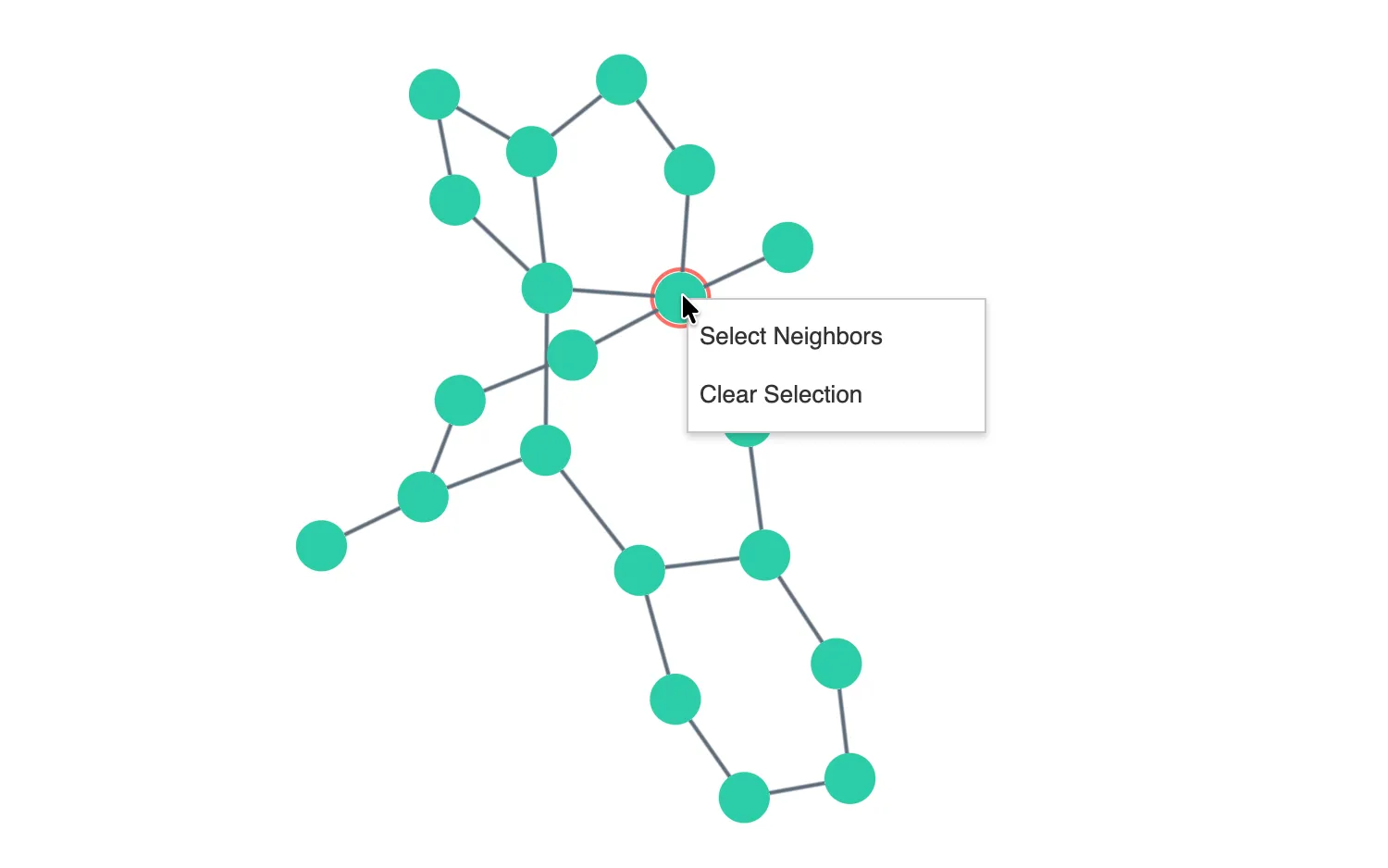
Right click on chart items to trigger the custom menu.
The onContextMenu event is triggered by right clicking on the chart.
This example uses it to create a simple JSX context menu with a few commands.
You can see the example's styling in the CSS tab or modify the CSS in the playground.
See also
import React, { useState } from "react";
import { createRoot } from "react-dom/client";

import has from "lodash/has";
import isEmpty from "lodash/isEmpty";
import pickBy from "lodash/pickBy";
import { Chart } from "regraph";
import { neighbors } from "regraph/analysis";

import data from "./data";

export const Demo = () => <ContextMenuDemo items={data()} />;

function ContextMenu(props) {
  const { menu, selection, selectneighbors, selectall, selectnone } = props;
  if (!menu.visible) {
    return null;
  }
  const menuItems = [];

  if (!isEmpty(selection)) {
    menuItems.push(
      { onClick: selectneighbors, text: "Select Neighbors" },
      { onClick: selectnone, text: "Clear Selection" },
    );
  } else {
    menuItems.push({ onClick: selectall, text: "Select All" });
  }

  return (
    <div className="menu" style={{ left: menu.x + 1, top: menu.y + 1 }}>
      {menuItems.map((menuItem) => (
        <div
          key={menuItem.text}
          className="menu-item"
          onClick={menuItem.onClick}
        >
          {menuItem.text}
        </div>
      ))}
    </div>
  );
}

function ContextMenuDemo(props) {
  const [selection, setSelection] = useState({});
  const [menu, setMenu] = useState({ visible: false, x: 0, y: 0 });

  const { items } = props;

  const openContextMenu = ({ id, x: xClickPos, y: yClickPos }) => {
    // The id is the chart item id, or null if background is clicked.
    // In many apps, menus would use the id. But in this demo
    // the selection from the state is used.
    setMenu({ x: xClickPos, y: yClickPos, visible: true });

    if (id == null) {
      return;
    }

    if (selection[id] == null) {
      setSelection({ [id]: true });
    }
  };

  // prevent the browser context menu appearing
  const suppressBrowserContextMenu = (evt) => {
    evt.preventDefault();
  };

  // selection functions are passed down to the context menu actions
  const selectNeighbors = async () => {
    const nodesAndLinks = await neighbors(items, selection);
    const nodesToSelect = pickBy(
      items,
      (item, id) => has(nodesAndLinks, id) && isNode(item),
    );
    setSelection({ ...selection, ...nodesToSelect });
  };

  const selectAll = () => {
    const fullSelection = pickBy(items, isNode);
    setSelection({ ...fullSelection });
  };

  const selectNone = () => {
    setSelection({});
  };

  // keep the chart selection and state synchronized
  const handleChartChange = (change) => {
    if (change.selection) {
      setSelection({ ...change.selection });
    }
  };

  // clear selection and remove the menu when clicking on the background
  const handleChartClick = ({ id }) => {
    if (!id) {
      setSelection({});
      setMenu({ visible: false, x: 0, y: 0 });
    }
  };

  const handleKeyDown = (evt) => {
    if (evt.key === "Escape") {
      setMenu({ visible: false, x: 0, y: 0 });
    }
  };

  return (
    <div
      style={{ width: "100%", height: "100%" }}
      onContextMenu={suppressBrowserContextMenu}
      onKeyDown={handleKeyDown}
      onClick={() => setMenu({ visible: false, x: 0, y: 0 })}
    >
      <Chart
        items={items}
        selection={selection}
        options={{
          navigation: false,
          overview: false,
        }}
        onClick={handleChartClick}
        onChange={handleChartChange}
        onContextMenu={openContextMenu}
      />
      <ContextMenu
        menu={menu}
        selection={selection}
        selectneighbors={selectNeighbors}
        selectall={selectAll}
        selectnone={selectNone}
      />
    </div>
  );
}

// select nodes by looking for the id1 property
function isNode(item) {
  return !has(item, "id1");
}

const root = createRoot(document.getElementById("regraph"));
root.render(<Demo />);import { style } from "@ci/theme/rg/js/storyStyles";
function data() {
const items = {
0: { ...style.primary1 },
1: { ...style.primary1 },
2: { ...style.primary1 },
3: { ...style.primary1 },
4: { ...style.primary1 },
5: { ...style.primary1 },
6: { ...style.primary1 },
7: { ...style.primary1 },
8: { ...style.primary1 },
9: { ...style.primary1 },
10: { ...style.primary1 },
11: { ...style.primary1 },
12: { ...style.primary1 },
13: { ...style.primary1 },
14: { ...style.primary1 },
15: { ...style.primary1 },
16: { ...style.primary1 },
17: { ...style.primary1 },
18: { ...style.primary1 },
19: { ...style.primary1 },
"0-1": {
...style.link,
id1: 1,
id2: 0,
},
"0-2": {
...style.link,
id1: 2,
id2: 0,
},
"0-3": {
...style.link,
id1: 3,
id2: 0,
},
"0-4": {
...style.link,
id1: 4,
id2: 0,
},
"6-9": {
...style.link,
id1: 6,
id2: 9,
},
"10-5": {
...style.link,
id1: 10,
id2: 5,
},
"12-9": {
...style.link,
id1: 12,
id2: 9,
},
"13-18": {
...style.link,
id1: 13,
id2: 18,
},
"11-15": {
...style.link,
id1: 15,
id2: 11,
},
"17-3": {
...style.link,
id1: 17,
id2: 3,
},
"18-8": {
...style.link,
id1: 18,
id2: 8,
},
"1-12": {
...style.link,
id1: 1,
id2: 12,
},
"12-15": {
...style.link,
id1: 15,
id2: 12,
},
"19-9": {
...style.link,
id1: 19,
id2: 9,
},
"14-5": {
...style.link,
id1: 5,
id2: 14,
},
"1-8": {
...style.link,
id1: 8,
id2: 1,
},
"16-6": {
...style.link,
id1: 16,
id2: 6,
},
"13-17": {
...style.link,
id1: 17,
id2: 13,
},
"1-13": {
...style.link,
id1: 1,
id2: 13,
},
"10-7": {
...style.link,
id1: 7,
id2: 10,
},
"0-16": {
...style.link,
id1: 0,
id2: 16,
},
"11-14": {
...style.link,
id1: 14,
id2: 11,
},
"15-7": {
...style.link,
id1: 15,
id2: 7,
},
"2-7": {
...style.link,
id1: 2,
id2: 7,
},
};
return items;
}
export default data;<!doctype html>
<html>
<head>
<link rel="stylesheet" href="./style.css" />
</head>
<body>
<div id="regraph" style="height: 100vh"></div>
<script type="module" src="./code.jsx"></script>
</body>
</html>.menu {
position: absolute;
width: 160px;
color: rgb(51, 51, 51);
background-color: white;
border: solid 1px #c8c8c8;
padding-bottom: 4px;
padding-top: 4px;
font-family: sans-serif;
user-select: none;
cursor: default;
display: block;
-webkit-box-shadow: 0px 2px 4px rgba(0, 0, 0, 0.2);
-moz-box-shadow: 0px 2px 4px rgba(0, 0, 0, 0.2);
box-shadow: 0px 2px 4px rgba(0, 0, 0, 0.2);
}
.menu-item {
padding: 6px;
cursor: pointer;
font-size: 13px;
}
.menu-item:hover {
background-color: #eee;
}