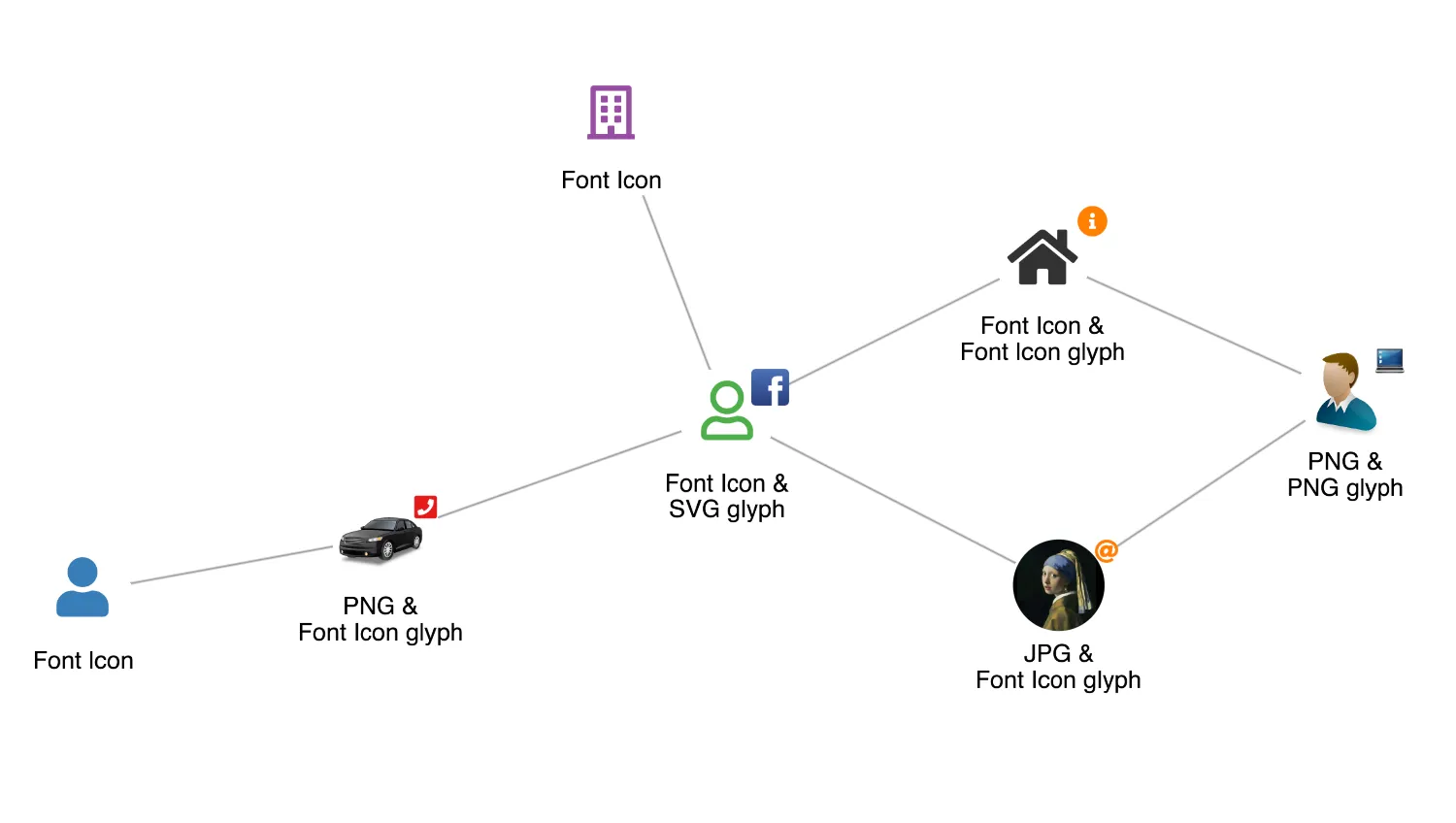
KeyLines supports the most popular image formats including PNG, JPG and SVG. See the Image Formats docs for details.
KeyLines also supports any font icons including Font Awesome, Material Design Icons and many more.
This demo uses Font Awesome 5 in two weights - solid and regular. Icons are imported from fontawesome5/all.css which means that both weights can be used simultaneously without requiring any CSS changes.
For more information, see the Fonts and Font Icons docs.
Design guidelines
When choosing from the wide range of font characters available, select the icons that are intuitive and recognisable even at low zoom levels. Also make sure that:
- icon colours meet required contrast standards
- icons are sufficiently distinct from each other
- icons are correctly aligned, or use the imageAlignment chart option to align them
Key functions used:
import KeyLines from "keylines";
import { data } from "./data.js";

let chart;

function getImageAlignment() {
  // Images are added to to the imageAlignment object
  // using their path as the key and an object describing the
  // adjustments to their position and scale as the value.
  const imageAlignmentDefinition = {
    "/public/images/icons/person4.png": { e: 0.9 },
    "/public/images/icons/car.png": { dy: -6, e: 0.9 },
    "/public/images/icons/laptop1.png": { dy: -20, dx: 20 },
    "/public/images/icons/facebook.svg": { dx: 10, e: 1.2 },
  };

  // For font icons, instead of a path as the key,
  // we need to pass in the same value as used in fi's t property.
  const fontIconAlignmentDefinitions = {
    "fas fa-user": { dy: -10 },
    "far fa-user": { dy: -10 },
    "far fa-building": { dy: 2, e: 0.9 },
    "fas fa-phone-square": { dx: 20, dy: -20, e: 1.3 },
    "fas fa-home": { e: 1.05 },
    "fas fa-at": { e: 1.2, dy: -40, dx: 40 },
    "fas fa-info-circle": { e: 1.2, dy: -40, dx: 40 },
  };

  return {
    ...imageAlignmentDefinition,
    ...fontIconAlignmentDefinitions,
  };
}

async function startKeyLines() {
  chart = await KeyLines.create({
    container: "klchart",
    options: {
      handMode: true,
      // Font icons and images can often be poorly aligned.
      // Set offsets to the icons to ensure they are centred correctly.
      imageAlignment: getImageAlignment(),
      logo: {
        u: "/public/images/Logo.png",
      },
      // Set the name of the font we want to use for icons
      // (a font must be loaded in the browser with exactly this name)
      iconFontFamily: "Font Awesome 5 Free",
    },
  });

  // To see how images and font icons are included within the data, see fonticons-data.js
  chart.load(data);
  chart.layout();
}

function loadFontsAndStart() {
  Promise.all([
    document.fonts.load('900 24px "Font Awesome 5 Free"'),
    document.fonts.load('400 24px "Font Awesome 5 Free"'),
  ]).then(startKeyLines);
}

window.addEventListener("DOMContentLoaded", loadFontsAndStart);import KeyLines from "keylines";
const palette = {
brown: "rgb(166, 86, 40)",
blue: "rgb(55, 126, 184)",
orange: "rgb(255, 127, 0)",
green: "rgb(77, 175, 74)",
red: "rgb(228, 26, 28)",
purple: "rgb(152, 78, 163)",
grey: "rgb(153, 153, 153)",
darkgrey: "rgb(50, 50, 50)",
};
export const data = {
type: "LinkChart",
items: [
{
id: "1",
type: "node",
fi: {
t: "fas fa-user",
c: palette.blue,
},
t: "Font Icon",
},
{
id: "2",
type: "node",
u: "/public/images/icons/person4.png",
t: "PNG &\nPNG glyph",
g: [
{
p: "ne",
u: "/public/images/icons/laptop1.png",
},
],
},
{
id: "3",
type: "node",
fi: {
t: "far fa-user",
c: palette.green,
},
t: "Font Icon &\nSVG glyph",
g: [
{
p: "ne",
u: "/public/images/icons/facebook.svg",
},
],
},
{
id: "4",
type: "node",
u: "/public/images/icons/pearlgirl.jpg",
ci: true,
t: "JPG &\nFont Icon glyph",
g: [
{
p: "ne",
fi: {
t: "fas fa-at",
c: palette.orange,
},
},
],
},
{
id: "5",
type: "node",
u: "/public/images/icons/car.png",
t: "PNG &\nFont Icon glyph",
g: [
{
p: "ne",
fi: {
t: "fas fa-phone-square",
c: palette.red,
},
},
],
},
{
id: "6",
type: "node",
fi: {
t: "far fa-building",
c: palette.purple,
},
t: "Font Icon",
},
{
id: "7",
type: "node",
fi: {
t: "fas fa-home",
c: palette.darkgrey,
},
t: "Font Icon &\nFont Icon glyph",
g: [
{
p: "ne",
e: 1.3,
fi: {
t: "fas fa-info-circle",
c: palette.orange,
},
},
],
},
{
id: "l1",
type: "link",
id1: "1",
id2: "5",
},
{
id: "l2",
type: "link",
id1: "2",
id2: "4",
},
{
id: "l3",
type: "link",
id1: "2",
id2: "7",
},
{
id: "l4",
type: "link",
id1: "3",
id2: "5",
},
{
id: "l5",
type: "link",
id1: "3",
id2: "6",
},
{
id: "l6",
type: "link",
id1: "3",
id2: "7",
},
{
id: "l7",
type: "link",
id1: "3",
id2: "4",
},
],
};<!doctype html>
<html lang="en" style="background-color: #2d383f">
<head>
<meta charset="utf-8" />
<title>Icons and Images</title>
<link rel="stylesheet" type="text/css" href="@ci/theme/kl/css/keylines.css" />
<link rel="stylesheet" type="text/css" href="@ci/theme/kl/css/minimalsdk.css" />
<link rel="stylesheet" type="text/css" href="@ci/theme/kl/css/sdk-layout.css" />
<link rel="stylesheet" type="text/css" href="@ci/theme/kl/css/demo.css" />
<link
rel="stylesheet"
type="text/css"
href="@fortawesome/[email protected]/css/all.css"
/>
</head>
<body>
<div id="klchart" class="klchart"></div>
<script type="module" src="./code.js"></script>
</body>
</html>