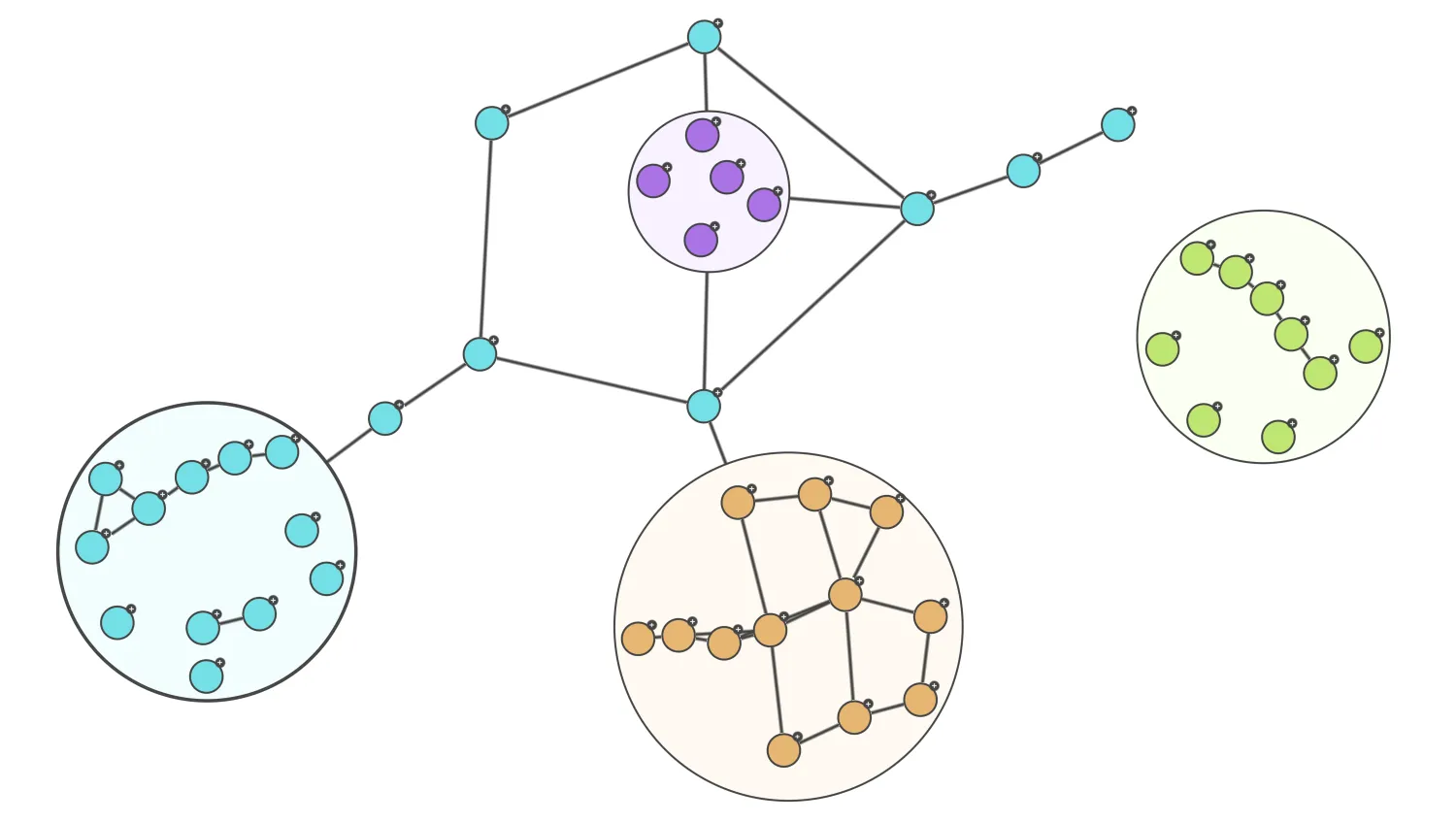
This demo shows you how you can use the parentId property of data to merge it into an existing node in the chart, promoting that node into a combo. This allows you to load a small ‘top level’ network initially, and bring in lower levels of detail on demand, reducing the need to bring large numbers of nodes and links into a chart when they aren’t needed.
The demo works by listening to a 'double-click' event, and calling first a chart.merge() to bring in the new data with the appropriate parentId, followed by a chart.combo().arrange() call to ensure the new combo is correctly sized and arranged.
Key functions used:
import KeyLines from "keylines";
import { randomColour, baseNode, baseLink, plusIcon } from "./data.js";

let chart;
let idCount = 0;

const maxNodes = 12;
const minNodes = 3;
const linkDensity = 0.2;

function createRandomNodes(parent) {
  // Create random nodes with links between them all in a given parent
  const items = [];
  const nodeCount =
    Math.floor(Math.random() * (maxNodes - minNodes + 1)) + minNodes;
  const colour = randomColour();
  // Create nodes
  for (let n = 0; n < nodeCount; n++) {
    items.push(
      Object.assign({}, baseNode, {
        id: `node${idCount++}`,
        parentId: parent,
        c: colour.node,
        g: [plusIcon],
      }),
    );
  }
  // Create links
  for (let n1 = 0; n1 < nodeCount; n1++) {
    for (let n2 = n1 + 1; n2 < nodeCount; n2++) {
      if (Math.random() < linkDensity) {
        items.push(
          Object.assign({}, baseLink, {
            id: `link${idCount++}`,
            id1: items[n1].id,
            id2: items[n2].id,
          }),
        );
      }
    }
  }
  return { items, colour };
}

async function createParentCombo(id) {
  const data = createRandomNodes(id);
  // Create the new combo with the nodes
  await chart.merge(data.items);
  await chart.setProperties({ id, g: [], oc: { c: data.colour.oc } });
  await chart.combo().arrange(id, { animate: false });
  await chart.combo().open(id);
}

function isNode(id) {
  const item = chart.getItem(id);
  return item?.type === "node";
}

function handleClick({ id, preventDefault }) {
  if (id && !chart.combo().isCombo(id) && isNode(id)) {
    createParentCombo(id);
    preventDefault();
  }
}

async function startKeyLines() {
  const options = {
    handMode: true,
    // Set the name of the font we want to use for icons (a font must be loaded in the browser
    // with exactly this name)
    iconFontFamily: "Font Awesome 5 Free",
    logo: { u: "/public/images/Logo.png" },
    selectionColour: "rgb(68, 68, 68)",
  };

  chart = await KeyLines.create({
    container: "klchart",
    options,
  });
  chart.on("double-click", handleClick);

  chart.load({ type: "LinkChart", items: createRandomNodes(null).items });
  chart.zoom("fit", { animate: false });
  chart.layout("organic", { time: 400 });
}

function loadKeyLines() {
  document.fonts.load('24px "Font Awesome 5 Free"').then(startKeyLines);
}

window.addEventListener("DOMContentLoaded", loadKeyLines);import KeyLines from "keylines";
const colours = [
{ node: "rgb(171, 115, 230)", oc: "rgb(248, 242, 255)" },
{ node: "rgb(230, 181, 115)", oc: "rgb(255, 250, 242)" },
{ node: "rgb(115, 157, 230)", oc: "rgb(242, 247, 255)" },
{ node: "rgb(115, 222, 230)", oc: "rgb(242, 254, 255)" },
{ node: "rgb(192, 230, 115)", oc: "rgb(251, 255, 242)" },
];
export function randomColour() {
return colours[Math.floor(Math.random() * colours.length)];
}
export const baseNode = {
type: "node",
oc: {
c: "rgb(255, 255, 255)",
bw: 3,
b: "rgb(68, 68, 68)",
},
b: "rgb(68, 68, 68)",
bw: 2,
t: null,
};
export const baseLink = {
type: "link",
c: "rgb(68, 68, 68)",
w: 5,
t: null,
};
export const plusIcon = {
c: "rgb(68, 68, 68)",
b: "rgb(68, 68, 68)",
fi: {
t: "fas fa-plus",
c: "rgb(255, 255, 255)",
},
p: "45",
};<!doctype html>
<html lang="en" style="background-color: #2d383f">
<head>
<meta charset="utf-8" />
<title>Load Data into Combos</title>
<link rel="stylesheet" type="text/css" href="@ci/theme/kl/css/keylines.css" />
<link rel="stylesheet" type="text/css" href="@ci/theme/kl/css/minimalsdk.css" />
<link rel="stylesheet" type="text/css" href="@ci/theme/kl/css/sdk-layout.css" />
<link rel="stylesheet" type="text/css" href="@ci/theme/kl/css/demo.css" />
<link
rel="stylesheet"
type="text/css"
href="@fortawesome/[email protected]/css/fontawesome.css"
/>
<link
rel="stylesheet"
type="text/css"
href="@fortawesome/[email protected]/css/solid.css"
/>
</head>
<body>
<div id="klchart" class="klchart"></div>
<script type="module" src="./code.js"></script>
</body>
</html>