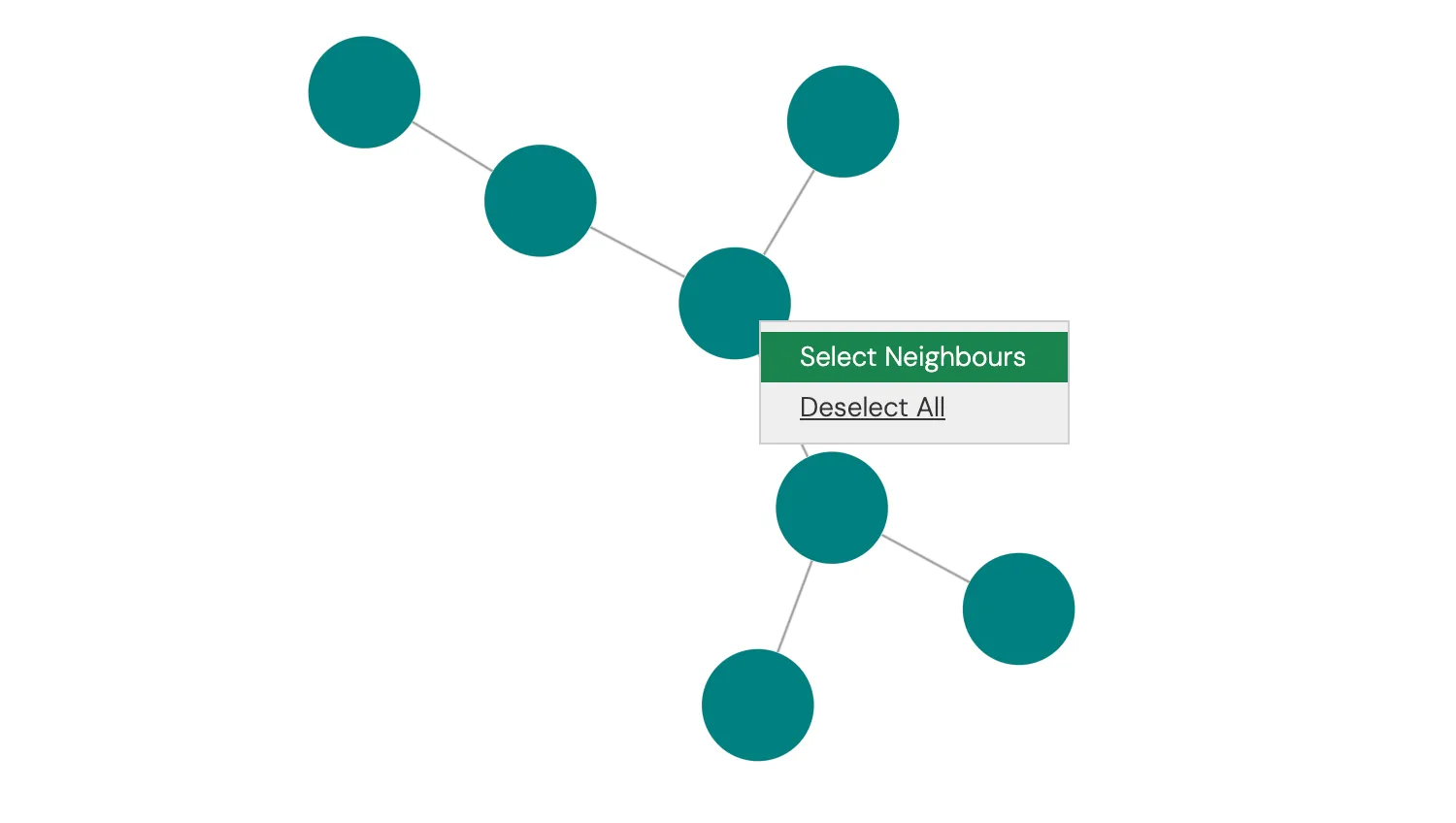
This demo shows how to display a right-click context menu with selected actions for chart elements.
When invoked on the chart background, the context menu shows an option to select all nodes. When invoked on a node or link, the context menu offers the options to select all the neighbours of a clicked item, or to unselect all items.
Generally it is good practice to offer only a small number of options.
Key functions used:
import KeyLines from "keylines";
import { data } from "./data.js";

let chart;
let selectedItemId;
const contextMenuId = "contextMenu";

// Background context menu options
const contextMenuBackground = [
  {
    id: "selectAll",
    text: "Select All",
  },
];

// Item context menu options
const contextMenuItems = [
  {
    id: "selectNeighbours",
    text: "Select Neighbours",
  },
  {
    id: "deselectAll",
    text: "Deselect All",
  },
];

// Creates html for the context menu that we want to show
function createMenuMarkup(entries, x, y) {
  const listEntries = entries
    .map(
      (entry) =>
        `<li><a id='${entry.id}' tabindex='-1' oncontextmenu='return false;'> ${entry.text}</a></li>`,
    )
    .join("");

  return `
    <ul class='kl-dropdown-menu' role='menu' style='top: ${y}px; left: ${x}px; display: block;'>
        ${listEntries}
    </ul>
  `;
}

// Remove any context menu from chart if it is displayed
function removeExistingMenu() {
  const menuToRemove = document.getElementById(contextMenuId);
  if (menuToRemove) {
    menuToRemove.remove();
  }
}

function displayContextMenu(item, x, y) {
  // Clicked on an item or on the background
  const menuToDisplay = item ? contextMenuItems : contextMenuBackground;
  // Set id of selected item if exists
  selectedItemId = item ? item.id : null;
  // Render context menu markup and display
  const newMenu = document.createElement("div");
  newMenu.id = contextMenuId;
  newMenu.innerHTML = createMenuMarkup(menuToDisplay, x + 8, y + 8);
  document.getElementsByClassName("chart-wrapper")[0].append(newMenu);
}

function createContextMenu({ id, x, y }) {
  const item = chart.getItem(id);
  removeExistingMenu();
  displayContextMenu(item, x, y);
}

// Select items that are linked to the current item
function selectNeighbours(selectedItem) {
  const neighbours = chart.graph().neighbours(selectedItem);
  // Make sure selection includes all links, nodes and the current item
  chart.selection([selectedItem, ...neighbours.nodes, ...neighbours.links]);
}

// Select all items
function selectAll() {
  const select = [];
  chart.each({ type: "all" }, (chartItem) => select.push(chartItem.id));
  chart.selection(select);
}

// Deselect all items
function deselectAll() {
  chart.selection([]);
}

function createEventHandlers() {
  // Listener for all click events
  document.addEventListener("click", (event) => {
    // Handle click events on menu list items
    if (event.target.id === "selectAll") {
      selectAll();
    } else if (event.target.id === "selectNeighbours") {
      selectNeighbours(selectedItemId);
    } else if (event.target.id === "deselectAll") {
      deselectAll();
    }
    // Hide the context menu when clicking outside of the chart
    if (event.which === 1) {
      removeExistingMenu();
    }
  });

  // When user pans, zooms or clicks the chart we will hide the context menu
  chart.on("view-change", removeExistingMenu);
  chart.on("pointer-down", removeExistingMenu);
  // Listening for the context menu event allows us to create the menu
  chart.on("context-menu", createContextMenu);
  // Prevent dragging while the context menu is is visible
  chart.on("drag-start", (e) => {
    if (document.getElementById(contextMenuId)) {
      e.preventDefault();
    }
  });
}

async function loadKeyLines() {
  const options = {
    drag: {
      links: false,
    },
    logo: { u: "/public/images/Logo.png" },
    handMode: true,
  };
  chart = await KeyLines.create({ container: "klchart", options });
  chart.load(data);
  chart.layout();
  createEventHandlers();
}

window.addEventListener("DOMContentLoaded", loadKeyLines);export const data = {
type: "LinkChart",
items: [
{
type: "node",
id: "Node 1",
c: "teal",
},
{
type: "node",
id: "Node 2",
c: "teal",
},
{
type: "node",
id: "Node 3",
c: "teal",
},
{
type: "node",
id: "Node 4",
c: "teal",
},
{
type: "node",
id: "Node 5",
c: "teal",
},
{
type: "node",
id: "Node 6",
c: "teal",
},
{
type: "node",
id: "Node 7",
c: "teal",
},
{
type: "link",
id: "Node 1 - Node 2",
id1: "Node 1",
id2: "Node 2",
},
{
type: "link",
id: "Node 1 - Node 3",
id1: "Node 1",
id2: "Node 3",
},
{
type: "link",
id: "Node 1 - Node 4",
id1: "Node 1",
id2: "Node 4",
},
{
type: "link",
id: "Node 2 - Node 5",
id1: "Node 2",
id2: "Node 5",
},
{
type: "link",
id: "Node 2 - Node 6",
id1: "Node 2",
id2: "Node 6",
},
{
type: "link",
id: "Node 5 - Node 7",
id1: "Node 5",
id2: "Node 7",
},
],
};<!doctype html>
<html lang="en" style="background-color: #2d383f">
<head>
<meta charset="utf-8" />
<title>Context Menus</title>
<link rel="stylesheet" type="text/css" href="@ci/theme/kl/css/keylines.css" />
<link rel="stylesheet" type="text/css" href="@ci/theme/kl/css/minimalsdk.css" />
<link rel="stylesheet" type="text/css" href="@ci/theme/kl/css/sdk-layout.css" />
<link rel="stylesheet" type="text/css" href="@ci/theme/kl/css/demo.css" />
</head>
<body>
<div id="klchart" class="klchart"></div>
<script type="module" src="./code.js"></script>
</body>
</html>