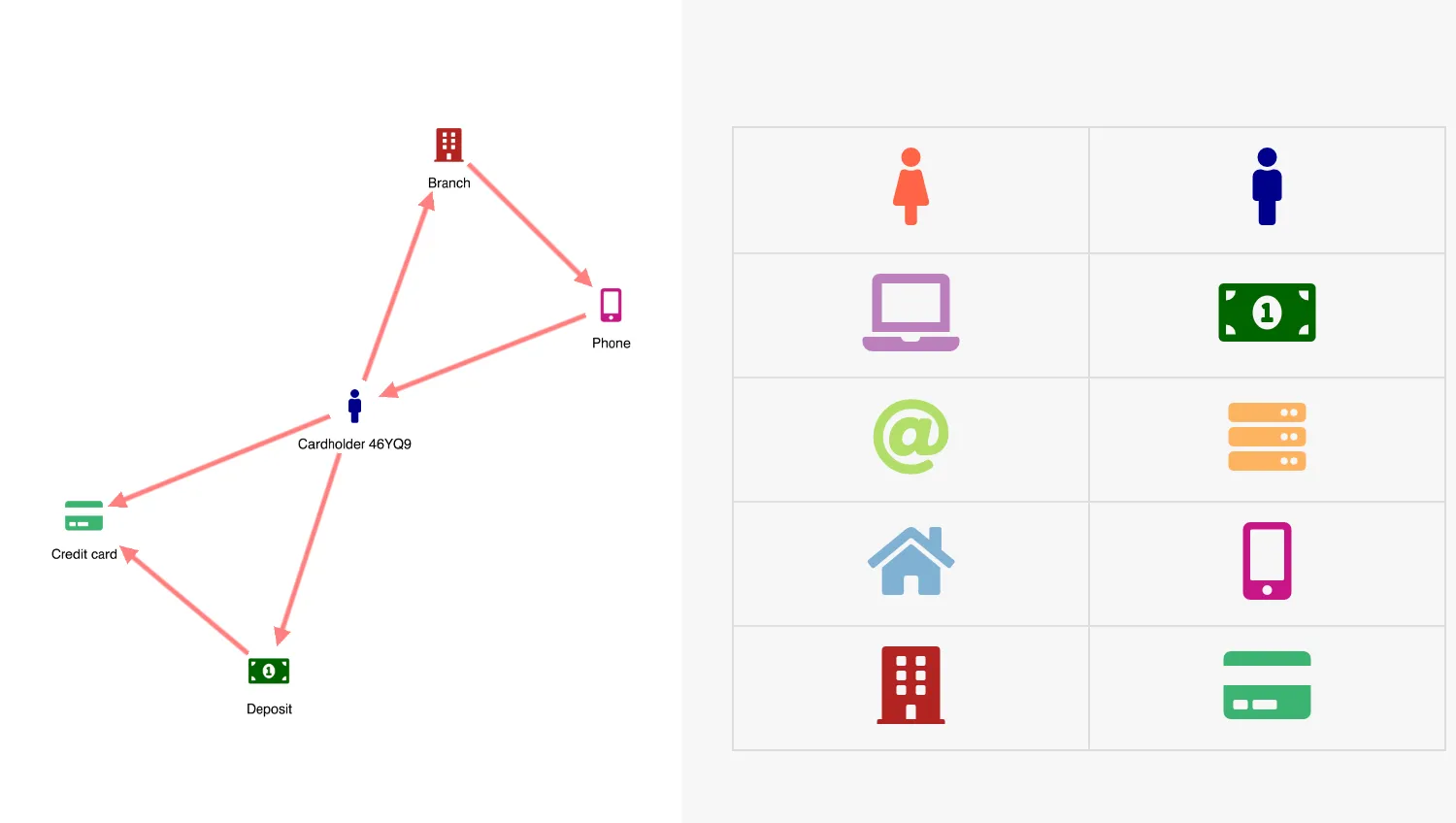
This demo illustrates the ability to create items on charts by dragging pre-defined nodes into the chart and then creating links between them.
You can also edit node and link names by double-clicking them.
Key functions used:
- chart.createLink
- chart.labelPosition
- chart.lock
- chart.setItem
- chart.setProperties
- chart.worldCoordinates
- Chart Events
import KeyLines from "keylines";
let chart;
let container;
const draggableArea = document.getElementsByClassName(
  "chart-wrapper demo-cols",
)[0];
// used for item creation
let nodeIdCounter = 0;
let linkIdCounter = 0;

let dragIcon = "";
let clone;
let dragStartCoords;

function removePlusIcon(nodeId) {
  if (nodeId) {
    chart.setProperties({ id: nodeId, g: null });
  }
}

function removeAllPlusIcons() {
  chart.each({ type: "node" }, (node) => {
    if (node.g) {
      removePlusIcon(node.id);
    }
  });
}

// Glyphs
function addPlusIcon({ id }) {
  removeAllPlusIcons();
  const hoveringItem = chart.getItem(id);
  // in case the cursor is hovering a node, add the icon
  if (id && hoveringItem.type === "node") {
    chart.setProperties({ id, g: [{ p: "ne", t: "+", c: "green" }] });
  }
}

async function createLink(nodeId, newLinkId) {
  // Define the style of the new link
  const newLinkStyle = {
    c: "rgb(255, 127, 127)",
    w: 5,
    a2: true, // link directed to the new node
  };
  // create the link and remove the + icon at the end in any case
  const linkedItemId = await chart.createLink(nodeId, newLinkId, {
    style: newLinkStyle,
  });
  removePlusIcon(linkedItemId);
}

function startLinkCreation({ id: nodeId, type, subItem }) {
  // if the node has the plus icon on the top-right corner...
  if (type === "node" && subItem.subId === "ne") {
    const linkId = `link${++linkIdCounter}`;
    // override the default node dragger with create-link
    createLink(nodeId, linkId);
  }
}

// place and setup the label box
function openLabelEditBox({ id }) {
  const item = chart.getItem(id);
  if (!item) return;

  const editLabel = document.getElementById("editLabel");
  const chartBox = document.getElementById("klchart").getBoundingClientRect();
  let keyDownHandler;

  function closeEdit() {
    editLabel.style.display = "none";
    chart.lock(false);
    // detach event listeners from the box
    editLabel.removeEventListener("keydown", keyDownHandler, false);
    editLabel.removeEventListener("blur", closeEdit, false);
  }

  keyDownHandler = (evt) => {
    if (evt.keyCode === 27) {
      // esc
      // exit without save
      closeEdit();
    }
    if (evt.keyCode === 13) {
      // return
      // save
      chart.setProperties({ id, t: editLabel.value });
      // and exit
      closeEdit();
    }
  };

  const labelPosition = chart.labelPosition(id);
  labelPosition.x1 += chartBox.left;
  labelPosition.x2 += chartBox.left;
  labelPosition.y1 += chartBox.top - 8;
  labelPosition.y2 += chartBox.top - 8;
  const labelWidth = labelPosition.x2 - labelPosition.x1;
  const editBoxWidth = Math.max(labelWidth, 80);
  const deltaWidth = editBoxWidth - labelWidth;
  // Place the box just under the node
  Object.assign(editLabel.style, {
    fontSize: `${labelPosition.fs}px`,
    top: `${labelPosition.y1}px`,
    left: `${labelPosition.x1 - deltaWidth / 2}px`,
    height: `${labelPosition.y2 - labelPosition.y1 + 4}px`,
    width: `${editBoxWidth}px`,
  });

  // copy and paste the current label in the box
  editLabel.value = item.t || "";

  // listen for which key the user presses
  editLabel.addEventListener("keydown", keyDownHandler, false);

  // on blur, exit without save
  editLabel.addEventListener("blur", closeEdit, false);

  // show the box, focus and set it ready to be filled
  editLabel.style.display = "block";
  editLabel.focus();
  editLabel.select();
  // lock the chart
  chart.lock(true);
}

function followMouse(evt) {
  // The cloned icon has 'position: fixed'.
  // On mousemove, we update its top and left CSS values
  // by looking at the current mouse position.
  clone.style.left = `${evt.clientX - clone.clientWidth / 2}px`;
  clone.style.top = `${evt.clientY - clone.clientHeight / 2}px`;
}

function getIconColor(iconName) {
  const icon = document.querySelector(`#dragdropTable i.fa-${iconName}`);
  return getComputedStyle(icon).color;
}

function removeClone() {
  clone.parentElement.removeChild(clone);
  clone = null;
}

function createNode(mouseViewCoords) {
  // mouseViewCoords gives the position of the
  // mouseup event, relative to the top-left corner of the the page

  const chartBox = document.getElementById("klchart").getBoundingClientRect();
  const x = mouseViewCoords.x - chartBox.left;
  const y = mouseViewCoords.y - chartBox.top;
  const pos = chart.worldCoordinates(x, y);
  const id = `node${++nodeIdCounter}`;
  // create the node
  chart.setItem({
    type: "node",
    id,
    x: pos.x,
    y: pos.y,
    fi: {
      t: `fas fa-${dragIcon}`,
      c: getIconColor(dragIcon),
    },
    t: "New Item",
  });

  openLabelEditBox({ id });
  removeClone();
}

function revertDrag() {
  // dropped icon outside of chart, so we slide it back to initial position
  clone.classList.add("transition");
  clone.style.left = `${dragStartCoords.x}px`;
  clone.style.top = `${dragStartCoords.y}px`;
  // when the transition is over, remove the cloned fonticon
  setTimeout(removeClone, 500);
}

function endDrag(evt) {
  document.removeEventListener("mousemove", followMouse, false);
  document.removeEventListener("mouseup", endDrag, false);

  // check whether we have dropped the cloned icon within the chart area
  const klRect = container.getBoundingClientRect();

  const mouseViewCoords = {
    x: evt.clientX,
    y: evt.clientY,
  };

  const withinChartX =
    mouseViewCoords.x >= 0 && mouseViewCoords.x <= klRect.width;
  const withinChartY =
    mouseViewCoords.y >= 0 && mouseViewCoords.y <= klRect.height;
  const mouseIsOverChart = withinChartX && withinChartY;
  if (mouseIsOverChart) {
    createNode(mouseViewCoords);
  } else {
    revertDrag();
  }
}

function startDrag(evt) {
  if (!clone) {
    const element = evt.target;
    dragIcon = element.dataset.icon;
    clone = element.cloneNode(true);
    draggableArea.appendChild(clone);

    // add id to apply CSS
    clone.id = "icon-clone";

    dragStartCoords = {
      x: evt.clientX,
      y: evt.clientY,
    };
    followMouse(evt);
    document.addEventListener("mousemove", followMouse, false);
    document.addEventListener("mouseup", endDrag, false);
  }
}

function makeDraggable(element) {
  element.addEventListener("mousedown", startDrag, false);
}

function setUpUI() {
  container = document.getElementById("klchart");
  chart.on("hover", addPlusIcon);
  chart.on("drag-start", startLinkCreation);
  chart.on("double-click", openLabelEditBox);
  const draggables = document.querySelectorAll(".draggable");
  draggables.forEach(makeDraggable);

  const layoutButton = document.getElementById("layout");
  layoutButton.addEventListener(
    "click",
    () => {
      chart.layout("organic", { tightness: 2 });
    },
    false,
  );
  const clearButton = document.getElementById("clear");
  clearButton.addEventListener("click", chart.clear, false);
}

async function startKeyLines() {
  const imageAlignment = {
    "fa-female": { e: 1.2 },
    "fa-male": { e: 1.2 },
    "fa-money-bill-alt": { e: 1.125 },
  };

  const options = {
    drag: {
      links: false,
    },
    logo: { u: "/public/images/Logo.png" },
    // quick hover refresh time to set the glyph icon
    hover: 5,
    iconFontFamily: "Font Awesome 5 Free",
    imageAlignment,
  };

  // create the chart
  chart = await KeyLines.create({ container: "klchart", options });
  setUpUI();
}

function loadFontsAndStart() {
  document.fonts.load('24px "Font Awesome 5 Free"').then(startKeyLines);
}

window.addEventListener("DOMContentLoaded", loadFontsAndStart);<!doctype html>
<html lang="en" style="background-color: #2d383f">
<head>
<meta charset="utf-8" />
<title>Drag and Drop Items</title>
<link rel="stylesheet" type="text/css" href="@ci/theme/kl/css/keylines.css" />
<link rel="stylesheet" type="text/css" href="@ci/theme/kl/css/minimalsdk.css" />
<link rel="stylesheet" type="text/css" href="@ci/theme/kl/css/sdk-layout.css" />
<link rel="stylesheet" type="text/css" href="@ci/theme/kl/css/demo.css" />
<link
rel="stylesheet"
type="text/css"
href="@fortawesome/[email protected]/css/fontawesome.css"
/>
<link
rel="stylesheet"
type="text/css"
href="@fortawesome/[email protected]/css/solid.css"
/>
<link rel="stylesheet" href="./style.css" />
</head>
<body>
<div id="klchart" class="klchart">
<input
id="editLabel"
type="text"
name="label"
style="display: none; position: fixed; max-height 0px;"
/>
</div>
<script type="module" src="./code.js"></script>
</body>
</html>.cicontent fieldset {
margin: 0 auto;
max-width: 250px;
}
#clear {
float: right;
}
/* Standard Table Styling */
table {
max-width: 100%;
background-color: transparent;
border-collapse: collapse;
border-spacing: 0;
}
.table {
width: 100%;
margin-bottom: 20px;
}
.table-bordered {
border: 1px solid #ddd;
border-collapse: separate;
*border-collapse: collapse;
border-left: 0;
}
.table th,
.table td {
line-height: 20px;
text-align: left;
vertical-align: top;
}
.table td {
border-top: 1px solid #ddd;
}
.table-condensed th,
.table-condensed td {
padding: 4px 5px;
}
.table-bordered th,
.table-bordered td {
border-left: 1px solid #ddd;
}
.table-bordered tbody:first-child tr:first-child td {
border-top: 0;
}
/**/
#dragdropTable tr {
height: 3rem;
}
#dragdropTable td {
height: 4rem;
position: relative;
text-align: center;
padding: 10px 16px;
}
.tab-content {
overflow: visible;
}
.table i.fas {
cursor: pointer;
width: 50%;
left: 0;
top: 10px;
position: absolute;
font-size: 2.5rem;
height: 2.5rem;
line-height: 2.5rem;
margin-left: 25%;
}
.drag-drop-img {
z-index: 26;
width: 60px;
height: 60px;
}
#icon-clone {
display: block;
position: fixed;
text-align: center;
z-index: 1000;
max-width: 50px;
max-height: 50px;
margin: 0;
pointer-events: none;
}
i.fas.transition {
transition:
top 0.5s ease-in-out,
left 0.5s ease-in-out;
}
i.fa-female,
i.fa-male {
font-size: 3rem;
}
i.fa-laptop {
color: #bc80bd;
font-size: 2.3rem;
height: 2.3rem;
}
i.fa-female {
color: #ff6347;
}
i.fa-male {
color: #00008b;
}
i.fa-money-bill-alt {
color: #006400;
}
i.fa-at {
color: #b3de69;
}
i.fa-server {
color: #fdb462;
}
i.fa-home {
color: #80b1d3;
}
i.fa-mobile-alt {
color: #c71585;
}
i.fa-building {
color: #b22222;
}
i.fa-credit-card {
color: #3cb371;
}