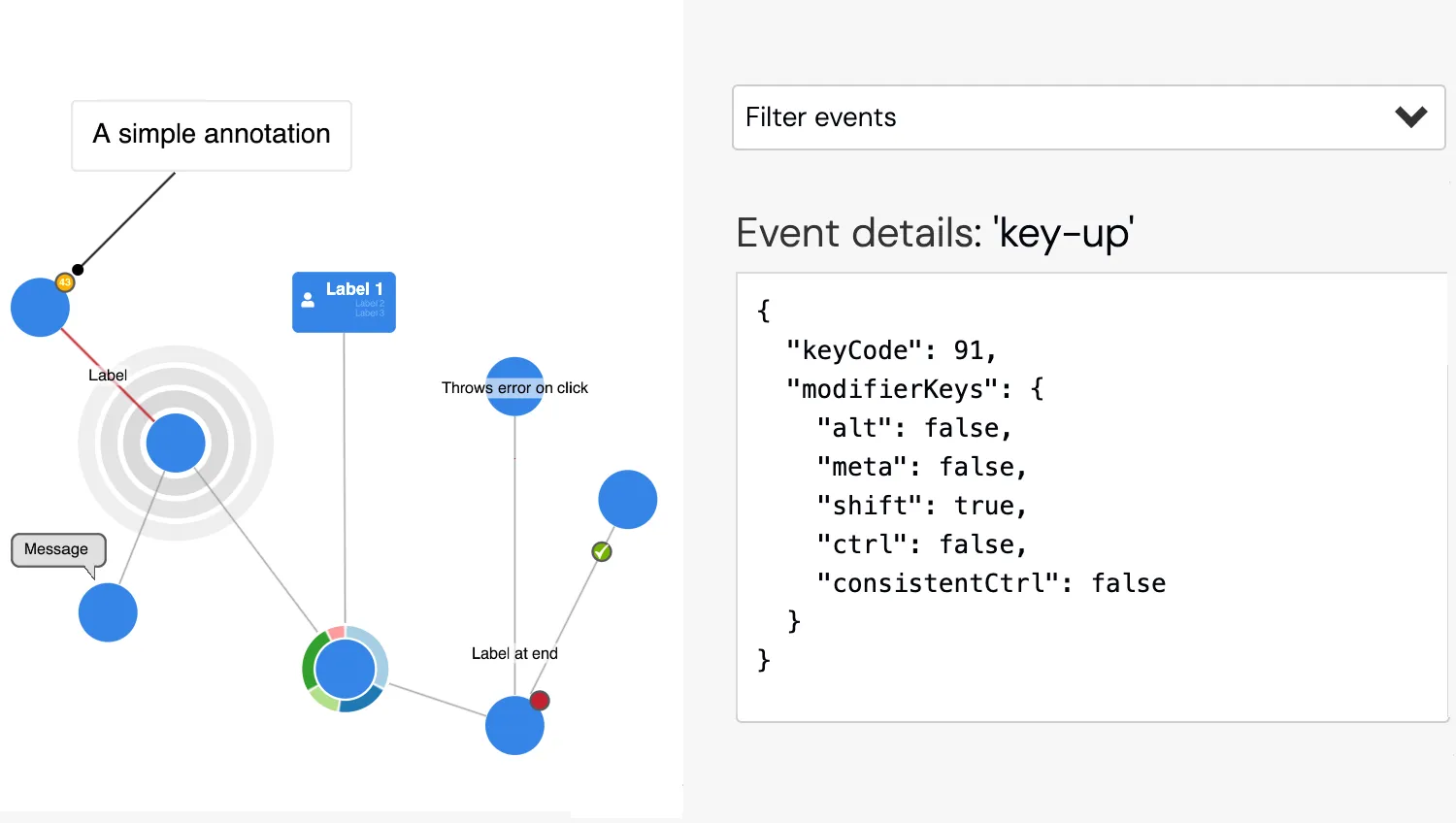
KeyLines events are flexible and customisable and support mouse, keyboard and touch device inputs.
In this demo you can experiment with chart events and common user gestures such as clicking or dragging on a variety of chart items.
While you interact, the events are added to the top of the Event list as they are fired.
The Event details window shows the object passed to the event handler of the active event.
See also
Demos: Time Bar Events
Key functions used:
import KeyLines from "keylines";
import { data } from "./data.js";

let chart;

const events = [
  "click",
  "context-menu",
  "double-click",
  "drag-end",
  "drag-move",
  "drag-over",
  "drag-start",
  "hover",
  "key-down",
  "key-up",
  "pointer-down",
  "pointer-move",
  "pointer-up",
  "prechange",
  "selection-change",
  "view-change",
  "wheel",
];

const ignoreList = ["drag-move", "pointer-move"];
let eventDetails = {};
let eventCounter = 0;

function positionModifierKeys() {
  const chartDivRect = document
    .getElementById("klchart")
    .getBoundingClientRect();
  const modifierKeysDiv = document.getElementById("modifier-keys");
  modifierKeysDiv.style.top = `${chartDivRect.bottom - modifierKeysDiv.offsetHeight}px`;
  modifierKeysDiv.style.left = `${chartDivRect.left}px`;
  modifierKeysDiv.style.opacity = 1;
}

function initialiseInteractions() {
  // Create a map of which events should be listened to
  const onEvents = new Map(
    events
      .filter((name) => ignoreList.indexOf(name) === -1)
      .map((event) => [event, true]),
  );

  // Get all the elements we wish to be able to modify
  const eventsButton = document.getElementById("filterEvents");
  const eventsContainer = document.getElementById("eventsListContainer");
  const eventsList = document.getElementById("eventsList");
  const noEvents = document.getElementById("noEvents");
  const allEvents = document.getElementById("allEvents");
  const eventNameDisplay = document.getElementById("eventName");
  const eventDetailsPre = document.getElementById("eventDetails");
  const prevEventButton = document.getElementById("prevEvent");
  const nextEventButton = document.getElementById("nextEvent");
  const eventLog = document.getElementById("eventLog");
  const eventsTable = document.getElementById("events");
  const clearButton = document.getElementById("clear");
  // Get the bounds of the event log so can ensure the highlighted event is in view
  const { top: eventLogTop, bottom: eventLogBottom } =
    eventLog.getBoundingClientRect();

  function displayEvent(evtId) {
    const details = eventDetails[evtId];
    const json = JSON.stringify(details.event, undefined, 2);
    eventDetailsPre.innerHTML = json;
    eventDetailsPre.dataset.id = evtId;
    eventNameDisplay.innerHTML = `: '${details.name}'`;

    // Disable the previous / next event buttons if no such event exists
    prevEventButton.disabled = !eventDetails[evtId - 1];
    nextEventButton.disabled = !eventDetails[evtId + 1];
  }

  function highlightRow(eventRow) {
    [...document.getElementsByClassName("selectedEvent")].forEach((el) => {
      el.classList.remove("selectedEvent");
    });
    eventRow.classList.add("selectedEvent");
    // Check if row is visible, if not scroll into view
    const distToTop = eventRow.getBoundingClientRect().top - eventLogTop;
    if (distToTop < 0) {
      eventLog.scrollTop += distToTop;
    } else {
      const distToBottom =
        eventRow.getBoundingClientRect().bottom - eventLogBottom;
      if (distToBottom > 0) {
        eventLog.scrollTop += distToBottom;
      }
    }
  }

  function onRowClick(rowClickEvt) {
    const row = rowClickEvt.currentTarget;
    highlightRow(row);
    displayEvent(parseInt(row.dataset.lastId, 10));
  }

  function displayNextEvent() {
    // Get the ID of the next event
    const evtId = parseInt(eventDetailsPre.dataset.id, 10) + 1;
    // Check if it is grouped in the currently highlighted row
    const currEvtRow = document.getElementsByClassName("selectedEvent")[0];
    if (parseInt(currEvtRow.dataset.lastId, 10) < evtId) {
      highlightRow(currEvtRow.previousSibling);
    }
    // Display the details of this event
    displayEvent(evtId);
  }

  function displayPrevEvent() {
    // Get the ID of the previous event
    const evtId = parseInt(eventDetailsPre.dataset.id, 10) - 1;
    // Check if it is grouped in the currently highlighted row
    const currEvtRow = document.getElementsByClassName("selectedEvent")[0];
    if (parseInt(currEvtRow.dataset.firstId, 10) > evtId) {
      highlightRow(currEvtRow.nextSibling);
    }
    // Display the details of this event
    displayEvent(evtId);
  }

  // Add the HTML for the event filter
  events.forEach((event) => {
    // Create a copy of the template
    const eventLabel = document.createElement("label");
    eventLabel.innerHTML = `<input type="checkbox" id="${event}" ${
      onEvents.has(event) ? 'checked="checked"' : ""
    }"> ${event}`;
    const inp = eventLabel.querySelector("input");
    // Add the on change listener
    eventLabel.addEventListener("change", () => {
      onEvents.set(event, inp.checked);
    });

    // Make the no events button disable this input
    noEvents.addEventListener("click", () => {
      inp.checked = false;
      onEvents.set(event, false);
    });

    // Make the all events button enable this input
    allEvents.addEventListener("click", () => {
      inp.checked = true;
      onEvents.set(event, true);
    });

    // Add it to the event list
    eventsList.append(eventLabel);
  });

  clearButton.addEventListener("click", () => {
    clearButton.classList.add("hide");
    eventsTable.innerHTML = "";
    eventNameDisplay.innerHTML = "";
    eventDetailsPre.innerHTML = "No event selected";
    eventDetailsPre.dataset.id = undefined;
    prevEventButton.disabled = true;
    nextEventButton.disabled = true;
    eventDetails = {};
  });

  eventsButton.addEventListener("click", (event) => {
    const classList = eventsContainer.classList;
    if (classList.contains("hide")) {
      classList.remove("hide");
    } else {
      classList.add("hide");
    }
    event.stopPropagation();
  });

  document.addEventListener("click", (event) => {
    if (event.target.closest("#eventsListContainer") === null) {
      eventsContainer.classList.add("hide");
    }
  });

  nextEventButton.addEventListener("click", displayNextEvent);
  prevEventButton.addEventListener("click", displayPrevEvent);

  chart.on("click", ({ id }) => {
    if (id === "7") throw new Error("Example Error Event");
  });

  // Attach an event handler to all the chart events
  chart.on("all", (evt) => {
    // Update the active modifier keys
    if (evt.event && evt.event.modifierKeys) {
      Object.keys(evt.event.modifierKeys).forEach((key) => {
        if (evt.event.modifierKeys[key]) {
          document.getElementById(key).classList.add("active");
        } else {
          document.getElementById(key).classList.remove("active");
        }
      });
    }
    if (onEvents.get(evt.name)) {
      // Add this event to the log
      const eventObject = {};
      if (evt.event) {
        Object.keys(evt.event).forEach((prop) => {
          if (prop !== "defaultPrevented") eventObject[prop] = evt.event[prop];
        });
      }
      const lastEvt = eventDetails[eventCounter++];
      eventDetails[eventCounter] = { name: evt.name, event: eventObject };
      // Check if a repeat of the previous event
      if (
        eventObject &&
        lastEvt &&
        evt.name === lastEvt.name &&
        eventObject.id === lastEvt.event.id
      ) {
        // Group it with the previous event and up the counter for that event
        const td = document.getElementsByClassName("eventname")[0];
        const rowData = td.parentElement.dataset;
        const countSpan = td.children[0];
        countSpan.innerText = `(${eventCounter - rowData.firstId + 1})`;
        rowData.lastId = eventCounter;
      } else {
        // Add it to the top of the event log
        const tr = document.createElement("tr");
        tr.innerHTML = `<td id='${eventCounter}' class='eventname'>'${evt.name}'<span></span></td>`;
        tr.dataset.firstId = eventCounter;
        tr.dataset.lastId = eventCounter;
        tr.onclick = onRowClick;
        eventsTable.insertBefore(tr, eventsTable.firstChild);
      }
      // Ensure the top row is highlighed
      highlightRow(
        document.getElementsByClassName("eventname")[0].parentElement,
      );
      // Update the displayed event details to show this event
      displayEvent(eventCounter);

      // Unhide the clear button
      clearButton.classList.remove("hide");
    }
  });

  // Hide the modifier keys when open the source tab
  [...document.getElementsByClassName("tablinks")].forEach((el) => {
    el.addEventListener("click", () => {
      document.getElementById("modifier-keys").style.opacity =
        el.name === "sourceTab" ? 0 : 1;
    });
  });
}

async function startKeyLines() {
  // Create the keylines chart
  chart = await KeyLines.create({
    container: "klchart",
    options: {
      logo: { u: "/public/images/Logo.png" },
      iconFontFamily: "Font Awesome 5 Free",
      selectedNode: { b: "#72B300" },
    },
  });
  chart.load(data);
  chart.zoom("fit");

  // Position the modifier keys overlay on the chart
  positionModifierKeys();
  window.addEventListener("resize", positionModifierKeys);
  // Deactivate them when the chart isn't focussed
  document.getElementById("klchart").addEventListener("focusout", () => {
    [...document.getElementsByClassName("key")].forEach((el) =>
      el.classList.remove("active"),
    );
  });

  initialiseInteractions();
}

function loadFontsAndStart() {
  document.fonts.load('24px "Font Awesome 5 Free"').then(startKeyLines);
}

window.addEventListener("DOMContentLoaded", loadFontsAndStart);import KeyLines from "keylines";
export const data = {
type: "LinkChart",
items: [
{
id: "an1",
type: "annotation",
subject: "1",
t: { t: "A simple annotation" },
position: { distance: 50, angle: "ne" },
},
{
id: "1",
type: "node",
c: "#3485e7",
x: 80,
y: 80,
g: [{ p: "ne", c: "rgb(255, 175, 0)", t: "43" }],
},
{
id: "2",
type: "node",
c: "#3485e7",
x: 140,
y: 350,
bu: { p: "nw", c: "#e0e0e0", t: "Message" },
},
{
id: "3",
type: "node",
c: "#3485e7",
x: 350,
y: 400,
donut: { v: [5, 3, 2, 4, 1] },
},
{
id: "4",
type: "node",
c: "#3485e7",
x: 500,
y: 450,
g: [{ p: 45, c: "#c41f30" }],
},
{
id: "5",
type: "node",
c: "#3485e7",
x: 600,
y: 250,
},
{
id: "6",
type: "node",
c: "#3485e7",
x: 200,
y: 200,
ha0: { r: 40, w: 15, c: "rgba(180,180,180,0.5)" },
ha1: { r: 60, w: 15, c: "rgba(200,200,200,0.5)" },
ha2: { r: 80, w: 15, c: "rgba(220,220,220,0.5)" },
},
{
id: "7",
type: "node",
c: "#3485e7",
t: "Throws error on click",
x: 500,
y: 150,
},
{
id: "8",
type: "node",
c: "#3485e7",
w: "auto",
h: "auto",
fbc: "rgba(0, 0, 0, 0)",
fc: "white",
borderRadius: 6,
fs: 15,
t: [
{
fi: { t: "fas fa-user" },
position: { vertical: 18, horizontal: "left" },
padding: { top: 0, right: 0, bottom: 0, left: 8 },
fs: 20,
},
{
t: "Label 1",
fb: true,
position: { vertical: "top", horizontal: "right" },
padding: { top: 8, right: 10, bottom: 0, left: 0 },
margin: { left: 10 },
},
{
t: "Label 2",
fs: 8,
padding: { top: 0, right: 10, bottom: 0, left: 0 },
},
{
t: "Label 3",
fs: 8,
padding: { top: 0, right: 10, bottom: 0, left: 0 },
},
],
x: 350,
y: 10,
},
{
id: "l1",
type: "link",
id1: "6",
id2: "2",
c: "rgb(145, 146, 149)",
w: 1,
},
{
id: "l2",
type: "link",
id1: "3",
id2: "8",
c: "rgb(145, 146, 149)",
w: 1,
},
{
id: "l3",
type: "link",
id1: "6",
id2: "1",
t: "Label",
c: "#c41f30",
w: 2,
},
{
id: "l4",
type: "link",
id1: "4",
id2: "7",
c: "rgb(145, 146, 149)",
w: 1,
t1: { t: "Label at end" },
t2: { g: [{ p: "ne", c: "rgb(220, 0, 0)", a: true }] },
},
{
id: "l5",
type: "link",
id1: "4",
id2: "5",
c: "rgb(145, 146, 149)",
w: 1,
t2: {
g: [
{
p: "ne",
c: "rgb(114, 179, 0)",
u: "/public/images/glyphs/check-mark.png",
},
],
},
},
{
id: "l6",
type: "link",
id1: "6",
id2: "3",
c: "rgb(145, 146, 149)",
w: 1,
},
{
id: "l7",
type: "link",
id1: "3",
id2: "4",
c: "rgb(145, 146, 149)",
w: 1,
},
],
};<!doctype html>
<html lang="en" style="background-color: #2d383f">
<head>
<meta charset="utf-8" />
<title>Interaction Events</title>
<link rel="stylesheet" type="text/css" href="@ci/theme/kl/css/keylines.css" />
<link rel="stylesheet" type="text/css" href="@ci/theme/kl/css/minimalsdk.css" />
<link rel="stylesheet" type="text/css" href="@ci/theme/kl/css/sdk-layout.css" />
<link rel="stylesheet" type="text/css" href="@ci/theme/kl/css/demo.css" />
<link
rel="stylesheet"
type="text/css"
href="@fortawesome/[email protected]/css/fontawesome.css"
/>
<link
rel="stylesheet"
type="text/css"
href="@fortawesome/[email protected]/css/solid.css"
/>
<link rel="stylesheet" href="./style.css" />
</head>
<body>
<div id="klchart" class="klchart"></div>
<div id="modifier-keys" style="position: absolute; pointer-events: none">
<span class="key" id="alt">alt</span><span class="key" id="ctrl">ctrl</span
><span class="key" id="consistentCtrl">consistentCtrl</span
><span class="key" id="meta">meta</span><span class="key" id="shift">shift</span>
</div>
<script type="module" src="./code.js"></script>
</body>
</html>#events .eventname {
color: #00aa70;
font-family:
Monaco,
Andale Mono,
Courier New,
monospace;
padding: 4px 5px;
font-size: 14px;
cursor: pointer;
}
#filterEvents {
border-color: #cacdcf;
border-style: solid;
border-width: 1px;
border-radius: 3px;
padding: 6px;
cursor: pointer;
background-color: #fff;
margin-top: 10px;
}
#filterEvents .icon-chevron-down {
width: 12px;
height: 12px;
border-color: #333;
border-style: solid;
border-width: 4px 4px 0px 0px;
transform: rotate(135deg);
margin-right: 5px;
}
#eventsListContainer {
width: 368px;
border-width: 1px;
border-color: #cacdcf;
border-top: 0px;
border-style: solid;
border-radius: 3px;
padding-bottom: 8px;
background-color: #ffffff;
position: absolute;
margin-left: 0px;
z-index: 1000;
scrollbar-width: none;
}
#eventsList {
padding: 6px;
width: 100%;
}
#eventsList label {
display: inline-block;
margin: 4px 40px 4px 0px;
width: calc(48% - 35px);
cursor: pointer;
}
#noEvents {
margin-left: 6px;
}
#eventLog {
height: 250px;
overflow-y: auto;
margin-bottom: 10px;
clear: both;
border: 1px solid #ccc;
background-color: #fff;
cursor: ns-resize;
}
#eventLog table {
margin-bottom: 5px;
}
input[type="checkbox"] {
margin-right: 5px;
}
#events .selectedEvent {
background-color: #ddd;
}
@media (max-width: 979px) {
#eventsListContainer {
width: 326px;
}
#eventsList label {
margin-right: 11px;
width: calc(50% - 11px);
}
}
@media (max-width: 767px) {
#eventsListContainer {
width: 266px;
}
#eventsList label {
margin-right: 10px;
width: calc(50% - 10px);
font-size: 11px;
}
}
#eventDetails {
height: 250px;
width: 100%;
overflow-y: auto;
}
#modifier-keys {
opacity: 0;
}
.key {
background-color: #b2df8a;
border: 2px solid #ffffff;
display: inline-block;
color: #5e5e5e;
font: 14px arial;
text-decoration: none;
text-align: center;
margin: 3px 3px;
padding: 6px 6px;
}
.key.active {
border-color: #ffaf00;
background-color: #ffaf00;
}