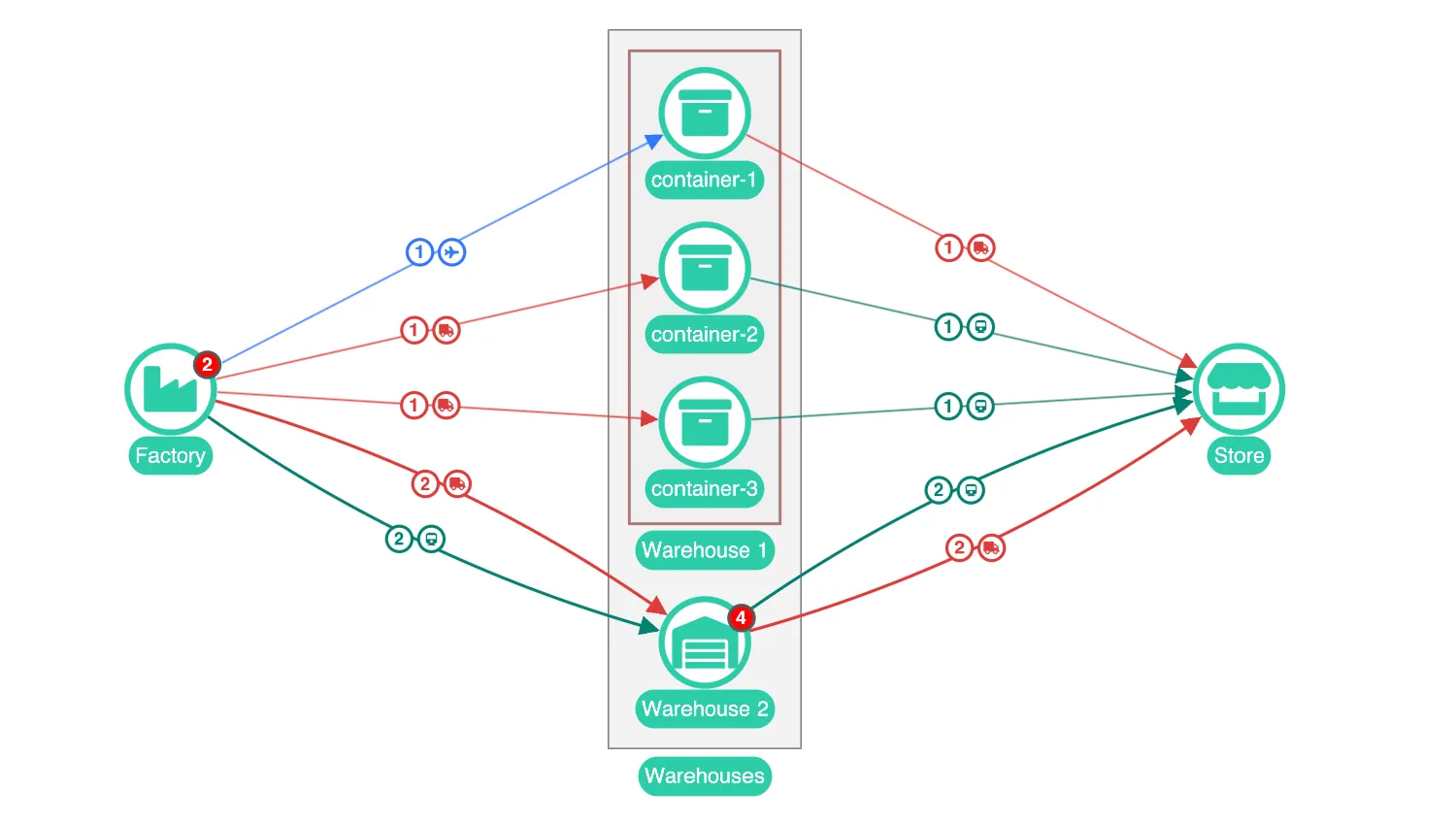
A chart with large numbers of links between individual pairs of nodes or combos can become cluttered and difficult to read. To prevent this, KeyLines lets you display groups of links with shared properties, as aggregate links, using the aggregateLinks API.
As well as aggregating all links between pairs of nodes, you can also set the aggregateBy option to aggregate just the links that have a particular custom property, and/or aggregate your links by direction, by setting aggregateByDirection.
A link-aggregation event is fired every time an aggregate link is created, updated or deleted, which allows you to create custom behaviours and add styling to your aggregate links.
Aggregate links and combos
Aggregate links are especially useful for combos and nested combos which can reveal large numbers of underlying links when opened.
For closed combos, aggregate links organise links at any nesting level while always preserving the information about which combos are connected.
Beta Release
Link Aggregation is provided as beta functionality.
Key functions used:
import KeyLines from "keylines";
import { data, combineNodesAndRevealLinks } from "./data.js";

let chart;

async function layout() {
  await chart.layout("sequential", {
    orientation: "right",
    stretch: 2,
    level: "level",
  });
}

function isCombo(ids, type = "node") {
  return chart.combo().isCombo(ids, { type });
}

function openCombo(ids) {
  const targets = Array.isArray(ids) ? ids : [ids];
  chart.combo().open(targets, { adapt: "inCombo" });
}

function closeCombo(ids) {
  const targets = Array.isArray(ids) ? ids : [ids];
  chart.combo().close(targets, { adapt: "inCombo" });
}

function initialiseInteractions() {
  document.querySelectorAll('input[name="aggregateLinks"]').forEach((radio) => {
    radio.addEventListener("click", async (e) => {
      const value = e.target.value;
      switch (value) {
        case "true":
          chart.options({ aggregateLinks: true });
          break;
        case "false":
          chart.options({ aggregateLinks: false });
          break;
        case "via":
          chart.options({ aggregateLinks: { aggregateBy: "via" } });
          break;
      }
    });
  });

  chart.on("link-aggregation", ({ change, links, aggregateByValue, id }) => {
    if (change !== "deleted") {
      // style the aggregate after it has been created or updated
      let colour = "grey";
      let typeGlyph; // glyph that shows the type of transport

      if (aggregateByValue) {
        // if aggregating by link type, get some styling from a child link
        const childLink = chart.getItem(links[0]);
        colour = childLink.c;
        typeGlyph = childLink.g[0];
      }

      // create a glyph to show the number of child links
      const glyphs = [{ c: "white", b: colour, t: links.length, fc: colour }];

      if (typeGlyph) {
        glyphs.push(typeGlyph);
      }

      chart.setProperties({ id, w: links.length, c: colour, g: glyphs });
    }
  });

  chart.on("double-click", ({ id, preventDefault, button }) => {
    if (id && button === 0) {
      if (isCombo(id)) {
        if (chart.combo().isOpen(id)) {
          closeCombo(id);
        } else {
          openCombo(id);
        }
      }
      preventDefault();
    }
  });
}

async function startKeyLines() {
  const options = {
    handMode: true,
    selectionColour: "#f75252",
    combos: { shape: "rectangle" },
    iconFontFamily: "Font Awesome 5 Free",
    linkEnds: { avoidLabels: false },
    aggregateLinks: { aggregateBy: "via" },
  };

  chart = await KeyLines.create({ container: "klchart", options });
  initialiseInteractions();
  chart.load(data);

  // combine and reveal links
  await combineNodesAndRevealLinks(chart);
  await layout();
}

function loadWebFonts() {
  document.fonts.load('24px "Font Awesome 5 Free"').then(startKeyLines);
}

window.addEventListener("DOMContentLoaded", loadWebFonts);import KeyLines from "keylines";
const colour1 = "#2dcda8";
function createNode(id, labelText, type) {
let fontIcon;
let level;
if (type === "assemblyLine") {
fontIcon = "fas fa-cogs";
level = 1;
}
if (type === "container") {
fontIcon = "fas fa-archive";
level = 2;
}
if (type === "store") {
fontIcon = "fas fa-store";
level = 3;
}
return {
id,
type: "node",
c: "white",
b: colour1,
d: { level },
t: [
{
t: labelText,
position: "s",
fbc: colour1,
fc: "white",
borderRadius: 15,
padding: "6 4 4 4",
},
],
fi: {
c: colour1,
t: fontIcon,
},
};
}
let nLinks = 0;
function createLinks(from, to, type, n) {
const links = [];
let fontIcon;
let colour;
if (type === "road") {
fontIcon = "fa-truck";
colour = "#dd3c3c";
}
if (type === "air") {
fontIcon = "fa-plane";
colour = "#3377ff";
}
if (type === "rail") {
fontIcon = "fa-train";
colour = "#048170";
}
for (let i = 0; i < n; i++) {
nLinks++;
const id = `${from}-${to}-${nLinks}`;
links.push({
id,
type: "link",
id1: from,
id2: to,
c: colour,
d: { via: type },
a2: true,
w: 2,
g: [
{
c: "white",
fc: colour,
fi: { c: colour, t: fontIcon },
b: colour,
},
],
});
}
return links;
}
function createSupplyChain() {
const items = [
createNode("assemblyLine1", "Assembly Line 1", "assemblyLine"),
createNode("assemblyLine2", "Assembly Line 2", "assemblyLine"),
createNode("superstore", "Store", "store"),
];
// create assemblyLine1 storage containers, and their links
let nContainers = 3;
for (let i = 0; i < nContainers; i++) {
// create the container node
const nodeId = `storage1-container-${i + 1}`;
items.push(createNode(nodeId, `container-${i + 1}`, "container"));
// create the link from assembly line to container
items.push(
...createLinks("assemblyLine1", nodeId, i === 0 ? "air" : "road", 1),
);
// create the link from container to store
items.push(
...createLinks(nodeId, "superstore", i > 0 ? "rail" : "road", 1),
);
}
// create assemblyLine2 storage containers, and their links
nContainers = 4;
for (let i = 0; i < nContainers; i++) {
// create the container node
const nodeId = `storage2-container-${i + 1}`;
items.push(createNode(nodeId, `container-${i + 1}`, "container"));
// create the link from assembly line to container
items.push(
...createLinks("assemblyLine2", nodeId, i > 1 ? "road" : "rail", 1),
);
// create the link from container to store
items.push(
...createLinks(nodeId, "superstore", i > 1 ? "rail" : "road", 1),
);
}
return items;
}
export const data = {
type: "LinkChart",
items: createSupplyChain(),
};
/**
* Combines nodes, styles the combos, hides combo links, and reveals underlying links
*/
export async function combineNodesAndRevealLinks(chart) {
// get storage1 and storage2 IDs, to make combo definition
const storage1Ids = [];
const storage2Ids = [];
chart.each({ type: "node" }, ({ id }) => {
if (id.startsWith("storage1")) {
storage1Ids.push(id);
}
if (id.startsWith("storage2")) {
storage2Ids.push(id);
}
});
// pull the style for the combo from a child node
const childAssemblyLineStyle = chart.getItem("assemblyLine1");
const factoryClosedStyle = Object.assign(childAssemblyLineStyle, {
fi: { ...childAssemblyLineStyle.fi, t: "fas fa-industry" },
});
// combine nodes and get the new combo node IDs
const comboIds = await chart.combo().combine(
[
{
ids: ["assemblyLine1", "assemblyLine2"],
open: false,
label: "Factory",
openStyle: {
t: [
{
t: "Factory",
position: "s",
fbc: "#2dcda8",
fc: "white",
borderRadius: 15,
margin: 5,
padding: "6 4 4 4",
},
],
},
style: {
...factoryClosedStyle,
t: [{ ...factoryClosedStyle.t[0], t: "Factory" }],
},
},
],
{
select: false,
animate: false,
},
);
// pull the style for the combo from a child node
const childWarehouseStyle = chart.getItem(storage1Ids[0]);
const warehouseClosedStyle = Object.assign(childWarehouseStyle, {
fi: { ...childWarehouseStyle.fi, t: "fas fa-warehouse" },
});
// combine container nodes in to warehouse combos
const warehouseComboIds = await chart.combo().combine(
[
{
ids: storage1Ids,
open: false,
label: "Warehouse 1",
openStyle: {
t: [
{
t: "Warehouse 1",
position: "s",
fbc: "#2dcda8",
fc: "white",
borderRadius: 15,
margin: 5,
padding: "6 4 4 4",
},
],
},
style: {
...warehouseClosedStyle,
t: [{ ...warehouseClosedStyle.t[0], t: "Warehouse 1" }],
},
},
{
ids: storage2Ids,
open: false,
label: "Warehouse 2",
openStyle: {
t: [
{
t: "Warehouse 2",
position: "s",
fbc: "#2dcda8",
fc: "white",
borderRadius: 15,
margin: 5,
padding: "6 4 4 4",
},
],
},
style: {
...warehouseClosedStyle,
t: [{ ...warehouseClosedStyle.t[0], t: "Warehouse 2" }],
},
},
],
{ select: false, animate: false },
);
chart
.combo()
.arrange(warehouseComboIds, { gridShape: { columns: 1 }, animate: false });
comboIds.push(warehouseComboIds);
comboIds.push(
// combine warehouses in to warehouse combo
await chart.combo().combine(
[
{
ids: warehouseComboIds,
open: false,
label: "Warehouses",
openStyle: {
t: [
{
t: "Warehouses",
position: "s",
fbc: "#2dcda8",
fc: "white",
borderRadius: 15,
margin: 5,
padding: "6 4 4 4",
},
],
},
style: {
...warehouseClosedStyle,
t: [{ ...warehouseClosedStyle.t[0], t: "Warehouses" }],
},
},
],
{ select: false },
),
);
// hide combo links, and reveal underlying
const toReveal = [];
const allCombolinkIds = [];
comboIds.forEach((comboId) => {
// get neighbouring combo links of this combo
const combolinkIds = chart
.graph()
.neighbours(comboId)
.links.filter((id) => {
return chart.combo().isCombo(id);
});
allCombolinkIds.push(...combolinkIds);
// iterate through links, and add link to list of links to reveal, if is a child
// of a combo link
chart.each({ type: "link" }, (link) => {
if (combolinkIds.includes(link.parentId)) {
toReveal.push(link.id);
}
});
// reveal the child combo links
chart.combo().reveal(toReveal);
});
// hide the combo links
const newProperties = allCombolinkIds.map((id) => {
return { id, hi: true };
});
chart.setProperties(newProperties);
// arrange the combos
chart
.combo()
.arrange(comboIds, { gridShape: { columns: 1 }, animate: false });
}<!doctype html>
<html lang="en" style="background-color: #2d383f">
<head>
<meta charset="utf-8" />
<title>Aggregating Links</title>
<link rel="stylesheet" type="text/css" href="@ci/theme/kl/css/keylines.css" />
<link rel="stylesheet" type="text/css" href="@ci/theme/kl/css/minimalsdk.css" />
<link rel="stylesheet" type="text/css" href="@ci/theme/kl/css/sdk-layout.css" />
<link rel="stylesheet" type="text/css" href="@ci/theme/kl/css/demo.css" />
<link
rel="stylesheet"
type="text/css"
href="@fortawesome/[email protected]/css/fontawesome.css"
/>
<link
rel="stylesheet"
type="text/css"
href="@fortawesome/[email protected]/css/solid.css"
/>
</head>
<body>
<div id="klchart" class="klchart"></div>
<script type="module" src="./code.js"></script>
</body>
</html>