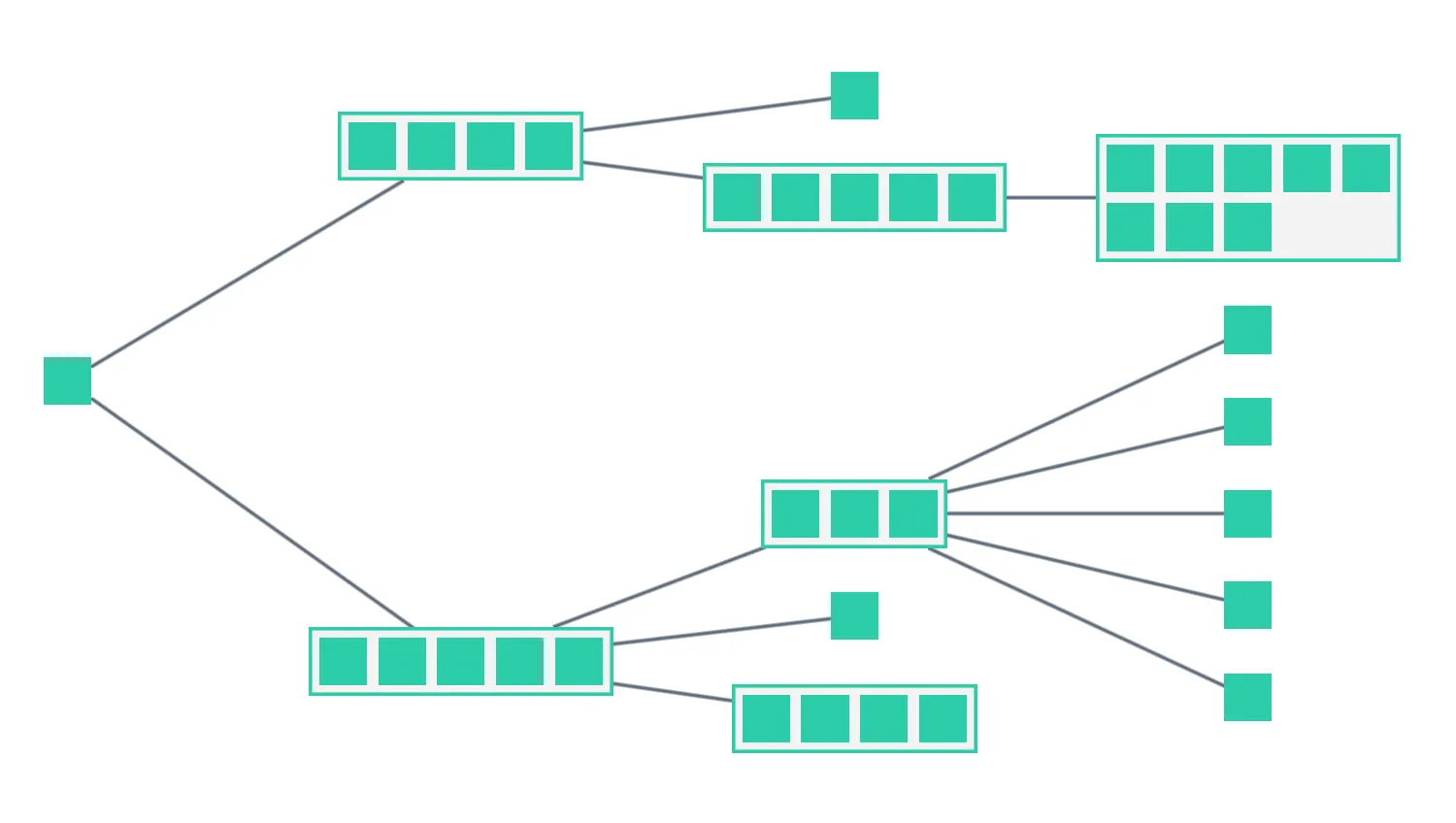
Switch between different shapes of grid inside open combos and use the slider to change the number of items per row or column.
The gridShape option controls the number of rows or columns in a grid set by the arrange option.
See also
import React, { useCallback, useState } from "react";
import { createRoot } from "react-dom/client";

import { debounce } from "lodash";
import { Chart } from "regraph";

import { data } from "./data";
import { style } from "@ci/theme/rg/js/storyStyles";

import "@ci/theme/rg/css/layout.css";

export const Demo = () => <GridArrange items={data()} />;

const gridShapesBy = ["columns", "rows", "auto"];
const orientations = ["Down", "Right"];

function GridArrange(props) {
  const { items } = props;
  const [state, setState] = useState({
    layout: { name: "sequential", orientation: "right" },
    gridShapeBy: "columns",
    combine: {
      shape: "rectangle",
      level: 1,
      properties: ["group"],
    },
    tightness: 5,
    number: 1,
    animate: true,
  });
  const debouncedSetState = useCallback(debounce(setState, 100), [debounce]);

  const onCombineNodesHandler = ({ setStyle }) => {
    let gridShape = "auto";
    if (state.gridShapeBy !== "auto") {
      gridShape =
        state.gridShapeBy === "columns"
          ? { columns: Number(state.number) }
          : { rows: Number(state.number) };
    }
    setStyle({
      gridShape,
      border: { color: style.primary1.color },
      label: { text: "" },
      arrange: {
        name: "grid",
        tightness: state.tightness,
      },
    });
  };

  return (
    <div className="story">
      <div
        className="options"
        style={{ flexBasis: "auto", minWidth: 400, flexWrap: "nowrap" }}
      >
        <div>
          <span
            style={{ display: "inline-block", width: 130 }}
            className="label"
          >
            Grid shape by
          </span>
          {gridShapesBy.map((gridShapeBy) => (
            <button
              className={state.gridShapeBy === gridShapeBy ? "active" : ""}
              type="button"
              key={gridShapeBy}
              onClick={() =>
                setState((current) => {
                  return {
                    ...current,
                    gridShapeBy,
                    combine: { ...current.combine },
                    layout: { ...current.layout },
                  };
                })
              }
            >
              {gridShapeBy[0].toUpperCase() + gridShapeBy.slice(1)}
            </button>
          ))}
        </div>
      </div>
      <div
        className="options"
        style={{ flexBasis: "auto", minWidth: 400, flexWrap: "nowrap" }}
      >
        <div>
          <span
            style={{ display: "inline-block", width: 130 }}
            className="label"
          >
            Number: {state.number}
          </span>
          <input
            type="range"
            min={1}
            step={1}
            max={5}
            id="slider"
            value={state.number}
            disabled={state.gridShapeBy === "auto"}
            style={{ padding: 0, verticalAlign: "middle" }}
            onChange={({ target }) => {
              debouncedSetState({
                ...state,
                animate: true,
                number: target.value,
                layout: { ...state.layout },
                combine: { ...state.combine },
              });
              setState((current) => {
                return { ...current, number: target.value };
              });
            }}
          />
        </div>
      </div>
      <div
        className="options"
        style={{ flexBasis: "auto", minWidth: 400, flexWrap: "nowrap" }}
      >
        <div>
          <span
            style={{ display: "inline-block", width: 130 }}
            className="label"
          >
            Tightness: {state.tightness}
          </span>
          <input
            type="range"
            min={0}
            step={1}
            max={10}
            id="slider"
            value={state.tightness}
            style={{ padding: 0, verticalAlign: "middle" }}
            onChange={({ target }) => {
              debouncedSetState({
                ...state,
                animate: false,
                tightness: parseFloat(target.value),
                layout: { ...state.layout },
                combine: { ...state.combine },
              });
              setState((current) => {
                return { ...current, tightness: parseFloat(target.value) };
              });
            }}
          />
        </div>
      </div>
      <div
        className="options"
        style={{ flexBasis: "auto", minWidth: 400, flexWrap: "nowrap" }}
      >
        <div>
          <span
            style={{ display: "inline-block", width: 130 }}
            className="label"
          >
            Orientation
          </span>
          {orientations.map((orientation) => (
            <button
              className={
                state.layout.orientation === orientation.toLowerCase()
                  ? "active"
                  : ""
              }
              type="button"
              key={orientation}
              onClick={() =>
                setState((current) => {
                  return {
                    ...current,
                    layout: {
                      ...current.layout,
                      orientation: orientation.toLowerCase(),
                    },
                  };
                })
              }
            >
              {orientation}
            </button>
          ))}
        </div>
      </div>

      <div className="chart-wrapper">
        <Chart
          animation={{ animate: state.animate }}
          layout={state.layout}
          items={items}
          combine={state.combine}
          onCombineNodes={onCombineNodesHandler}
        />
      </div>
    </div>
  );
}

const root = createRoot(document.getElementById("regraph"));
root.render(<Demo />);import { style } from "@ci/theme/rg/js/storyStyles";
const linkColor = style.link.color;
const nodeColor = style.primary1.color;
const width = 4;
function data() {
return {
// level 0
0: {
color: nodeColor,
borderColor: "white",
data: { level: 0, group: null },
shape: "box",
},
// level 1
1: {
color: nodeColor,
data: { level: 1, group: 1 },
shape: "box",
},
2: {
color: nodeColor,
data: { level: 1, group: 1 },
shape: "box",
},
3: {
color: nodeColor,
data: { level: 1, group: 1 },
shape: "box",
},
4: {
color: nodeColor,
data: { level: 1, group: 1 },
shape: "box",
},
5: {
color: nodeColor,
data: { level: 1, group: 2 },
shape: "box",
},
6: {
color: nodeColor,
data: { level: 1, group: 2 },
shape: "box",
},
7: {
color: nodeColor,
data: { level: 1, group: 2 },
shape: "box",
},
8: {
color: nodeColor,
data: { level: 1, group: 2 },
shape: "box",
},
9: {
color: nodeColor,
data: { level: 1, group: 2 },
shape: "box",
},
// level 2
10: {
color: nodeColor,
data: { level: 1, group: 3 },
shape: "box",
},
11: {
color: nodeColor,
data: { level: 1, group: 3 },
shape: "box",
},
12: {
color: nodeColor,
data: { level: 1, group: 3 },
shape: "box",
},
13: {
color: nodeColor,
data: { level: 1, group: 3 },
shape: "box",
},
14: {
color: nodeColor,
data: { level: 1, group: 3 },
shape: "box",
},
15: {
color: nodeColor,
data: { level: 1, group: null },
shape: "box",
},
16: {
color: nodeColor,
data: { level: 1, group: 4 },
shape: "box",
},
17: {
color: nodeColor,
data: { level: 1, group: 4 },
shape: "box",
},
18: {
color: nodeColor,
data: { level: 1, group: 4 },
shape: "box",
},
19: {
color: nodeColor,
data: { level: 1, group: 5 },
shape: "box",
},
20: {
color: nodeColor,
data: { level: 1, group: 5 },
shape: "box",
},
21: {
color: nodeColor,
data: { level: 1, group: 5 },
shape: "box",
},
22: {
color: nodeColor,
data: { level: 1, group: 5 },
shape: "box",
},
23: {
color: nodeColor,
data: { level: 1, group: null },
shape: "box",
},
24: {
color: nodeColor,
data: { level: 1, group: 6 },
shape: "box",
},
25: {
color: nodeColor,
data: { level: 1, group: 6 },
shape: "box",
},
26: {
color: nodeColor,
data: { level: 1, group: 6 },
shape: "box",
},
27: {
color: nodeColor,
data: { level: 1, group: 6 },
shape: "box",
},
28: {
color: nodeColor,
data: { level: 1, group: 6 },
shape: "box",
},
29: {
color: nodeColor,
data: { level: 1, group: 6 },
shape: "box",
},
30: {
color: nodeColor,
data: { level: 1, group: 6 },
shape: "box",
},
31: {
color: nodeColor,
data: { level: 1, group: 6 },
shape: "box",
},
32: {
color: nodeColor,
data: { level: 1, group: null },
shape: "box",
},
33: {
color: nodeColor,
data: { level: 1, group: null },
shape: "box",
},
34: {
color: nodeColor,
data: { level: 1, group: null },
shape: "box",
},
35: {
color: nodeColor,
data: { level: 1, group: null },
shape: "box",
},
36: {
color: nodeColor,
data: { level: 1, group: null },
shape: "box",
},
// This declares a link between nodes a and b
"0-3": {
id1: 0,
id2: 3,
width,
color: linkColor,
},
"0-7": {
id1: 0,
id2: 7,
width,
color: linkColor,
},
"3-11": {
id1: 3,
id2: 11,
width,
color: linkColor,
},
"3-15": {
id1: 3,
id2: 15,
width,
color: linkColor,
},
"7-17": {
id1: 7,
id2: 17,
width,
color: linkColor,
},
"7-20": {
id1: 7,
id2: 20,
width,
color: linkColor,
},
"7-23": {
id1: 7,
id2: 23,
width,
color: linkColor,
},
"11-25": {
id1: 11,
id2: 25,
width,
color: linkColor,
},
"17-32": {
id1: 17,
id2: 32,
width,
color: linkColor,
},
"17-33": {
id1: 17,
id2: 33,
width,
color: linkColor,
},
"17-34": {
id1: 17,
id2: 34,
width,
color: linkColor,
},
"17-35": {
id1: 17,
id2: 35,
width,
color: linkColor,
},
"17-36": {
id1: 17,
id2: 36,
width,
color: linkColor,
},
};
}
export { data };<!doctype html>
<html>
<body>
<div id="regraph" style="height: 100vh"></div>
<script type="module" src="./code.jsx"></script>
</body>
</html>