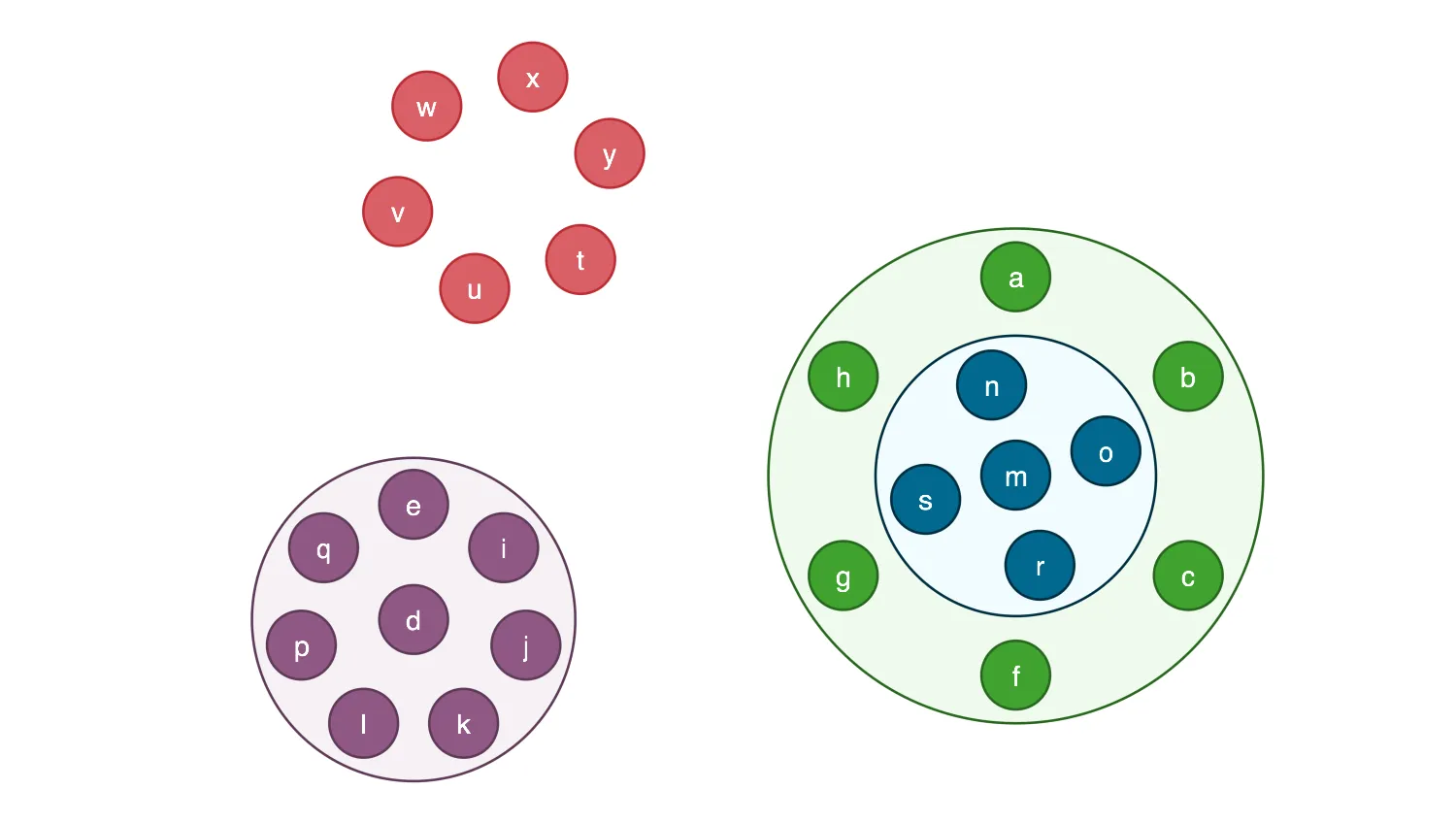
This demo lets you transfer nodes and combos by dragging. The colour-coded nodes make it easy to keep track of what moved where.
Dragging behaviour
With the default demo settings:
- Start by dragging nodes from a combo to the chart and from the chart to a combo.
- Now try dragging nodes from one combo to another, including to and from the nested combo.
- An easy way to create a new combo (from nodes that don't already belong to one) is by dragging and dropping one node onto another.
- Drag and drop a combo onto a node or other combo. You might find it easier to close the combo first by double-clicking on it. The combo you dragged becomes a nested combo.
The kind of dragging support you give to users depends on your data. If each combo contains fixed data, such as country of origin, you may not want to allow dragging between them. Turn off the Allow transfer between comboscheckbox to see this behaviour.
Arranging and resizing
Use the Allow manual arrangement of items checkbox to position dragged items exactly where you want them:See also Documentation: Combos and Combos ConceptsDemos: Combo Options and Combining Nodes
- With the checkbox turned off, every time you transfer an item into a combo, the items are rearranged in a circular pattern.The combo also resizes to accommodate changes.
- With the checkbox turned on, you can position the items yourself.Select the combo to reveal drag handles for resizing. If the combos look untidy once you've finished making manual changes, use the Arrange items and Resize combosbuttons to make improvements automatically.
Key functions used:
import KeyLines from "keylines";
import data, {
  selectionColour,
  nodeColours,
  nodeBorders,
  ocColours,
  acceptOcColours,
  plusGlyph,
  createGlyph,
} from "./data.js";

let chart;
let mode;
let propsToReset = [];
let isCombining = false;

const arrangeCheckbox = document.getElementById("arrange");
const transferCheckbox = document.getElementById("transfer");
const resizeButton = document.getElementById("resize");
const arrangeItemsButton = document.getElementById("arrangeItems");
const arrangeButtons = Array.from(document.querySelectorAll("#rhsForm .btn"));
const arrangeTextElement = document.getElementById("arrangeText");

function isCombo(id) {
  return chart.combo().isCombo(id);
}

function getComboNodeItem(id) {
  const item = chart.getItem(id);
  if (item && item.type === "node") {
    if (isCombo(id)) {
      return item;
    }
    const comboId = item.parentId;
    if (comboId) {
      return chart.getItem(comboId);
    }
  }
  return null;
}

function getAllComboNodes() {
  const comboIdSet = new Set();
  chart.each({ type: "node", items: "all" }, (node) => {
    if (isCombo(node.id)) {
      comboIdSet.add(node.id);
    }
  });
  return comboIdSet;
}

function arrangeAllCombos(options) {
  chart.combo().arrange(Array.from(getAllComboNodes()), options);
}

function handleResizeCombos() {
  arrangeAllCombos({ name: "none" });
}

function handleRespositionCombos() {
  arrangeAllCombos({ resize: false, name: "concentric" });
}

function handleDragStart({ setDragOptions, preventDefault }) {
  if (isCombining) {
    preventDefault();
    return;
  }
  // Allow combo contents to be dragged separately from the top level combo
  setDragOptions({ dragCombos: false });
  propsToReset = [];
}

// Darken the colour of the combo to indicate that if the drag ended here
// the node(s) being dragged would transfer into it
function styleOverCombo(combo) {
  const { id, c } = combo;
  propsToReset.push({
    id,
    oc: { c: ocColours[nodeColours.indexOf(c)] },
  });
  chart.setProperties({
    id,
    oc: { c: acceptOcColours[nodeColours.indexOf(c)] },
  });
}

// Add a + glyph to the node to indicate that if the drag ended here
// a combo would be created containing this node and the node(s) being dragged
function addGlyphToNode(id) {
  propsToReset.push({ id, g: [] });
  chart.setProperties({ id, g: [plusGlyph] });
}

function handleDragOver({ id }) {
  // Clear previous styling
  chart.setProperties(propsToReset);

  // Apply styling to indicate the result of ending the drag here
  if (id !== null) {
    const currentTargetCombo = getComboNodeItem(id);
    if (currentTargetCombo === null) {
      // We're over a node, meaning that if the drag ends here we can create a combo
      addGlyphToNode(id);
    } else {
      // We're over a combo, meaning that if the drag ends here we can transfer into it
      styleOverCombo(currentTargetCombo);
    }
  }
}

async function makeNewCombo(idsToCombine, idBeingDragged) {
  const item = chart.getItem(idBeingDragged);
  const style = {
    c: item.c,
    e: 1.4,
    b: nodeBorders[nodeColours.indexOf(item.c)],
  };
  const openStyle = {
    c: ocColours[nodeColours.indexOf(item.c)],
    b: nodeBorders[nodeColours.indexOf(item.c)],
    bw: 2,
  };
  await chart.combo().combine(
    {
      ids: idsToCombine,
      open: true,
      style,
      glyph: createGlyph,
      openStyle,
      label: "",
    },
    {
      arrange: mode.arrange ? "none" : "concentric",
    },
  );
}

// Get an array of all the nested combos that contain a given node (starting at innermost)
function getAncestors(nodeId) {
  if (nodeId === null) return [];
  const ancestors = [];
  let ancestor = chart.getItem(nodeId).parentId;
  while (ancestor) {
    ancestors.push(ancestor);
    ancestor = chart.getItem(ancestor).parentId;
  }
  return ancestors;
}

function getNodesToTransfer(nodeIds, idToTransferInto) {
  // Exclude nodes from being transferred
  // if a combo that contains them is being transferred
  // or they are already in the combo being transferred into
  return nodeIds.filter((nodeId) => {
    return (
      !getAncestors(nodeId).some((id) => nodeIds.includes(id)) &&
      (chart.getItem(nodeId).parentId ?? null) !== idToTransferInto
    );
  });
}

async function handleDragEnd({ id, dragIds, type, preventDefault }) {
  chart.setProperties(propsToReset);
  if (type === "node") {
    // Check the type it has been dragged onto is the chart background (null) or a node
    const inBackground = chart.getItem(id) === null;
    const isNode = chart.getItem(id)?.type === "node";
    if (inBackground || isNode) {
      // Set a flag to prevent another drag starting while async combo functions are running
      isCombining = true;

      const transferOptions = {
        arrange: mode.arrange ? "none" : "concentric",
        resize: !mode.arrange,
      };

      const currentTargetCombo = getComboNodeItem(id);
      if (currentTargetCombo === null && !inBackground) {
        // Create a new combo
        const idsToCombine = [id, ...dragIds];
        // Ensure all the items being combined are at the top level
        await chart.combo().transfer(idsToCombine, null, transferOptions);
        await makeNewCombo(idsToCombine, id);
      } else {
        const currentTargetComboId = currentTargetCombo
          ? currentTargetCombo.id
          : null;
        const nodesToTransfer = getNodesToTransfer(
          dragIds,
          currentTargetComboId,
        );
        // Check there is at least one item to transfer
        if (nodesToTransfer.length > 0) {
          await chart.combo().open(currentTargetComboId);
          await chart
            .combo()
            .transfer(nodesToTransfer, currentTargetComboId, transferOptions);
        }
      }
      // Clear the flag, as it is now safe for another drag to start
      isCombining = false;
    }
    if (!mode.arrange) {
      preventDefault();
    }
  }
}

function setMode() {
  arrangeCheckbox.disabled = !transferCheckbox.checked;
  arrangeCheckbox.checked = arrangeCheckbox.checked && transferCheckbox.checked;
  arrangeTextElement.style.color = transferCheckbox.checked ? "" : "silver";

  mode = {
    arrange: arrangeCheckbox.checked,
    transfer: transferCheckbox.checked,
  };

  removeTransferDragEvents();
  if (mode.transfer) {
    addTransferDragEvents();
  }

  arrangeButtons.forEach((btn) => {
    btn.disabled = !mode.arrange;
  });

  // update whether open combos have resize handles on selection
  const updateRe = Array.from(getAllComboNodes()).map((id) => ({
    id,
    oc: { re: mode.arrange },
  }));
  chart.setProperties(updateRe);
}

function addTransferDragEvents() {
  chart.on("drag-start", handleDragStart);
  chart.on("drag-over", handleDragOver);
  chart.on("drag-end", handleDragEnd);
}

function removeTransferDragEvents() {
  chart.off("drag-start", handleDragStart);
  chart.off("drag-over", handleDragOver);
  chart.off("drag-end", handleDragEnd);
}

function initialiseEvents() {
  addTransferDragEvents();

  arrangeCheckbox.addEventListener("change", setMode);
  transferCheckbox.addEventListener("change", setMode);
  resizeButton.addEventListener("click", handleResizeCombos);
  arrangeItemsButton.addEventListener("click", handleRespositionCombos);
}

async function startKeyLines() {
  const options = {
    logo: { u: "/public/images/Logo.png" },
    selectedNode: {
      b: selectionColour,
      bw: 4,
      oc: {
        b: selectionColour,
        bw: 4,
      },
    },
    handMode: true,
  };

  chart = await KeyLines.create({ container: "klchart", options });
  chart.load(data);
  chart.zoom("fit");

  setMode();
  initialiseEvents();
}

window.addEventListener("DOMContentLoaded", startKeyLines);const data = {
type: "LinkChart",
items: [
{
type: "node",
c: "#3fa331",
id: "a",
x: -113.81707343325651,
y: -222.8009140335388,
t: "a",
fc: "white",
fbc: "rgba(0,0,0,0)",
fs: 22,
bw: 2,
b: "#28671f",
parentId: "_combo_7",
},
{
type: "node",
c: "#3fa331",
id: "b",
x: 23.014940364684776,
y: -143.8009140335388,
t: "b",
fc: "white",
fbc: "rgba(0,0,0,0)",
fs: 22,
bw: 2,
b: "#28671f",
parentId: "_combo_7",
},
{
type: "node",
c: "#3fa331",
id: "c",
x: 23.014940364684804,
y: 14.199085966461169,
t: "c",
fc: "white",
fbc: "rgba(0,0,0,0)",
fs: 22,
bw: 2,
b: "#28671f",
parentId: "_combo_7",
},
{
type: "node",
c: "#905885",
id: "d",
x: -591.4117467583621,
y: 49.10718128128315,
t: "d",
fc: "white",
fbc: "rgba(0,0,0,0)",
fs: 22,
bw: 2,
b: "#5f3a58",
parentId: "_combo_3",
},
{
type: "node",
c: "#905885",
id: "e",
x: -591.4117467583621,
y: -42.247756053464784,
t: "e",
fc: "white",
fbc: "rgba(0,0,0,0)",
fs: 22,
bw: 2,
b: "#5f3a58",
parentId: "_combo_3",
},
{
type: "node",
c: "#3fa331",
id: "f",
x: -113.81707343325655,
y: 93.19908596646123,
t: "f",
fc: "white",
fbc: "rgba(0,0,0,0)",
fs: 22,
bw: 2,
b: "#28671f",
parentId: "_combo_7",
},
{
type: "node",
c: "#3fa331",
id: "g",
x: -250.6490872311978,
y: 14.199085966461283,
t: "g",
fc: "white",
fbc: "rgba(0,0,0,0)",
fs: 22,
bw: 2,
b: "#28671f",
parentId: "_combo_7",
},
{
type: "node",
c: "#3fa331",
id: "h",
x: -250.64908723119788,
y: -143.80091403353867,
t: "h",
fc: "white",
fbc: "rgba(0,0,0,0)",
fs: 22,
bw: 2,
b: "#28671f",
parentId: "_combo_7",
},
{
type: "node",
c: "#905885",
id: "i",
x: -519.9875806711622,
y: -7.851690496375852,
t: "i",
fc: "white",
fbc: "rgba(0,0,0,0)",
fs: 22,
bw: 2,
b: "#5f3a58",
parentId: "_combo_3",
},
{
type: "node",
c: "#905885",
id: "j",
x: -502.34726843509503,
y: 69.43556725853186,
t: "j",
fc: "white",
fbc: "rgba(0,0,0,0)",
fs: 22,
bw: 2,
b: "#5f3a58",
parentId: "_combo_3",
},
{
type: "node",
c: "#905885",
id: "k",
x: -551.7743249607115,
y: 131.41513574906745,
t: "k",
fc: "white",
fbc: "rgba(0,0,0,0)",
fs: 22,
bw: 2,
b: "#5f3a58",
parentId: "_combo_3",
},
{
type: "node",
c: "#905885",
id: "l",
x: -631.0491685560128,
y: 131.41513574906742,
t: "l",
fc: "white",
fbc: "rgba(0,0,0,0)",
fs: 22,
bw: 2,
b: "#5f3a58",
parentId: "_combo_3",
},
{
type: "node",
c: "#00698f",
id: "m",
x: -113.81707343325652,
y: -65.43128624719101,
t: "m",
fc: "white",
fbc: "rgba(0,0,0,0)",
fs: 22,
bw: 2,
b: "#002f41",
parentId: "_combo_1",
},
{
type: "node",
c: "#00698f",
id: "n",
x: -132.96968277084306,
y: -136.90979739258205,
t: "n",
fc: "white",
fbc: "rgba(0,0,0,0)",
fs: 22,
bw: 2,
b: "#002f41",
parentId: "_combo_1",
},
{
type: "node",
c: "#00698f",
id: "o",
x: -42.33856228786547,
y: -84.58389558477752,
t: "o",
fc: "white",
fbc: "rgba(0,0,0,0)",
fs: 22,
bw: 2,
b: "#002f41",
parentId: "_combo_1",
},
{
type: "node",
c: "#905885",
id: "p",
x: -680.4762250816293,
y: 69.43556725853172,
t: "p",
fc: "white",
fbc: "rgba(0,0,0,0)",
fs: 22,
bw: 2,
b: "#5f3a58",
parentId: "_combo_3",
},
{
type: "node",
c: "#905885",
id: "q",
x: -662.835912845562,
y: -7.851690496375944,
t: "q",
fc: "white",
fbc: "rgba(0,0,0,0)",
fs: 22,
bw: 2,
b: "#5f3a58",
parentId: "_combo_3",
},
{
type: "node",
c: "#00698f",
id: "r",
x: -94.66446409567004,
y: 6.0472248982000565,
t: "r",
fc: "white",
fbc: "rgba(0,0,0,0)",
fs: 22,
bw: 2,
b: "#002f41",
parentId: "_combo_1",
},
{
type: "node",
c: "#00698f",
id: "s",
x: -185.2955845786476,
y: -46.27867690960452,
t: "s",
fc: "white",
fbc: "rgba(0,0,0,0)",
fs: 22,
bw: 2,
b: "#002f41",
parentId: "_combo_1",
},
{
type: "node",
c: "#d95f66",
id: "t",
x: -458.9314615429433,
y: -236.45013339727885,
t: "t",
fc: "white",
fbc: "rgba(0,0,0,0)",
fs: 22,
bw: 2,
b: "#bd2d35",
},
{
type: "node",
c: "#d95f66",
id: "u",
x: -542.9670841378348,
y: -213.55183789937698,
t: "u",
fc: "white",
fbc: "rgba(0,0,0,0)",
fs: 22,
bw: 2,
b: "#bd2d35",
},
{
type: "node",
c: "#d95f66",
id: "v",
x: -604.0700221860415,
y: -274.5238580340921,
t: "v",
fc: "white",
fbc: "rgba(0,0,0,0)",
fs: 22,
bw: 2,
b: "#bd2d35",
},
{
type: "node",
c: "#d95f66",
id: "w",
x: -580.9128603196883,
y: -358.24757278912716,
t: "w",
fc: "white",
fbc: "rgba(0,0,0,0)",
fs: 22,
bw: 2,
b: "#bd2d35",
},
{
type: "node",
c: "#d95f66",
id: "x",
x: -496.8664741183195,
y: -381.3075260290679,
t: "x",
fc: "white",
fbc: "rgba(0,0,0,0)",
fs: 22,
bw: 2,
b: "#bd2d35",
},
{
type: "node",
c: "#d95f66",
id: "y",
x: -435.8729042754569,
y: -320.6703115097571,
t: "y",
fc: "white",
fbc: "rgba(0,0,0,0)",
fs: 22,
bw: 2,
b: "#bd2d35",
},
],
combos: {
_combo_1: {
type: "node",
c: "#00698f",
id: "_combo_1",
x: -113.81707343325652,
y: -64.80091403353877,
hi: false,
bg: false,
g: [
{
p: "ne",
c: "#ffa845",
t: "5",
b: null,
},
],
oc: {
b: "#002f41",
bw: 2,
c: "#f1fbff",
bs: "solid",
re: false,
w: 222,
h: 222,
la: "concentric",
},
b: "#002f41",
e: 1.4,
parentId: "_combo_7",
_combo: {
nodeIds: ["m", "n", "o", "r", "s"],
linkIds: [],
open: true,
comboScale: 1,
g: "ne",
e: 1,
},
_offsets: [
{
x: 59.99999999999994,
y: 120.00000000000004,
},
{
x: 60,
y: -30.000000000000014,
},
{
x: 60,
y: -179.99999999999994,
},
{
x: -90,
y: 119.99999999999999,
},
{
x: -90.00000000000006,
y: -30.000000000000014,
},
],
},
_combo_3: {
type: "node",
c: "#905885",
id: "_combo_3",
x: -591.4117467583621,
y: 49.10718128128315,
hi: false,
bg: false,
g: [
{
p: "ne",
c: "#ffa845",
t: "8",
b: null,
},
],
oc: {
b: "#5f3a58",
bw: 2,
c: "#f6f1f5",
bs: "solid",
re: false,
w: 256,
h: 256,
la: "concentric",
},
b: "#5f3a58",
e: 1.4,
_combo: {
nodeIds: ["d", "e", "i", "j", "k", "l", "p", "q"],
linkIds: [],
open: true,
comboScale: 1,
g: "ne",
e: 1,
},
_offsets: [
{
x: 225.36158581269927,
y: -149.63841418730075,
},
{
x: 225.36158581269927,
y: -299.63841418730067,
},
{
x: 75.36158581269933,
y: -149.6384141873007,
},
{
x: 74.78304851238045,
y: -300.21695148761955,
},
{
x: -75.21695148761961,
y: 299.78304851238045,
},
{
x: -75.21695148761961,
y: 149.78304851238036,
},
{
x: -225.2169514876196,
y: 299.78304851238045,
},
{
x: -225.21695148761955,
y: 149.78304851238042,
},
],
},
_combo_7: {
type: "node",
c: "#3fa331",
id: "_combo_7",
x: -113.81707343325652,
y: -64.80091403353877,
hi: false,
bg: false,
g: [
{
p: "ne",
c: "#ffa845",
t: "11",
b: null,
},
],
oc: {
b: "#28671f",
bw: 2,
c: "#effaed",
bs: "solid",
re: false,
w: 392,
h: 392,
la: "concentric",
},
b: "#28671f",
e: 1.4,
_combo: {
nodeIds: ["a", "b", "c", "f", "g", "h", "_combo_1"],
linkIds: [],
open: true,
comboScale: 1,
g: "ne",
e: 1,
},
_offsets: [
{
x: 115.79693390004553,
y: 188.65407675718848,
},
{
x: 115.79693390004553,
y: 38.654076757188406,
},
{
x: 115.79693390004553,
y: -111.34592324281157,
},
{
x: -34.20306609995441,
y: 188.65407675718848,
},
{
x: -34.20306609995441,
y: 38.654076757188406,
},
{
x: -34.20306609995447,
y: -111.34592324281162,
},
{
x: -244.7816034002733,
y: -231.92446054313046,
},
],
},
nodes: [],
links: [],
},
reveal: [],
viewSettings: {
width: 1551,
height: 1132,
zoom: 1,
offsetX: 1515.1144065856934,
offsetY: 979.1001720428467,
},
};
export default data;
export const selectionColour = "#ffa845";
export const nodeColours = ["#3fa331", "#00698f", "#905885", "#d95f66"];
export const nodeBorders = ["#28671f", "#002f41", "#5f3a58", "#bd2d35"];
export const ocColours = ["#effaed", "#f1fbff", "#f6f1f5", "#fbeeee"];
export const acceptOcColours = ["#aae3a2", "#7bdcff", "#d1b4cb", "#e89ea3"];
export const plusGlyph = {
p: "nw",
t: "+",
c: selectionColour,
e: 2,
b: null,
};
export const createGlyph = {
p: "ne",
c: selectionColour,
t: 8,
b: null,
};<!doctype html>
<html lang="en" style="background-color: #2d383f">
<head>
<meta charset="utf-8" />
<title>Combo Dragging</title>
<link rel="stylesheet" type="text/css" href="@ci/theme/kl/css/keylines.css" />
<link rel="stylesheet" type="text/css" href="@ci/theme/kl/css/minimalsdk.css" />
<link rel="stylesheet" type="text/css" href="@ci/theme/kl/css/sdk-layout.css" />
<link rel="stylesheet" type="text/css" href="@ci/theme/kl/css/demo.css" />
</head>
<body>
<div id="klchart" class="klchart"></div>
<script type="module" src="./code.js"></script>
</body>
</html>