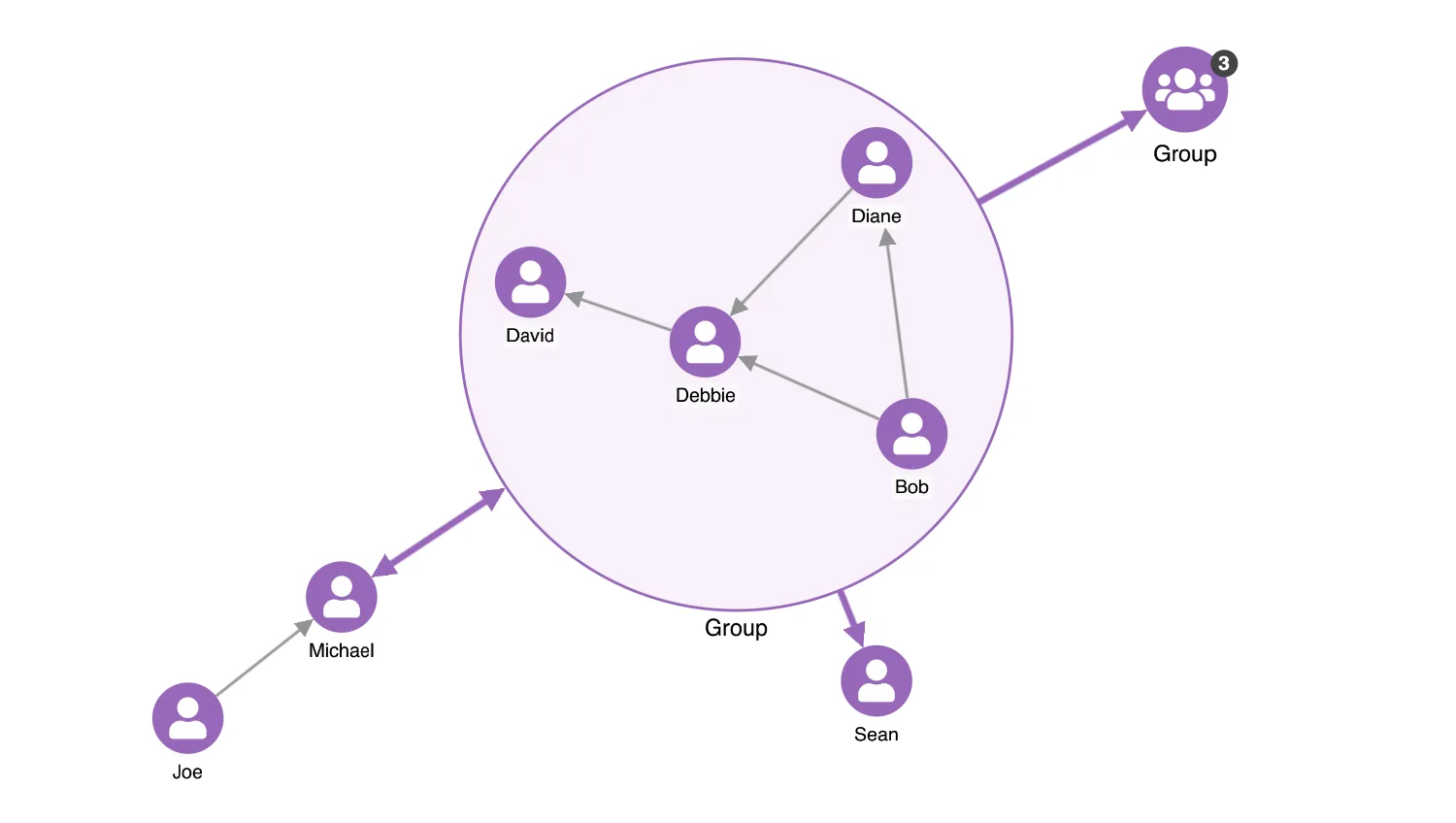
Complex, data-heavy visualisations can make it difficult to see underlying patterns.
Combos in KeyLines put multiple nodes into a combined node without affecting the links between them, which can help you simplify charts and spot partnerships such as members of the same gang or a terrorist group.
Open and closed state
In closed combos, items are hidden and their number is summarized by a default counter glyph.
Open combos show the items within a combo border. You can enable the counter glyph on open combos by setting comboGlyphOnOpen to true.
Nested combos
Nested combos are combos created inside other combos. There’s no limit to the number of nested levels, and you can uncombine them in sequence.
Combo options
The shape property controls the shape of all open combos in the chart. It can be set to 'circle' (default) or 'rectangle'.
There are several ways how nodes inside open combos can be arranged. Choosing the 'grid' option, which is default for rectangular combos, also lets you control the row or column dimension of open combos with the gridShape option. Any arrangement can be made tighter or looser using the tightness option.
See also
Documentation: Combos and Combos Concepts
Demos: Combining Nodes and Combo Dragging
Key functions used:
import KeyLines from "keylines";
import { data } from "./data.js";

let chart;
const purple = "#9767ba";
const validArrangeOptions = {
  sequential: ["tightness", "stretch", "orientation"],
  lens: ["tightness"],
  concentric: ["tightness"],
  grid: ["tightness", "gridShape"],
};

function enableButton(el, enabled) {
  const button = typeof el === "string" ? document.getElementById(el) : el;
  if (enabled) {
    button.classList.remove("disabled");
    button.removeAttribute("disabled");
  } else {
    button.classList.add("disabled");
    button.setAttribute("disabled", "");
  }
}

function isComboNode(id) {
  return chart.combo().isCombo(id, { type: "node" });
}

function isTopLevel(id) {
  return chart.combo().find(id) === null;
}

function isTopLevelComboNodeSelected() {
  return chart.selection().some((id) => isComboNode(id) && isTopLevel(id));
}

function selectedNodes() {
  return chart.selection().filter((id) => chart.getItem(id).type === "node");
}

function selectedTopLevelNodes() {
  return selectedNodes().filter(isTopLevel);
}

function multipleNodesSelected() {
  return selectedTopLevelNodes().length > 1;
}

function getArrange() {
  const arrange = {
    tightness: getSliderValue("tightness"),
    name: getRadioButtonValue("arrange"),
  };

  if (arrange.name === "grid") {
    const gridShape = getRadioButtonValue("gridShape");
    if (gridShape === "row") {
      arrange.gridShape = { rows: 1 };
    } else if (gridShape === "col") {
      arrange.gridShape = { columns: 1 };
    }
  }

  if (arrange.name === "sequential") {
    arrange.orientation = getRadioButtonValue("orientation");
    arrange.stretch = getSliderValue("stretch");
  }

  return arrange;
}

// generate a list of all combos ordered by how deeply nested they are
function getComboList() {
  const comboIds = [];
  chart.each({ type: "node", items: "all" }, ({ id }) => {
    if (chart.combo().isCombo(id)) {
      comboIds.push(id);
    }
  });
  return comboIds;
}

function onSelection() {
  enableButton("combine", multipleNodesSelected());
  enableButton("uncombine", isTopLevelComboNodeSelected());
}

async function combineSelected() {
  enableButton("combine", false);
  await chart.combo().combine(
    {
      ids: selectedTopLevelNodes(),
      label: "Group",
      open: true,
      style: {
        fi: {
          t: "fas fa-users",
          c: "white",
        },
        c: purple,
        e: 1.2,
      },
    },
    { arrange: getArrange() },
  );
}

async function uncombineSelected() {
  await chart.combo().uncombine(chart.selection(), {
    full: document.getElementById("uncombineAll").checked,
  });
}

function doLayout(opts = {}) {
  return chart.layout("organic", opts);
}

function arrangeAllCombos(opts = {}) {
  updateArrangeOptionsPanel();
  return chart
    .combo()
    .arrange(getComboList(), Object.assign(getArrange(), opts));
}

function updateArrangeOptionsPanel() {
  const validOptions = validArrangeOptions[getArrange().name] ?? [];

  // gather up all the unique arrange options
  const arrangeOptions = new Set();
  document.querySelectorAll("#arrange-options .opt-container").forEach((v) => {
    arrangeOptions.add(v.getAttribute("name"));
  });

  // and filter them out based on the new arrange selected
  for (const opt of arrangeOptions) {
    setInputHidden(opt, !validOptions.includes(opt));
  }
}

async function setComboShape() {
  chart.options({ combos: { shape: getRadioButtonValue("shape") } });
  // Arrange all combos from innermost to outmost to size the new shape appropriately and
  // update the arrangement to take account of the new size of any nested combos
  await arrangeAllCombos({ animate: false });
  return doLayout({ mode: "adaptive", fit: false });
}

function getSliderValue(name) {
  const container = document.querySelector(`.opt-container[name="${name}"]`);
  return parseFloat(container.querySelector(`input[type="range"]`).value);
}

function getRadioButtonValue(name) {
  const container = document.querySelector(`.opt-container[name="${name}"]`);
  return container.querySelector(`button.active`).value;
}

function setupSlider(name, fn) {
  const container = document.querySelector(`.opt-container[name="${name}"]`);
  const input = container.querySelector('input[type="range"]');
  const label = container.querySelector(".value");

  input.addEventListener("input", () => {
    label.innerText = getSliderValue(name);
  });
  input.addEventListener("change", fn);
}

function setInputHidden(name, hidden) {
  const container = document.querySelector(`.opt-container[name="${name}"]`);
  container.style.display = hidden ? "none" : "block";
}

function setupRadioButton(name, fn) {
  const container = document.querySelector(`.opt-container[name="${name}"]`);
  const allInputs = container.querySelectorAll("button");

  allInputs.forEach((target) => {
    target.addEventListener("click", (e) => {
      allInputs.forEach((other) => {
        if (other !== target) {
          other.classList.remove("active");
        }
      });
      target.classList.add("active");
      fn(e);
    });
  });
}

function setUpEventHandlers() {
  // set up the button enabled states
  chart.on("selection-change", onSelection);

  // radio buttons
  setupRadioButton("shape", setComboShape);
  setupRadioButton("arrange", () => arrangeAllCombos());
  setupRadioButton("orientation", () => arrangeAllCombos());
  setupRadioButton("gridShape", () => arrangeAllCombos());

  // sliders
  setupSlider("tightness", () => arrangeAllCombos());
  setupSlider("stretch", () => arrangeAllCombos());

  // buttons
  document.getElementById("combine").addEventListener("click", combineSelected);
  document
    .getElementById("uncombine")
    .addEventListener("click", uncombineSelected);
  document.getElementById("layout").addEventListener("click", () => doLayout());

  // set up the initial look
  updateArrangeOptionsPanel();
  onSelection();
}

async function startKeyLines() {
  // Font Icons and images can often be poorly aligned,
  // set offsets to the icons to ensure they are centred correctly
  const imageAlignment = {};
  const imageAlignmentDefinitions = {
    "fas fa-user": { e: 0.9 },
    "fas fa-users": { e: 0.85 },
  };

  // List of icons to realign
  const icons = Object.keys(imageAlignmentDefinitions);
  icons.forEach((icon) => {
    imageAlignment[icon] = imageAlignmentDefinitions[icon];
  });

  chart = await KeyLines.create({
    container: "klchart",
    options: {
      drag: {
        links: false,
      },
      selectionColour: "#444",
      imageAlignment,
      logo: { u: "/public/images/Logo.png" },
      // Set the name of the font we want to use for icons (a font must be loaded in the browser
      // with exactly this name)
      iconFontFamily: "Font Awesome 5 Free",
      defaultStyles: {
        comboGlyph: {
          c: "#444",
          b: "rgba(0,0,0,0)",
          fc: "white",
        },
        comboLinks: {
          c: purple,
          w: 5,
        },
        openCombos: {
          c: "rgba(246,238,248,0.8)",
          bw: 2,
          b: purple,
        },
      },
    },
  });
  chart.load(data());
  // create one combo right at the start
  await chart.layout(undefined, { animate: false });
  await chart.combo().combine(
    {
      ids: ["c", "b", "a", "j"],
      label: "Group",
      open: true,
      style: {
        fi: {
          t: "fas fa-users",
          c: "white",
        },
        c: purple,
        e: 1.2,
      },
    },
    { arrange: getArrange(), animate: false },
  );
  chart.layout();
  setUpEventHandlers();
}

function loadKeyLines() {
  document.fonts.load('24px "Font Awesome 5 Free"').then(startKeyLines);
}

window.addEventListener("DOMContentLoaded", loadKeyLines);import KeyLines from "keylines";
export function data() {
var purple = "#9767ba";
var userFontIcon = { t: "fas fa-user", c: "white" };
var nodeData = {
a: { fn: "Bob", ln: "Smith" },
b: { fn: "Diane", ln: "Caliva" },
c: { fn: "Debbie", ln: "Denise" },
d: { fn: "Sean", ln: "Young" },
e: { fn: "Tim", ln: "Angulo" },
f: { fn: "Bud", ln: "Alper" },
g: { fn: "Morris", ln: "Chapnick" },
h: { fn: "Joe", ln: "Turkel" },
j: { fn: "David", ln: "Snyder" },
i: { fn: "Michael", ln: "Deeley" },
};
var linkData = [
"a-b",
"a-c",
"a-d",
"a-e",
"b-c",
"b-d",
"c-j",
"c-i",
"e-g",
"h-i",
"g-e",
"i-j",
];
var nodes = Object.keys(nodeData).map(function (id) {
var d = nodeData[id];
return {
type: "node",
id: id,
t: d.fn,
c: purple,
fi: userFontIcon,
d: d,
};
});
var links = linkData.map(function (id) {
var ends = id.split("-");
return {
type: "link",
id: id,
id1: ends[0],
id2: ends[1],
a2: true,
w: 2,
};
});
return {
type: "LinkChart",
items: nodes.concat(links),
};
}<!doctype html>
<html lang="en" style="background-color: #2d383f">
<head>
<meta charset="utf-8" />
<title>Combo Options</title>
<link rel="stylesheet" type="text/css" href="@ci/theme/kl/css/keylines.css" />
<link rel="stylesheet" type="text/css" href="@ci/theme/kl/css/minimalsdk.css" />
<link rel="stylesheet" type="text/css" href="@ci/theme/kl/css/sdk-layout.css" />
<link rel="stylesheet" type="text/css" href="@ci/theme/kl/css/demo.css" />
<link
rel="stylesheet"
type="text/css"
href="@fortawesome/[email protected]/css/fontawesome.css"
/>
<link
rel="stylesheet"
type="text/css"
href="@fortawesome/[email protected]/css/solid.css"
/>
<link rel="stylesheet" href="./style.css" />
</head>
<body>
<div id="klchart" class="klchart"></div>
<script type="module" src="./code.js"></script>
</body>
</html>table {
max-width: 100%;
background-color: transparent;
border-collapse: collapse;
border-spacing: 0;
}
.table {
width: 100%;
margin-bottom: 20px;
}
.table th,
.table td {
line-height: 20px;
text-align: left;
vertical-align: top;
}
.table td {
border-top: 1px solid #ddd;
}
.table-condensed th,
.table-condensed td {
padding: 4px 5px;
}
.table td {
padding: 6px 16px;
}
.btn-group {
display: flex;
}
.btn-group > .btn {
flex: 1;
min-width: fit-content;
}
input[type="range"] {
display: block;
}
#arrange-options legend {
font-size: 14px;
line-height: 20px;
margin-bottom: 2px;
}
#arrange-options {
margin-bottom: 10px;
gap: 10px;
display: flex;
flex-direction: column;
}