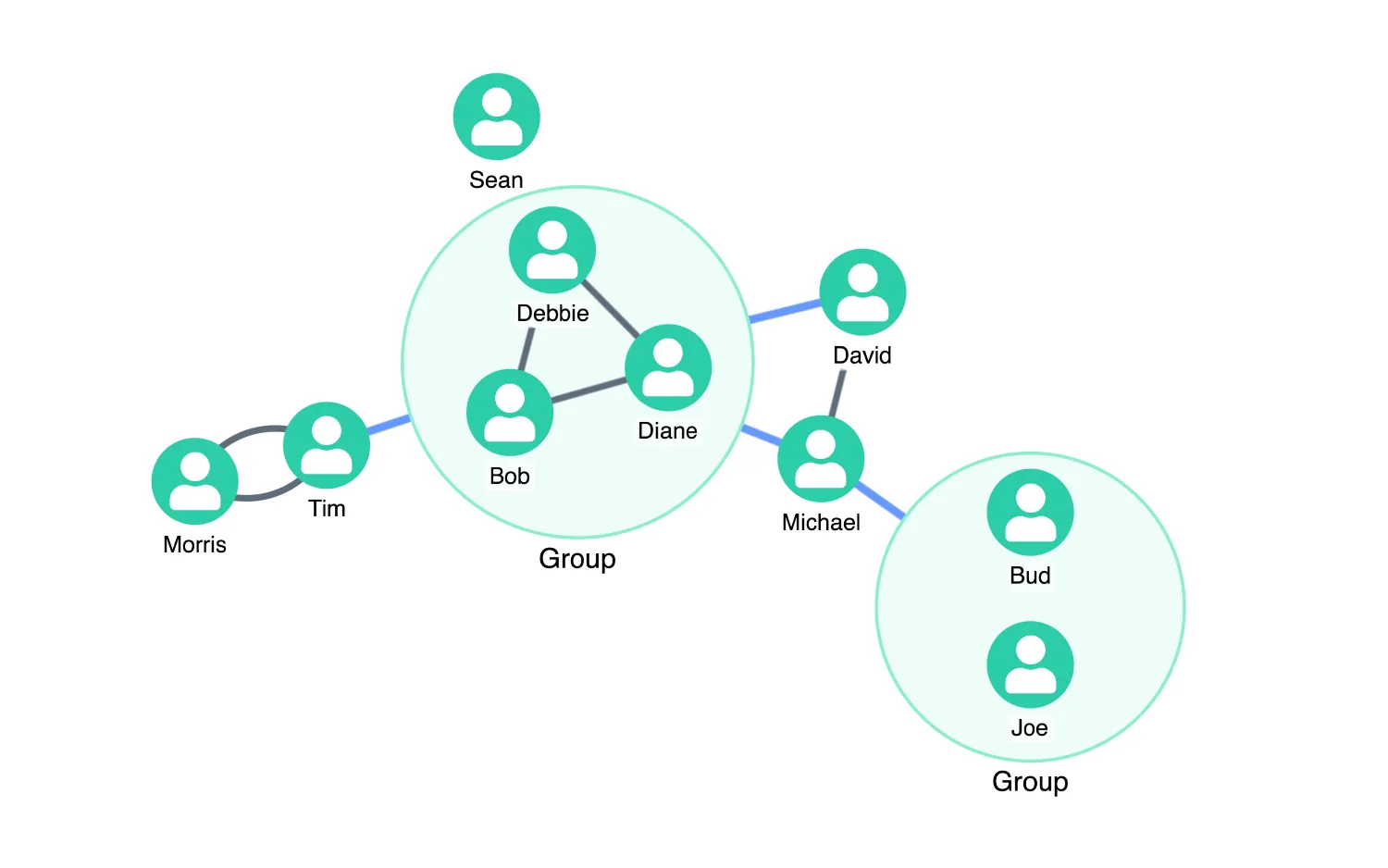
Select nodes and use the buttons above the chart to create combos.
To combine nodes, add a custom property to them. You can then pass the property key to the combine prop.
See also
import React, { useState } from "react";
import { createRoot } from "react-dom/client";

import has from "lodash/has";
import mapValues from "lodash/mapValues";
import merge from "lodash/merge";
import omit from "lodash/omit";
import { Chart } from "regraph";

import data from "./data";
import { style } from "@ci/theme/rg/js/storyStyles";

import "@fortawesome/fontawesome-free/css/fontawesome.css";
import "@fortawesome/fontawesome-free/css/solid.css";
import "@ci/theme/rg/css/layout.css";

function isLink(item) {
  return has(item, "id1");
}

function isSummaryLink(id) {
  return id.startsWith("_combolink_");
}

function ManualCombos(props) {
  const { items: originalItems } = props;
  const [state, setState] = useState({
    selection: {},
    items: originalItems,
    openCombos: {},
    combine: {
      level: 0,
      properties: [],
    },
    layout: { tightness: 8, name: "organic" },
  });

  const comboLookup = React.useRef({});
  const nextComboId = React.useRef(0);

  const lowestCombineLevelOnCombo = (combine, combo) => {
    for (let i = 0; i < combine.properties.length; i += 1) {
      const level = combine.properties[i];
      if (combo[level]) {
        return level;
      }
    }
    return undefined;
  };

  const combineNodesHandler = ({ setStyle, id, nodes, combo }) => {
    const { openCombos, combine } = state;

    // the lookup property needs to be the lowest level in the combo list
    comboLookup.current[id] = {
      nodes,
      combo,
      property: lowestCombineLevelOnCombo(combine, combo),
    };

    setStyle({
      open: !!openCombos[id],
      size: 1.2,
      color: style.combo.color,
      border: { width: 2, color: style.combo.border.color },
      arrange: "concentric",
      label: { text: "Group" },
      closedStyle: {
        color: style.primary1.color,
        border: {},
        label: [
          {
            text: "Group",
            position: "s",
          },
        ],
      },
    });
  };

  const combineLinksHandler = ({ setStyle }) => {
    setStyle({
      ...style.tertiary1,
      width: 5,
    });
  };

  const doubleClickHandler = ({ id }) => {
    // if the id is a comboId, we want to toggle its open state
    if (comboLookup.current[id]) {
      setState((current) => {
        const { combine, openCombos } = current;
        return {
          ...current,
          combine: { ...combine },
          openCombos: { ...openCombos, [id]: !openCombos[id] },
        };
      });
    }
  };

  const chartChangeHandler = (change) => {
    const { selection } = change;
    if (selection) {
      setState((current) => {
        return { ...current, selection };
      });
    }
  };

  // this function returns all the nodes that are selected directly
  // plus any nodes that are contained inside selected combos
  const underlyingSelectedNodes = () => {
    const { selection } = state;
    let underlying = {};
    Object.keys(selection).forEach((id) => {
      const nodes = comboLookup.current[id] && comboLookup.current[id].nodes;
      if (nodes) {
        underlying = { ...underlying, ...nodes };
      } else if (!isLink(id) && !isSummaryLink(id)) {
        underlying[id] = selection[id];
      }
    });
    return underlying;
  };

  const combineSelection = () => {
    const { selection, items, combine } = state;
    const { level, properties } = combine;

    // Calculate the new level of grouping.
    // If the selection contains combos, the new level needs to be higher than the
    // existing highest in the selection.
    const depths = Object.keys(selection)
      .filter((key) => comboLookup.current[key])
      .map((key) => Object.keys(selection[key]).length);

    const newLevel = depths.length > 0 ? Math.max(...depths) + 1 : 1;

    // find the nodes and add the property to their data properties
    const nodesToChange = underlyingSelectedNodes();
    // adding the same property to the nodes will cause them to combine
    nextComboId.current += 1;
    const levelName = `level${newLevel}`;
    const dataProp = { [levelName]: `combo${nextComboId.current}` };
    const withProperties = mapValues(nodesToChange, (node) => merge({}, node, { data: dataProp }));

    // 'higher' tells us if we have added a level. If we have then we'll
    // need to update the combine property too in the setState call.
    const higher = newLevel > level;

    setState((current) => {
      return {
        ...current,
        items: { ...items, ...withProperties },
        combine: {
          level: higher ? newLevel : level,
          properties: higher ? properties.concat(levelName) : properties,
        },
        layout: {
          ...current.layout,
        },
      };
    });
  };

  const uncombineSelection = () => {
    const { items, selection } = state;
    let uncombined = {};
    Object.keys(selection).forEach((id) => {
      if (comboLookup.current[id]) {
        const { nodes, property } = comboLookup.current[id];
        const newNodes = mapValues(nodes, (node) => omit(node, `data.${property}`));
        uncombined = { ...uncombined, ...newNodes };
      }
    });
    setState((current) => {
      return { ...current, items: { ...items, ...uncombined }, layout: { ...current.layout } };
    });
  };

  return (
    <div className="story">
      <div className="options">
        <button type="button" onClick={combineSelection}>
          Combine Selection
        </button>
        <button type="button" onClick={uncombineSelection}>
          Uncombine Selection
        </button>
      </div>
      <div className="chart-wrapper">
        <Chart
          items={state.items}
          selection={state.selection}
          combine={state.combine}
          layout={state.layout}
          options={{
            iconFontFamily: "Font Awesome 5 Free",
            imageAlignment: {
              "fas fa-user": { size: 0.9 },
              "fas fa-users": { size: 0.85 },
            },
            handMode: false,
            navigation: false,
            overview: false,
          }}
          animation={{ time: 600 }}
          onCombineNodes={combineNodesHandler}
          onCombineLinks={combineLinksHandler}
          onChange={chartChangeHandler}
          onDoubleClick={doubleClickHandler}
        />
      </div>
    </div>
  );
}

const FontReadyChart = React.lazy(() =>
  document.fonts.load("900 24px 'Font Awesome 5 Free'").then(() => ({
    default: () => <ManualCombos items={      } />,
  }))
);

export function Demo() {
  return (
    <React.Suspense fallback="">
      <FontReadyChart />
    </React.Suspense>
  );
}

const root = createRoot(document.getElementById("regraph"));
root.render(<Demo />);import { style } from "@ci/theme/rg/js/storyStyles";
function data() {
const userFontIcon = { text: "fas fa-user", color: "white" };
const nodeData = {
a: { fn: "Bob", ln: "Smith" },
b: { fn: "Diane", ln: "Caliva" },
c: { fn: "Debbie", ln: "Denise" },
d: { fn: "Sean", ln: "Young" },
e: { fn: "Tim", ln: "Angulo" },
f: { fn: "Bud", ln: "Alper" },
g: { fn: "Morris", ln: "Chapnick" },
h: { fn: "Joe", ln: "Turkel" },
j: { fn: "David", ln: "Snyder" },
i: { fn: "Michael", ln: "Deeley" },
};
const linkData = [
"a-b",
"a-c",
"a-d",
"a-e",
"b-c",
"b-d",
"c-j",
"c-i",
"e-g",
"h-i",
"g-e",
"i-j",
];
const items = {};
Object.keys(nodeData).forEach((id) => {
const d = nodeData[id];
items[id] = {
label: [{ text: d.fn, position: "s" }],
...style.primary1,
fontIcon: userFontIcon,
data: d,
};
});
linkData.forEach((id) => {
const ends = id.split("-");
items[id] = {
id1: ends[0],
id2: ends[1],
...style.link,
};
});
return items;
}
export default data;<!doctype html>
<html>
<body>
<div id="regraph" style="height: 100vh"></div>
<script type="module" src="./code.jsx"></script>
</body>
</html>