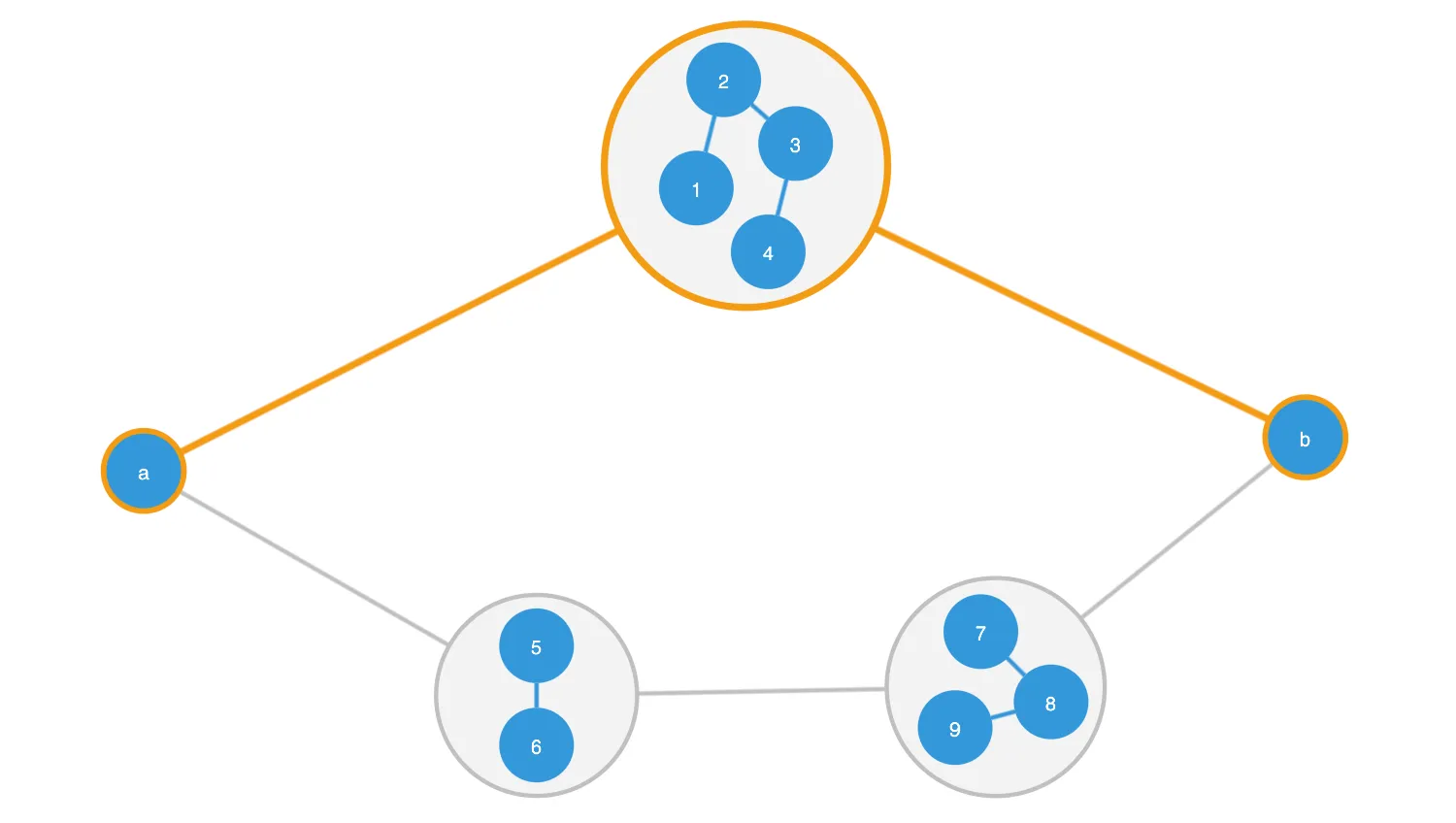
This demo illustrates how relationships between nodes are affected by combos.
Depending on whether or not you take combo nodes into account, the chart can look very different. Graph analysis can either take a top-down approach, in which nodes inside combos are ignored, or a bottom-up approach, in which combo nodes themselves are ignored in favour of the underlying nodes.
In this demo, you can select between top-down and bottom-up analysis to see how shortest path calculations are affected. The shortest path from a to b can be calculated two ways:
- Top Down a - Combo (1234) - b
- Bottom Up a - 5 - 6 - 7 - b
In KeyLines, the graph namespace takes a top-down view of the chart, so chart.graph().shortestPaths() will include the outermost combo in its calculation. In order to calculate the underlying shortest path, we have to create a separate graph engine - one which doesn't know about combos.
Various chart functions, including each, filter and foreground, include an items option which allows you to specify whether to iterate over top-level or underlying items.
For more information, see the Running graph analysis section in Combos Concepts.
Key functions used:
import KeyLines from "keylines";
import { data, combos, linkWidth, colours, openComboStyle } from "./data.js";

let chart;
let graph;
let toNode = null;
let fromNode = null;
let itemsToHighlight = [];

const pathTypeElements = document.querySelectorAll(".pathType");

function isTopLevelMode() {
  return (
    document.querySelector(".pathType.active").dataset.value === "toplevel"
  );
}

function getStyle(item, highlighted) {
  const style = { id: item.id };

  const isCombo = chart.combo().isCombo(item.id);
  if (item.type === "node") {
    if (isCombo) {
      style.oc = highlighted ? { b: colours.highlight, bw: 5 } : openComboStyle;
    } else {
      style.b = highlighted ? colours.highlight : null;
    }
  } else if (item.type === "link") {
    if (highlighted) {
      style.c = colours.highlight;
      style.w = 5;
    } else {
      style.c = isCombo ? colours.combolink : colours.link;
      style.w = linkWidth;
    }
  }
  return style;
}

/** Demo styling & highlighting * */

function updateHighlight(items) {
  // Clear styles on currently highlighted items
  const clear = itemsToHighlight.map((item) => getStyle(item, false));
  // Set styles on newly highlighted items (may override cleared styles but this is fine)
  const highlight = items.map((item) => getStyle(item, true));

  // Update chart items
  chart.setProperties(clear.concat(highlight));

  // Save the list of currently highlighted items
  itemsToHighlight = items;
}

// Check whether the node is 'visible' to the shortest path calculation
function isNodeVisible(node) {
  if (isTopLevelMode()) {
    // If we're in top mode, any nodes not inside combos are visible
    return !chart.combo().find(node.id);
  }
  // If we're in underlying node, any combos are not visible
  return !chart.combo().isCombo(node.id);
}

function clearSelection() {
  fromNode = null;
  toNode = null;
  chart.selection([]);
  updateHighlight([]);
}

/** Shortest path calculations * */

function calculateShortestPath() {
  // Only calculate the path if valid nodes are selected
  if (fromNode && toNode && isNodeVisible(fromNode) && isNodeVisible(toNode)) {
    let pathIds;
    if (isTopLevelMode()) {
      // Use the chart's model to find the shortest paths (Without looking inside combos)
      pathIds = chart.graph().shortestPaths(fromNode.id, toNode.id).items;

      // For each item in the path, get its top level parent (ie, outer combo)
      pathIds = pathIds.map((id) => chart.combo().find(id) || id);
    } else {
      // Use the graph engine to find shortest paths (ignoring combo nodes)
      pathIds = graph.shortestPaths(fromNode.id, toNode.id).items;
    }

    // Get the nodes on the path for highlighting
    const items = chart.getItem(pathIds);

    // Highlight items on the path
    updateHighlight(items);
  } else {
    clearSelection();
  }
}

function onSelectionChanged() {
  const nodes = [fromNode, toNode].filter((node) => node !== null);
  chart.selection(nodes.map((node) => node.id));
  if (nodes.length === 2) {
    calculateShortestPath();
  } else {
    updateHighlight(nodes);
  }
}

function selectNode(node) {
  // Don't re-select the node we just selected
  if (fromNode && fromNode.id === node.id) {
    return;
  }

  toNode = fromNode;
  fromNode = node;
  onSelectionChanged();
}

/** Demo Logic * */

// Update the set of revealed links
// If we're calculating underlying paths, reveal the underling links
// If we're calculating top paths, we clear the reveal with an empty array
function updateReveal() {
  const reveal = [];
  if (!isTopLevelMode()) {
    chart.each({ type: "link", items: "underlying" }, (link) => {
      reveal.push(link.id);
    });
  }
  chart.combo().reveal(reveal);
}

function getNearestVisibleNode(item) {
  if (isTopLevelMode()) {
    const parent = chart.combo().find(item.id);
    if (parent) {
      return chart.getItem(parent);
    }
  } else if (chart.combo().isCombo(item.id)) {
    return null;
  }
  if (item.type !== "node") {
    return null;
  }
  return item;
}

function handleSelect(id) {
  if (id === null) {
    // click on background - deselect all
    clearSelection();
  } else {
    const item = chart.getItem(id);
    if (item) {
      const nearest = getNearestVisibleNode(item);
      if (nearest) {
        selectNode(nearest);
      }
    }
  }
}

function setupEvents() {
  pathTypeElements.forEach((element) => {
    element.addEventListener("click", () => {
      pathTypeElements.forEach((e) => {
        e.classList.remove("active");
        e.classList.remove("btn-kl");
      });
      element.classList.add("active");
      element.classList.add("btn-kl");
      updateReveal();
      calculateShortestPath();
    });
  });

  chart.on("pointer-down", ({ id, button, preventDefault }) => {
    if (button === 0) {
      handleSelect(id);
      // Prevent KeyLines selecting the item
      preventDefault();
    }
  });

  // Prevent marquee dragging
  chart.on("drag-start", ({ preventDefault }) => preventDefault());

  // Prevent combos from being opened or closed
  chart.on("double-click", ({ preventDefault }) => preventDefault());
}

async function startKeyLines() {
  const options = {
    logo: { u: "/public/images/Logo.png" },
    selectedNode: {},
    navigation: { shown: false },
  };

  chart = await KeyLines.create({ container: "klchart", options });

  setupEvents();

  // data is defined in comboshortestpath-data.js
  graph = KeyLines.getGraphEngine();
  graph.load(data);
  chart.load(data);

  await chart
    .combo()
    .combine(combos, { select: false, animate: false, arrange: "concentric" });
  // Style combo links a little differently to normal links, using a regex-based property setter
  chart.setProperties(
    { id: "_combolink_", c: colours.combolink, w: linkWidth },
    true,
  );

  // Zoom the chart to fit
  chart.zoom("fit", { animate: false });

  // Set a nice default path
  selectNode(chart.getItem("a"));
  selectNode(chart.getItem("b"));
}

window.addEventListener("DOMContentLoaded", startKeyLines);export const data = {
type: "LinkChart",
items: [
{
type: "link",
c: "#3498db",
w: 3,
id: "a-1-1",
id1: "a",
id2: "1",
},
{
type: "link",
c: "#3498db",
w: 3,
id: "6-7",
id1: "6",
id2: "7",
},
{
type: "link",
c: "#3498db",
w: 3,
id: "1-2-1",
id1: "1",
id2: "2",
},
{
type: "link",
c: "#3498db",
w: 3,
id: "2-3-1",
id1: "2",
id2: "3",
},
{
type: "link",
c: "#3498db",
w: 3,
id: "3-4-1",
id1: "3",
id2: "4",
},
{
type: "link",
c: "#3498db",
w: 3,
id: "4-b-1",
id1: "4",
id2: "b",
},
{
type: "link",
c: "#3498db",
w: 3,
id: "5-6-1",
id1: "5",
id2: "6",
},
{
type: "link",
c: "#3498db",
w: 3,
id: "7-8-1",
id1: "7",
id2: "8",
},
{
type: "link",
c: "#3498db",
w: 3,
id: "8-9-1",
id1: "8",
id2: "9",
},
{
type: "link",
c: "#3498db",
w: 3,
id: "a-5-1",
id1: "a",
id2: "5",
},
{
type: "link",
c: "#3498db",
w: 3,
id: "b-7-1",
id1: "b",
id2: "7",
},
{
type: "node",
c: "#3498db",
fc: "white",
fbc: "rgba(0,0,0,0)",
id: "1",
t: "1",
x: 1.756659449743438,
y: -133.23040594125405,
},
{
type: "node",
c: "#3498db",
fc: "white",
fbc: "rgba(0,0,0,0)",
id: "2",
t: "2",
x: 79.75665944974341,
y: -133.23040594125405,
},
{
type: "node",
c: "#3498db",
fc: "white",
fbc: "rgba(0,0,0,0)",
id: "3",
t: "3",
x: 40.75665944974341,
y: -208.78038743644026,
},
{
type: "node",
c: "#3498db",
fc: "white",
fbc: "rgba(0,0,0,0)",
id: "4",
t: "4",
x: 40.75665944974341,
y: -57.68042444606783,
},
{
type: "node",
c: "#3498db",
fc: "white",
fbc: "rgba(0,0,0,0)",
id: "5",
t: "5",
x: -106.80220244388323,
y: 201.02017820680732,
},
{
type: "node",
c: "#3498db",
fc: "white",
fbc: "rgba(0,0,0,0)",
id: "6",
t: "6",
x: -106.80220244388323,
y: 279.0201782068073,
},
{
type: "node",
c: "#3498db",
fc: "white",
fbc: "rgba(0,0,0,0)",
id: "7",
t: "7",
x: 216.73759486344767,
y: 196.89150848552214,
},
{
type: "node",
c: "#3498db",
fc: "white",
fbc: "rgba(0,0,0,0)",
id: "8",
t: "8",
x: 259.73759486344767,
y: 271.3696932109839,
},
{
type: "node",
c: "#3498db",
fc: "white",
fbc: "rgba(0,0,0,0)",
id: "9",
t: "9",
x: 173.73759486344767,
y: 271.3696932109839,
},
{
type: "node",
c: "#3498db",
fc: "white",
fbc: "rgba(0,0,0,0)",
id: "a",
t: "a",
x: -383.6145630526956,
y: 81.7984777990385,
},
{
type: "node",
c: "#3498db",
fc: "white",
fbc: "rgba(0,0,0,0)",
id: "b",
t: "b",
x: 434.94250815926125,
y: 58.13080344215649,
},
],
};
export const combos = [
{
ids: ["1", "2", "3", "4"],
label: "",
style: {
fc: "#333",
c: "#3498db",
},
openStyle: {
bw: 3,
b: "#c0c0c0",
},
open: true,
},
{
ids: ["7", "8", "9"],
label: "",
style: {
fc: "#333",
c: "#3498db",
},
openStyle: {
bw: 3,
b: "#c0c0c0",
},
open: true,
},
{
ids: ["5", "6"],
label: "",
style: {
fc: "#333",
c: "#3498db",
},
openStyle: {
bw: 3,
b: "#c0c0c0",
},
open: true,
},
];
export const linkWidth = 3;
export const colours = {
node: "#3498db",
link: "#3498db",
combolink: "#c0c0c0",
highlight: "#f39c12",
};
export const openComboStyle = {
bw: linkWidth,
b: colours.combolink,
};<!doctype html>
<html lang="en" style="background-color: #2d383f">
<head>
<meta charset="utf-8" />
<title>Combos: Find Paths</title>
<link rel="stylesheet" type="text/css" href="@ci/theme/kl/css/keylines.css" />
<link rel="stylesheet" type="text/css" href="@ci/theme/kl/css/minimalsdk.css" />
<link rel="stylesheet" type="text/css" href="@ci/theme/kl/css/sdk-layout.css" />
<link rel="stylesheet" type="text/css" href="@ci/theme/kl/css/demo.css" />
</head>
<body>
<div id="klchart" class="klchart"></div>
<script type="module" src="./code.js"></script>
</body>
</html>