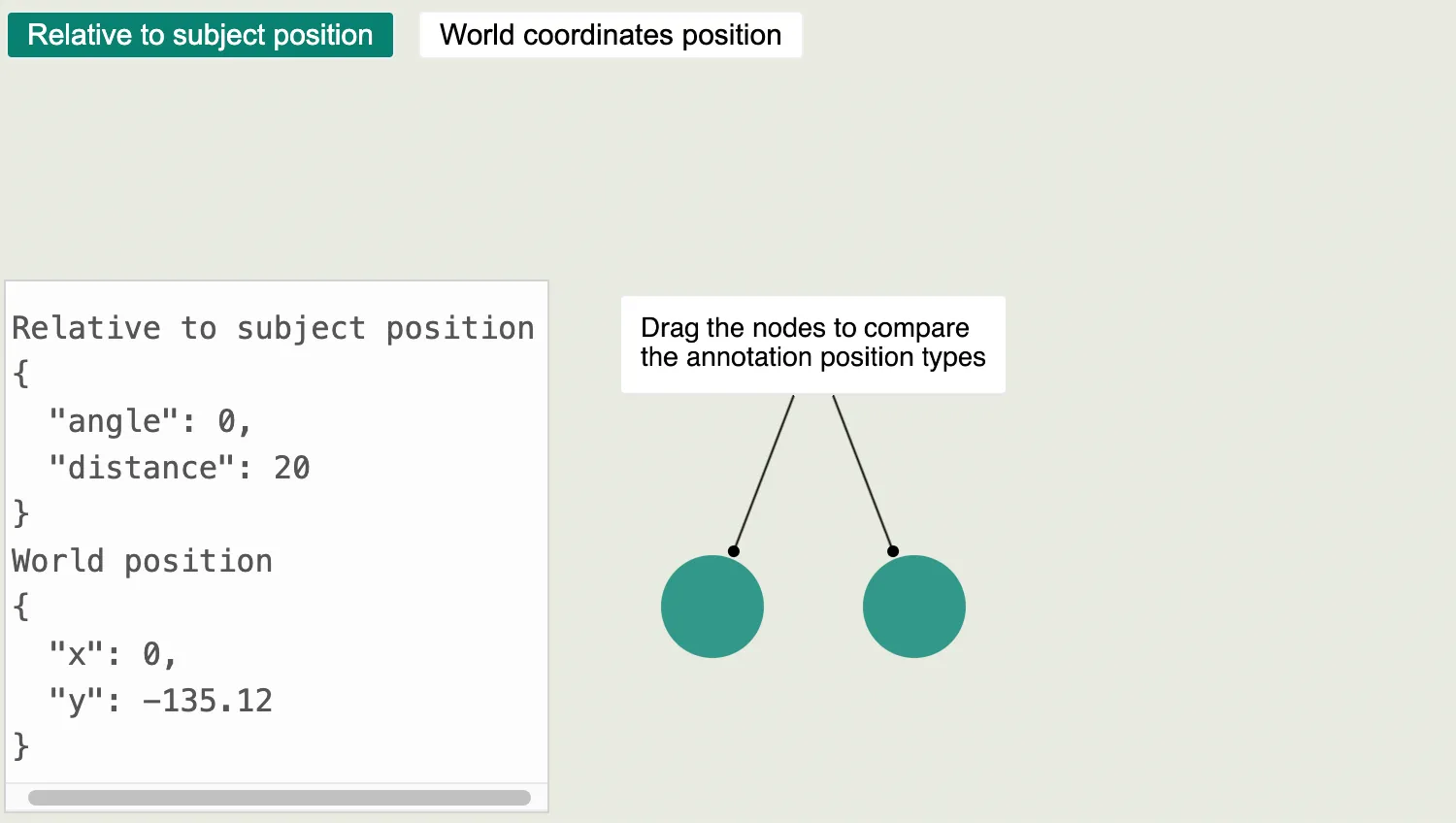
Use the buttons above the chart to switch between different positioning methods for annotations.
Annotations with subjects can be positioned relative to their subjects, and move to keep in their relative position even when the subjects move.
Alternatively, they can be positioned using world coordinates, and stay fixed in place even when the subjects move or the chart or view changes.
See also
- getRelativeAnnotationPosition Instance Method
- getWorldAnnotationPosition Instance Method
- annotationPositions Chart prop
import React, { useMemo, useRef, useState } from "react";
import { createRoot } from "react-dom/client";

import { Chart } from "regraph";

import { data } from "./data";

import "@fortawesome/fontawesome-free/css/fontawesome.css";
import "@fortawesome/fontawesome-free/css/solid.css";
import "@ci/theme/rg/css/properties.css";

const backgroundColor = "rgb(231, 234, 224)";
const layout = { name: "sequential" };

function toTwoDecimals(num) {
  return Number(num.toFixed(2));
}

export const Demo = () => <RelativeVsWorldPositioning items={data} />;

function RelativeVsWorldPositioning({ items }) {
  const [isUsingRelativePositioning, setIsUsingRelativePositioning] =
    useState(true);
  const [relativeAnnotationPosition, setRelativeAnnotationPosition] = useState({
    angle: 0,
    distance: 20,
  });
  const [worldAnnotationPosition, setWorldAnnotationPosition] = useState({
    x: 0,
    y: -135.12,
  });
  const chartRef = useRef(null);

  const formattedAnnotationPositions = useMemo(
    () => ({
      relative: {
        angle: toTwoDecimals(relativeAnnotationPosition.angle),
        distance: toTwoDecimals(relativeAnnotationPosition.distance),
      },
      world: {
        x: toTwoDecimals(worldAnnotationPosition.x),
        y: toTwoDecimals(worldAnnotationPosition.y),
      },
    }),
    [relativeAnnotationPosition, worldAnnotationPosition],
  );

  // keep the annotation position states up to date with chart interactions
  const onChange = () => {
    // annotation position helper instance methods can be used to convert between position types
    const relativePosition =
      chartRef.current.getRelativeAnnotationPosition("annotation");
    const worldPosition =
      chartRef.current.getWorldAnnotationPosition("annotation");
    setRelativeAnnotationPosition(relativePosition);
    setWorldAnnotationPosition(worldPosition);
  };

  return (
    <div className="story">
      <div className="options" style={{ backgroundColor }}>
        <button
          type="button"
          className={isUsingRelativePositioning ? "active" : ""}
          onClick={() =>
            setIsUsingRelativePositioning(!isUsingRelativePositioning)
          }
        >
          Relative to subject position
        </button>
        <button
          type="button"
          className={isUsingRelativePositioning ? "" : "active"}
          onClick={() =>
            setIsUsingRelativePositioning(!isUsingRelativePositioning)
          }
        >
          World coordinates position
        </button>
      </div>
      <div className="chart-wrapper">
        <Chart
          items={items}
          annotationPositions={{
            annotation: isUsingRelativePositioning
              ? relativeAnnotationPosition
              : worldAnnotationPosition,
          }}
          layout={layout}
          options={{
            navigation: false,
            overview: false,
            backgroundColor,
            fit: "none",
          }}
          ref={chartRef}
          onChange={onChange}
          animation={{ animate: false }}
        />
        <pre className="properties">
          {"Relative to subject position\n"}
          {JSON.stringify(formattedAnnotationPositions.relative, null, 2)}
          {"\nWorld position\n"}
          {JSON.stringify(formattedAnnotationPositions.world, null, 2)}
        </pre>
      </div>
    </div>
  );
}

const root = createRoot(document.getElementById("regraph"));
root.render(<Demo />);const nodeColor = "rgb(50, 152, 138)";
export const data = {
node1: {
color: nodeColor,
},
node2: {
color: nodeColor,
},
annotation: {
subject: ["node1", "node2"],
label: {
text: "Drag the nodes to compare the annotation position types",
},
},
};<!doctype html>
<html>
<body>
<div id="regraph" style="height: 100vh"></div>
<script type="module" src="./code.jsx"></script>
</body>
</html>