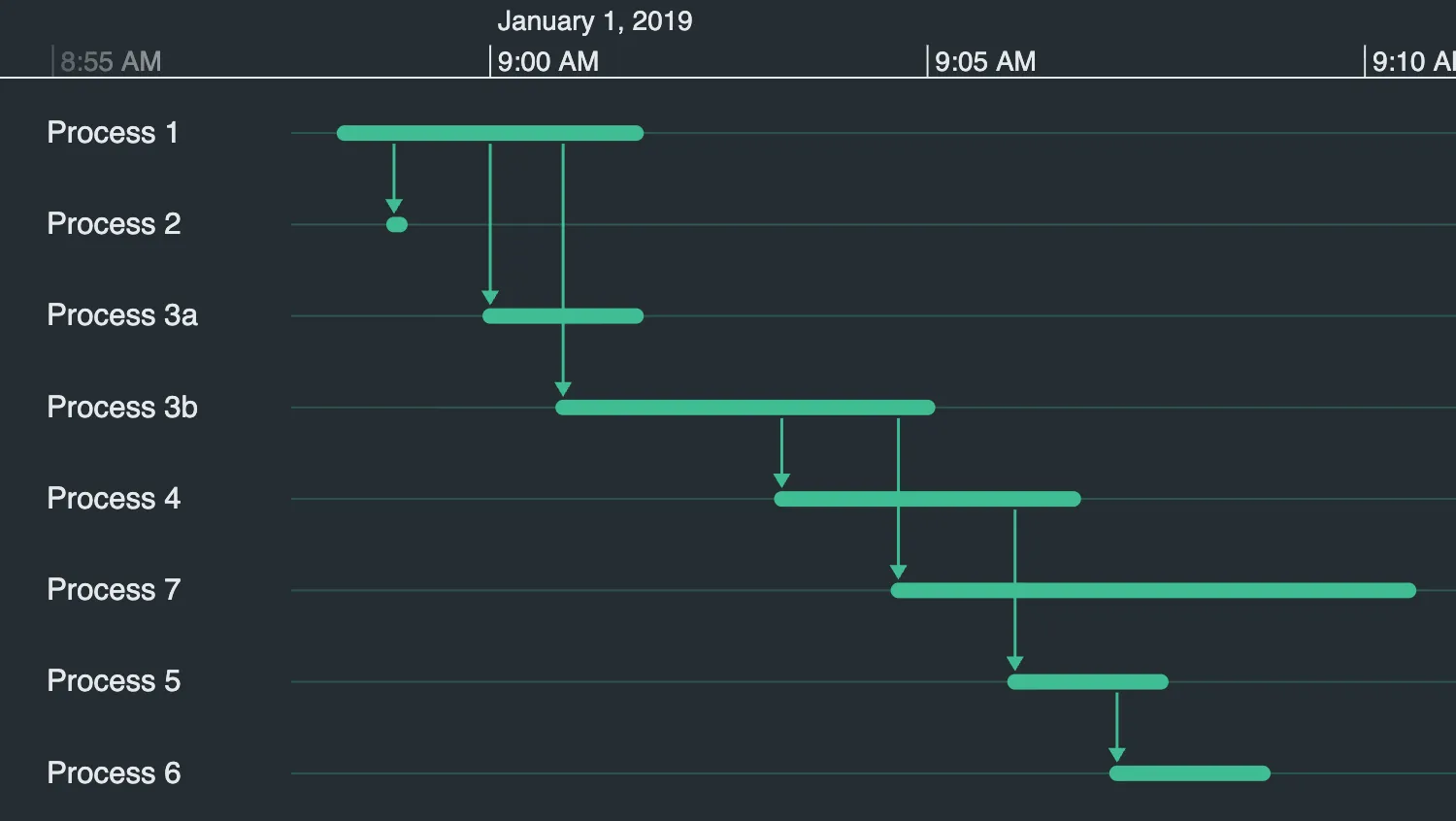
A Gantt chart displays a sequence of processes and dependencies.
To model a Gantt chart, you can use a combination of duration events to represent processes, and simple connected events to represent dependencies.
See also:
import { createTimeline } from "kronograph";
import data from "./data";

const timeline = createTimeline("my-timeline");

timeline.options({ focus: { showEventsOnNeighbors: true } });
timeline.setOrdering("firstevent");
timeline.set(data);
timeline.fit();export default {
entities: {
"Process 1": {},
"Process 3a": {},
"Process 3b": {},
"Process 2": {},
"Process 4": {},
"Process 5": {},
"Process 6": {},
"Process 7": {},
},
events: {
"Process 1-0": {
entityIds: ["Process 1"],
type: "Process",
time: {
start: Date.UTC(2019, 0, 1, 8, 58, 20),
end: Date.UTC(2019, 0, 1, 9, 1, 40),
},
},
"Process 3a-1": {
entityIds: ["Process 3a"],
type: "Process",
time: {
start: Date.UTC(2019, 0, 1, 9),
end: Date.UTC(2019, 0, 1, 9, 1, 40),
},
},
"Process 1-Process 3a-1": {
entityIds: ["Process 1", "Process 3a"],
time: Date.UTC(2019, 0, 1, 9),
},
"Process 3b-2": {
entityIds: ["Process 3b"],
type: "Process",
time: {
start: Date.UTC(2019, 0, 1, 9, 0, 50),
end: Date.UTC(2019, 0, 1, 9, 5),
},
},
"Process 1-Process 3b-2": {
entityIds: ["Process 1", "Process 3b"],
time: Date.UTC(2019, 0, 1, 9, 0, 50),
},
"Process 2-3": {
entityIds: ["Process 2"],
type: "Process",
time: {
start: Date.UTC(2019, 0, 1, 8, 58, 54),
end: Date.UTC(2019, 0, 1, 8, 58, 58),
},
},
"Process 1-Process 2-3": {
entityIds: ["Process 1", "Process 2"],
time: Date.UTC(2019, 0, 1, 8, 58, 54),
},
"Process 4-4": {
entityIds: ["Process 4"],
type: "Process",
time: {
start: Date.UTC(2019, 0, 1, 9, 3, 20),
end: Date.UTC(2019, 0, 1, 9, 6, 40),
},
},
"Process 3b-Process 4-4": {
entityIds: ["Process 3b", "Process 4"],
time: Date.UTC(2019, 0, 1, 9, 3, 20),
},
"Process 5-5": {
entityIds: ["Process 5"],
type: "Process",
time: {
start: Date.UTC(2019, 0, 1, 9, 6),
end: Date.UTC(2019, 0, 1, 9, 7, 40),
},
},
"Process 4-Process 5-5": {
entityIds: ["Process 4", "Process 5"],
time: Date.UTC(2019, 0, 1, 9, 6),
},
"Process 6-6": {
entityIds: ["Process 6"],
type: "Process",
time: {
start: Date.UTC(2019, 0, 1, 9, 7, 10),
end: Date.UTC(2019, 0, 1, 9, 8, 50),
},
},
"Process 5-Process 6-6": {
entityIds: ["Process 5", "Process 6"],
time: Date.UTC(2019, 0, 1, 9, 7, 10),
},
"Process 7-7": {
entityIds: ["Process 7"],
type: "Process",
time: {
start: Date.UTC(2019, 0, 1, 9, 4, 40),
end: Date.UTC(2019, 0, 1, 9, 10, 30),
},
},
"Process 3b-Process 7-7": {
entityIds: ["Process 3b", "Process 7"],
time: Date.UTC(2019, 0, 1, 9, 4, 40),
},
},
};<!doctype html>
<html>
<head>
<link rel="stylesheet" href="@ci/theme/kg/css/examples.css" />
</head>
<body>
<div id="my-timeline" style="height: 100vh"></div>
<script type="module" src="./code.js"></script>
</body>
</html>import React from "react";
import { createRoot } from "react-dom/client";
import Timeline from "kronograph/react/Timeline";
import data from "./data";
const options = {
focus: {
showEventsOnNeighbors: true,
},
};
export const Demo = () => (
<Timeline
entities={data.entities}
events={data.events}
eventTypes={data.eventTypes}
options={options}
ordering="firstevent"
/>
);
const root = createRoot(document.getElementById("my-timeline"));
root.render(<Demo />);export default {
entities: {
"Process 1": {},
"Process 3a": {},
"Process 3b": {},
"Process 2": {},
"Process 4": {},
"Process 5": {},
"Process 6": {},
"Process 7": {},
},
events: {
"Process 1-0": {
entityIds: ["Process 1"],
type: "Process",
time: {
start: Date.UTC(2019, 0, 1, 8, 58, 20),
end: Date.UTC(2019, 0, 1, 9, 1, 40),
},
},
"Process 3a-1": {
entityIds: ["Process 3a"],
type: "Process",
time: {
start: Date.UTC(2019, 0, 1, 9),
end: Date.UTC(2019, 0, 1, 9, 1, 40),
},
},
"Process 1-Process 3a-1": {
entityIds: ["Process 1", "Process 3a"],
time: Date.UTC(2019, 0, 1, 9),
},
"Process 3b-2": {
entityIds: ["Process 3b"],
type: "Process",
time: {
start: Date.UTC(2019, 0, 1, 9, 0, 50),
end: Date.UTC(2019, 0, 1, 9, 5),
},
},
"Process 1-Process 3b-2": {
entityIds: ["Process 1", "Process 3b"],
time: Date.UTC(2019, 0, 1, 9, 0, 50),
},
"Process 2-3": {
entityIds: ["Process 2"],
type: "Process",
time: {
start: Date.UTC(2019, 0, 1, 8, 58, 54),
end: Date.UTC(2019, 0, 1, 8, 58, 58),
},
},
"Process 1-Process 2-3": {
entityIds: ["Process 1", "Process 2"],
time: Date.UTC(2019, 0, 1, 8, 58, 54),
},
"Process 4-4": {
entityIds: ["Process 4"],
type: "Process",
time: {
start: Date.UTC(2019, 0, 1, 9, 3, 20),
end: Date.UTC(2019, 0, 1, 9, 6, 40),
},
},
"Process 3b-Process 4-4": {
entityIds: ["Process 3b", "Process 4"],
time: Date.UTC(2019, 0, 1, 9, 3, 20),
},
"Process 5-5": {
entityIds: ["Process 5"],
type: "Process",
time: {
start: Date.UTC(2019, 0, 1, 9, 6),
end: Date.UTC(2019, 0, 1, 9, 7, 40),
},
},
"Process 4-Process 5-5": {
entityIds: ["Process 4", "Process 5"],
time: Date.UTC(2019, 0, 1, 9, 6),
},
"Process 6-6": {
entityIds: ["Process 6"],
type: "Process",
time: {
start: Date.UTC(2019, 0, 1, 9, 7, 10),
end: Date.UTC(2019, 0, 1, 9, 8, 50),
},
},
"Process 5-Process 6-6": {
entityIds: ["Process 5", "Process 6"],
time: Date.UTC(2019, 0, 1, 9, 7, 10),
},
"Process 7-7": {
entityIds: ["Process 7"],
type: "Process",
time: {
start: Date.UTC(2019, 0, 1, 9, 4, 40),
end: Date.UTC(2019, 0, 1, 9, 10, 30),
},
},
"Process 3b-Process 7-7": {
entityIds: ["Process 3b", "Process 7"],
time: Date.UTC(2019, 0, 1, 9, 4, 40),
},
},
};<!doctype html>
<html>
<head>
<link rel="stylesheet" href="@ci/theme/kg/css/examples.css" />
</head>
<body>
<div id="my-timeline" style="height: 100vh"></div>
<script type="module" src="./code.jsx"></script>
</body>
</html>