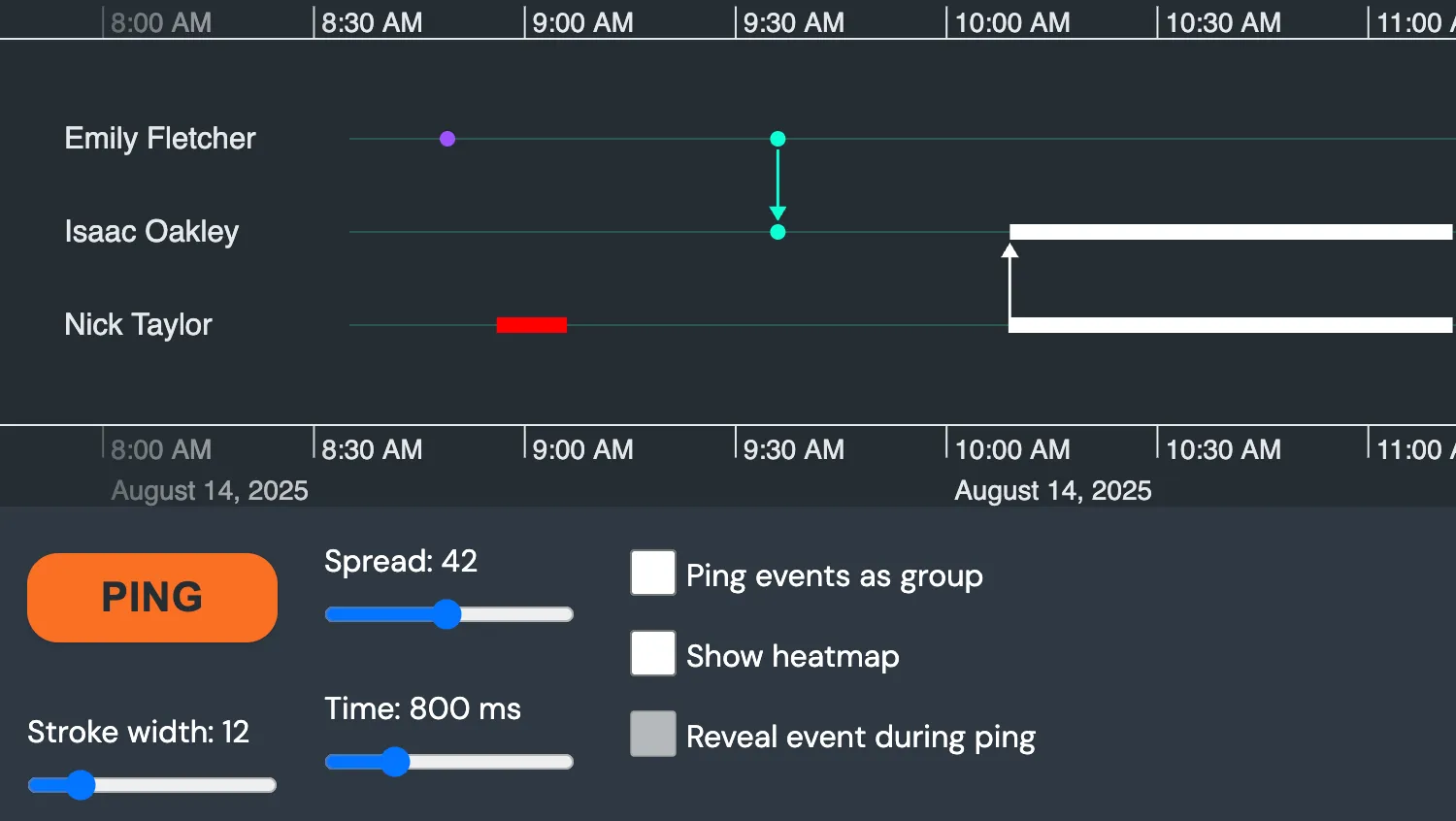
Click the button to ping the events on the timeline. Use the controls to adjust different aspects of the animation.
See also:
Click the button to ping the events on the timeline. Use the settings to adjust the animation.
See also:
import { createTimeline } from "kronograph";
import data from "./data";

let shouldReveal = false;
const eventsArr = Object.keys(data.events);
const revealEventCheckbox = document.getElementById("toggle-reveal");
const rangeSliders = document.querySelectorAll("input[type=range]");
const pingButtonEl = document.getElementById("ping");
const toggleHeatmapCheckboxEl = document.getElementById("toggle-heatmap");
const toggleRevealCheckboxEl = document.getElementById("toggle-reveal");
const toggleModeCheckboxEl = document.getElementById("toggle-mode");

// Default ping options
const pingOptions = {
  mode: "individual",
  repeat: 1,
  spread: 42,
  strokeWidth: 12,
  time: 800,
};

const pingEventColors = {
  a: "#9d52ff",
  b: "#ff0000",
  c: "#08ffd6",
  d: "#ffffff",
  grouped: "#ff8838",
};

// Setup sliders
rangeSliders.forEach((slider) => {
  const span = document.querySelector(`#${slider.id}-value`);
  slider.value = pingOptions[slider.id];
  span.textContent = slider.value;
  slider.oninput = () => {
    const sliderValue = parseInt(slider.value);
    span.textContent = sliderValue;
    pingOptions[slider.id] = sliderValue;
  };
});

function ping(event) {
  const button = event.currentTarget;
  button.disabled = true;
  const { mode, time } = pingOptions;
  if (shouldReveal) {
    timeline.reveal(eventsArr);
  }
  if (mode === "grouped") {
    timeline.ping(eventsArr, {
      ...pingOptions,
      color: pingEventColors.grouped,
    });
  } else {
    eventsArr.forEach((eventId) => {
      timeline.ping(eventId, {
        ...pingOptions,
        color: pingEventColors[eventId],
      });
    });
  }
  setTimeout(() => {
    button.disabled = false;
    if (shouldReveal) {
      timeline.reveal([]);
    }
  }, time);
}

function showHeatmap(visible) {
  timeline.options({
    events: {
      heatmapThreshold: visible ? 0 : 100,
    },
  });
  revealEventCheckbox.disabled = !visible;
}

function attachUIHandlers() {
  pingButtonEl.addEventListener("click", ping);
  toggleHeatmapCheckboxEl.addEventListener("click", (event) => {
    showHeatmap(event.target.checked);
  });
  toggleRevealCheckboxEl.addEventListener("click", () => {
    shouldReveal = !shouldReveal;
  });
  toggleModeCheckboxEl.addEventListener("click", () => {
    pingOptions.mode =
      pingOptions.mode === "individual" ? "grouped" : "individual";
  });
}

const timeline = createTimeline("my-timeline");
timeline.set(data);
timeline.range(new Date(2025, 7, 14, 8, 35), new Date(2025, 7, 14, 11, 26));
attachUIHandlers();export default {
eventTypes: {
smiley: {
fontIcon: {
fontFamily: "Font Awesome 5 Free",
fontWeight: 900,
scale: 1.8,
text: "\u{f118}",
},
},
},
entities: {
emilyfletcher82: {
label: "Emily Fletcher",
},
isaacoakley28: {
label: "Isaac Oakley",
},
nicktaylor22: {
label: "Nick Taylor",
},
},
events: {
a: {
entityIds: ["emilyfletcher82"],
time: new Date(2025, 7, 14, 8, 49),
color: "#9d52ff",
},
b: {
entityIds: ["nicktaylor22"],
time: {
start: new Date(2025, 7, 14, 8, 56),
end: new Date(2025, 7, 14, 9, 6),
},
color: "#ff0000",
},
c: {
entityIds: ["emilyfletcher82", "isaacoakley28"],
time: new Date(2025, 7, 14, 9, 36),
color: "#08ffd6",
},
d: {
entityIds: ["nicktaylor22", "isaacoakley28"],
time: {
start: new Date(2025, 7, 14, 10, 9),
end: new Date(2025, 7, 14, 11, 12),
},
color: "#ffffff",
},
},
};<!doctype html>
<html>
<head>
<link rel="stylesheet" href="@ci/theme/kg/css/examples.css" />
</head>
<body>
<div class="story">
<div class="story__timeline" id="my-timeline"></div>
<div class="story__controls story__controls--row">
<div class="stack">
<div class="story__controls__item" style="margin: 8px 0px 18px 0px">
<button class="button" id="ping" type="button">Ping</button>
</div>
<div>
<div>
<label>Stroke width:</label>
<span id="strokeWidth-value"></span>
</div>
<div class="slider-container">
<input type="range" id="strokeWidth" min="4" max="50" />
</div>
</div>
</div>
<div class="stack">
<div>
<div>
<label>Spread:</label>
<span id="spread-value"></span>
</div>
<div class="slider-container">
<input type="range" id="spread" min="6" max="80" />
</div>
</div>
<div>
<div>
<label>Time:</label>
<span id="time-value"></span><span> ms</span>
</div>
<div class="slider-container">
<input type="range" id="time" min="400" max="2000" step="50" />
</div>
</div>
</div>
<div class="stack" style="flex-grow: 1; margin-top: 6px">
<label for="toggle-mode">
<input type="checkbox" id="toggle-mode" />Ping events as group</label
>
<label for="toggle-heatmap">
<input type="checkbox" id="toggle-heatmap" />Show heatmap
</label>
<label for="toggle-reveal">
<input type="checkbox" id="toggle-reveal" disabled />Reveal event during ping
</label>
</div>
</div>
</div>
<script type="module" src="./code.js"></script>
</body>
</html>import React, { useRef, useState } from "react";
import { createRoot } from "react-dom/client";
import Timeline from "kronograph/react/Timeline";
import data from "./data";
const { entities, events } = data;
const eventsArr = Object.keys(events);
const defaultPingOptions = {
mode: "individual",
repeat: 1,
spread: 42,
strokeWidth: 12,
time: 800,
};
const pingEventColors = {
a: "#9d52ff",
b: "#ff0000",
c: "#08ffd6",
d: "#ffffff",
grouped: "#ff8838",
};
const initialTimeRange = {
start: new Date(2025, 7, 14, 8, 35),
end: new Date(2025, 7, 14, 11, 26),
};
export const Demo = () => {
const timelineRef = useRef(null);
const [pingOptions, setPingOptions] = useState(defaultPingOptions);
const [buttonDisabled, setButtonDisabled] = useState(false);
const [heatmapVisible, setHeatmapVisible] = useState(false);
const [shouldReveal, setShouldReveal] = useState(false);
const [eventsToReveal, setEventsToReveal] = useState([]);
const options = { events: { heatmapThreshold: heatmapVisible ? 0 : 100 } };
function updatePingOptions(event) {
setPingOptions({
...pingOptions,
[event.target.name]:
event.target.name !== "mode"
? Number(event.target.value)
: event.target.checked
? "grouped"
: "individual",
});
}
function processPing() {
setButtonDisabled(true);
const { mode, time } = pingOptions;
if (shouldReveal) {
setEventsToReveal(eventsArr);
}
if (mode === "grouped") {
timelineRef.current.ping(eventsArr, {
...pingOptions,
color: pingEventColors.grouped,
});
} else {
eventsArr.forEach((eventId) =>
timelineRef.current.ping(eventId, {
...pingOptions,
color: pingEventColors[eventId],
}),
);
}
setTimeout(() => {
setButtonDisabled(false);
if (shouldReveal) {
setEventsToReveal([]);
}
}, time);
}
return (
<div className="story">
<Timeline
className="story__timeline"
options={options}
entities={entities}
events={events}
range={initialTimeRange}
ref={timelineRef}
reveal={eventsToReveal}
/>
<div className="story__controls story__controls--row">
<div className="stack">
<div
className="story__controls__item"
style={{ margin: "8px 0px 18px 0px" }}
>
<button
className="button"
id="pinginstantaneous"
type="button"
onClick={processPing}
disabled={buttonDisabled}
>
Ping
</button>
</div>
<div>
<label>Stroke width: {pingOptions.strokeWidth}</label>
<div className="slider-container">
<input
name="strokeWidth"
type="range"
onInput={(event) => updatePingOptions(event)}
min="4"
max="50"
value={pingOptions.strokeWidth}
/>
</div>
</div>
</div>
<div className="stack">
<div>
<label>Spread: {pingOptions.spread}</label>
<div className="slider-container">
<input
name="spread"
type="range"
value={pingOptions.spread}
onInput={(event) => updatePingOptions(event)}
min="6"
max="80"
/>
</div>
</div>
<div>
<label>Time: {pingOptions.time} ms</label>
<div className="slider-container">
<input
name="time"
type="range"
value={pingOptions.time}
onInput={(event) => updatePingOptions(event)}
min="400"
max="2000"
step="50"
/>
</div>
</div>
</div>
<div className="stack" style={{ flexGrow: 1, marginTop: "6px" }}>
<label htmlFor="toggle-mode">
<input
type="checkbox"
id="toggle-mode"
name="mode"
onChange={(event) => updatePingOptions(event)}
/>
Ping events
</label>
<label htmlFor="toggle-heatmap">
<input
type="checkbox"
id="toggle-heatmap"
onChange={(e) => setHeatmapVisible(e.target.checked)}
/>
Show heatmap
</label>
<label htmlFor="toggle-reveal">
<input
type="checkbox"
id="toggle-reveal"
disabled={heatmapVisible}
onChange={(event) => setShouldReveal(event.target.checked)}
/>
Reveal event during ping
</label>
</div>
</div>
</div>
);
};
const root = createRoot(document.getElementById("my-timeline"));
root.render(<Demo />);export default {
eventTypes: {
smiley: {
fontIcon: {
fontFamily: "Font Awesome 5 Free",
fontWeight: 900,
scale: 1.8,
text: "\u{f118}",
},
},
},
entities: {
emilyfletcher82: {
label: "Emily Fletcher",
},
isaacoakley28: {
label: "Isaac Oakley",
},
nicktaylor22: {
label: "Nick Taylor",
},
},
events: {
a: {
entityIds: ["emilyfletcher82"],
time: new Date(2025, 7, 14, 8, 49),
color: "#9d52ff",
},
b: {
entityIds: ["nicktaylor22"],
time: {
start: new Date(2025, 7, 14, 8, 56),
end: new Date(2025, 7, 14, 9, 6),
},
color: "#ff0000",
},
c: {
entityIds: ["emilyfletcher82", "isaacoakley28"],
time: new Date(2025, 7, 14, 9, 36),
color: "#08ffd6",
},
d: {
entityIds: ["nicktaylor22", "isaacoakley28"],
time: {
start: new Date(2025, 7, 14, 10, 9),
end: new Date(2025, 7, 14, 11, 12),
},
color: "#ffffff",
},
},
};<!doctype html>
<html>
<head>
<link rel="stylesheet" href="@ci/theme/kg/css/examples.css" />
</head>
<body>
<div id="my-timeline" style="height: 100vh"></div>
<script type="module" src="./code.jsx"></script>
</body>
</html>