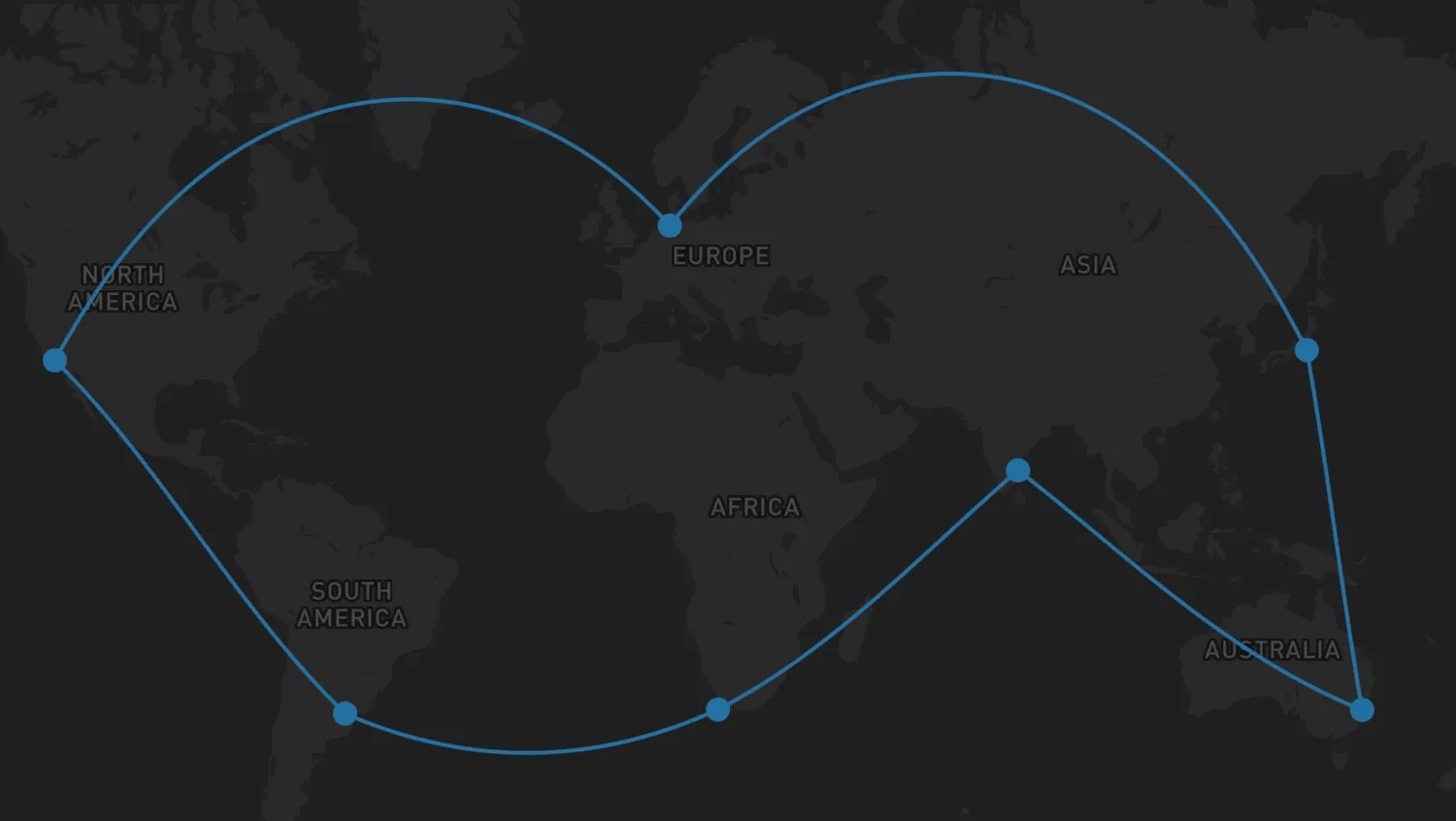
By default, links are drawn as straight lines between nodes, but it is also possible to show them as geodesic links or routes.
Use the checkboxes to explore how geodesic links and routes are displayed when the geodesic and showRoutes options are enabled.
NetworkLayerOptionsAPI- Geodesic Links docs
- Routes docs
import { MapWeave } from "mapweave/mapbox";
import { NetworkLayer } from "mapweave/layers";
import { networkData } from "./data";

let geodesicStatus = false;
let routesStatus = false;

const mapweave = new MapWeave({
  container: "mw",
  options: { accessToken: VITE_MAPBOX_API_KEY },
});
const networkLayer = new NetworkLayer({
  data: networkData,
  options: {
    links: {
      geodesic: geodesicStatus,
      showRoutes: routesStatus,
    },
  },
});
mapweave.addLayer(networkLayer);
mapweave.fitBounds({ padding: 50 });

const geodesicToggle = document.getElementById("geodesicToggle");
geodesicToggle.addEventListener("change", () => {
  if (geodesicStatus) {
    geodesicStatus = false;
  } else {
    geodesicStatus = true;
  }
  networkLayer.options({
    links: {
      geodesic: geodesicStatus,
    },
  });
});

let linkStyleReset;
const routesToggle = document.getElementById("routesToggle");
routesToggle.addEventListener("change", () => {
  if (routesStatus) {
    routesStatus = false;
    linkStyleReset();
  } else {
    routesStatus = true;
  }
  networkLayer.options({
    links: {
      showRoutes: routesStatus,
    },
  });
  if (routesStatus) {
    linkStyleReset = networkLayer.overrideStyle("Cape Town-Buenos Aires", {
      color: "orange",
      label: { visible: true },
    });
  }
});export const networkData = {
"Buenos Aires": {
type: "node",
color: "#2471a3",
latitude: -34.6,
longitude: -58.38,
},
"Cape Town": {
type: "node",
color: "#2471a3",
latitude: -33.91,
longitude: 18.45,
},
Chennai: {
type: "node",
color: "#2471a3",
latitude: 13.1021,
longitude: 80.2974,
},
Sydney: {
type: "node",
color: "#2471a3",
latitude: -33.9701,
longitude: 151.2185,
},
Tokyo: {
type: "node",
color: "#2471a3",
latitude: 35.5,
longitude: 139.8,
},
Bremerhaven: {
type: "node",
color: "#2471a3",
latitude: 53.5653,
longitude: 8.5442,
},
"Los Angeles": {
type: "node",
color: "#2471a3",
latitude: 33.75,
longitude: -118.19,
},
"Cape Town-Buenos Aires": {
type: "link",
id1: "Cape Town",
id2: "Buenos Aires",
color: "#2471a3",
label: {
text: "No route data",
backgroundColor: "orange",
color: "black",
visible: false,
},
},
"Chennai-Cape Town": {
type: "link",
id1: "Chennai",
id2: "Cape Town",
color: "#2471a3",
route: [
// === CHENNAI HARBOUR DEPARTURE ===
{ latitude: 13.1021, longitude: 80.2974 }, // Chennai Harbour Container Berth
{ latitude: 13.098, longitude: 80.315 }, // Artificial Breakwater Entrance Gates
{ latitude: 13.05, longitude: 80.35 }, // Chennai Outer Anchorage Zone
{ latitude: 11.5, longitude: 81.5 }, // Leaving the Indian East Coast
// === BAY OF BENGAL & EQUATORIAL CROSSING ===
{ latitude: 5.0, longitude: 80.5 }, // South of Sri Lanka (Dondra Head)
{ latitude: 0.0, longitude: 75.0 }, // Crossing the Equator (West of Maldives)
// === INDIAN OCEAN SOUTHWEST TRANSIT (LOW GRANULARITY) ===
{ latitude: -10.0, longitude: 65.0 }, // South Indian Ocean open basin
{ latitude: -20.0, longitude: 55.0 }, // Passing well east of Madagascar
{ latitude: -28.0, longitude: 46.0 }, // Squeezing south of Madagascar's southern shelf
// === APPROAChING SOUTH AFRICA (AGULHAS CURRENT CORRIDOR) ===
{ latitude: -33.5, longitude: 33.0 }, // Approaching the South African coast (off East London)
{ latitude: -34.5, longitude: 26.0 }, // Tracking the Agulhas Bank (off Port Elizabeth)
{ latitude: -35.2, longitude: 20.0 }, // Rounding Cape Agulhas (Southernmost tip of Africa)
{ latitude: -34.4, longitude: 18.4 }, // Rounding the Cape of Good Hope
// === CAPE TOWN HARBOUR ARRIVAL ===
{ latitude: -33.805, longitude: 18.15 }, // Sea Buoy / Entry into Table Bay
{ latitude: -33.821, longitude: 18.332 }, // Clearing Robben Island (West side)
{ latitude: -33.882, longitude: 18.421 }, // Table Bay Navigation Channel
{ latitude: -33.9032, longitude: 18.4355 }, // Harbour Entrance / Breakwater Pier
{ latitude: -33.911, longitude: 18.432 }, // Duncan Dock (Berth / Final Destination)
],
},
"Chennai-Sydney": {
type: "link",
id1: "Sydney",
id2: "Chennai",
color: "#2471a3",
route: [
// === SYDNEY HARBOUR (PORT BOTANY) DEPARTURE ===
{ latitude: -33.9701, longitude: 151.2185 }, // Port Botany Container Terminal Berth
{ latitude: -33.978, longitude: 151.225 }, // Botany Bay Dredged Channel
{ latitude: -33.995, longitude: 151.25 }, // Between Cape Banks and Inscription Point
{ latitude: -34.0, longitude: 151.3 }, // Leaving Botany Bay Approach Lanes
{ latitude: -33.85, longitude: 151.35 }, // Clearing Sydney Heads offshore
// === AUSTRALIAN EAST & NORTH COAST (LOW GRANULARITY) ===
{ latitude: -28.5, longitude: 154.0 }, // Offshore Cape Byron
{ latitude: -23.0, longitude: 154.5 }, // Coral Sea Corridor (Bypassing Great Barrier Reef)
{ latitude: -11.0, longitude: 144.0 }, // Torres Strait Entrance (Great North East Channel)
{ latitude: -10.5, longitude: 142.2 }, // Prince of Wales Channel (Torres Strait Chokepoint)
// === ARAFURA & TIMOR SEAS ===
{ latitude: -10.0, longitude: 137.0 }, // Arafura Sea Central
{ latitude: -9.0, longitude: 130.0 }, // Timor Sea (North of Darwin)
{ latitude: -8.5, longitude: 120.0 }, // Savu Sea Transit
// === INDONESIAN ARCHIPELAGO GATEWAY (LOMBOK STRAIT) ===
{ latitude: -8.75, longitude: 115.75 }, // Southern Entrance to Lombok Strait
{ latitude: -8.4, longitude: 115.7 }, // Mid-Strait Passage (Between Bali and Lombok)
{ latitude: -7.9, longitude: 115.65 }, // Java Sea Exit Corridor
// === INDIAN OCEAN NORTH-WEST TRANSIT ===
{ latitude: -5.0, longitude: 105.0 }, // South of Sunda Strait / West of Java
{ latitude: 0.0, longitude: 95.0 }, // Crossing the Equator (West of Sumatra)
{ latitude: 6.0, longitude: 88.0 }, // Entering the Bay of Bengal
// === CHENNAI HARBOUR APPROACH ===
{ latitude: 11.5, longitude: 81.5 }, // Approaching the Indian East Coast
{ latitude: 13.05, longitude: 80.35 }, // Chennai Outer Anchorage Zone
{ latitude: 13.098, longitude: 80.315 }, // Artificial Breakwater Entrance Gates
{ latitude: 13.1021, longitude: 80.2974 }, // Chennai Harbour Container Berth
],
},
"Sydney-Tokyo": {
type: "link",
id1: "Tokyo",
id2: "Sydney",
color: "#2471a3",
route: [
// === TOKYO BAY DEPARTURE ===
{ latitude: 35.618, longitude: 139.776 }, // Tokyo Port (Oi Container Wharves)
{ latitude: 35.6, longitude: 139.78 }, // Tokyo Oi Container Terminal Outer Basin
{ latitude: 35.35, longitude: 139.8 }, // Central Tokyo Bay Shipping Lane
{ latitude: 35.15, longitude: 139.75 }, // Uraga Channel (Narrow entry corridor)
{ latitude: 34.6, longitude: 139.8 }, // Nojima Saki (Leaving Tokyo Bay Traffic Scheme)
// === WESTERN PACIFIC SOUTHBOUND TRANSIT (LOW GRANULARITY) ===
{ latitude: 28.0, longitude: 141.0 }, // Passing east of the Ogasawara Islands
{ latitude: 15.0, longitude: 144.5 }, // West of Saipan / Mariana Islands
{ latitude: 5.0, longitude: 147.0 }, // Open Pacific (North of Papua New Guinea)
// === MELANESIA ISLAND PASSAGE (LAND AVOIDANCE GAPS) ===
{ latitude: -3.5, longitude: 152.5 }, // St. George's Channel (Between New Ireland & New Britain)
{ latitude: -6.0, longitude: 154.5 }, // Solomon Sea (West of Bougainville Island)
{ latitude: -11.0, longitude: 156.5 }, // Jomard Entrance / Louisiade Archipelago Gap
// === CORAL SEA & AUSTRALIAN EAST COAST TRANSIT ===
{ latitude: -16.0, longitude: 155.0 }, // Central Coral Sea (Avoiding Great Barrier Reef)
{ latitude: -23.0, longitude: 154.5 }, // Offshore Gladstone / Fraser Island, Australia
{ latitude: -28.5, longitude: 154.0 }, // Offshore Cape Byron (Australia's easternmost point)
{ latitude: -32.5, longitude: 152.5 }, // Offshore Newcastle / Port Stephens
// === SYDNEY HARBOUR (PORT BOTANY) ARRIVAL ===
{ latitude: -33.85, longitude: 151.35 }, // Approaching Sydney Heads offshore
{ latitude: -34.0, longitude: 151.3 }, // Entering Botany Bay Approach Lanes
{ latitude: -33.995, longitude: 151.25 }, // Between Cape Banks and Inscription Point
{ latitude: -33.978, longitude: 151.225 }, // Botany Bay Dredged Channel Entrance
{ latitude: -33.9701, longitude: 151.2185 }, // Port Botany Container Terminal Berth
],
},
"Bremerhaven-Tokyo": {
type: "link",
id1: "Bremerhaven",
id2: "Tokyo",
color: "#2471a3",
route: [
// === BREMERHAVEN HARBOUR DEPARTURE ===
{ latitude: 53.5653, longitude: 8.5442 }, // Container-Terminal Bremerhaven Berth
{ latitude: 53.585, longitude: 8.537 }, // Turning Basin / Northern Lock Gates Area
{ latitude: 53.64, longitude: 8.51 }, // Weser River Channel
{ latitude: 53.75, longitude: 8.42 }, // Weser River Estuary Entrance Channel
{ latitude: 54.0, longitude: 7.8 }, // Außenweser Approach (German Bight)
// === NORTH SEA & ENGLISH CHANNEL PASSAGE ===
{ latitude: 53.0, longitude: 4.3 }, // North Sea Traffic Lanes (Off Dutch Coast)
{ latitude: 51.1, longitude: 1.5 }, // Strait of Dover (Narrowest point)
{ latitude: 50.4, longitude: -0.5 }, // Mid-Channel Traffic Separation Scheme
{ latitude: 49.95, longitude: -5.0 }, // Channel Exit (Off Lizard Point)
// === BAY OF BISCAY & PORTUGUESE COAST ===
{ latitude: 45.0, longitude: -8.0 }, // Crossing the Bay of Biscay
{ latitude: 42.5, longitude: -9.5 }, // Clearing Cape Finisterre (Spain)
{ latitude: 38.8, longitude: -9.6 }, // Offshore Lisbon (Portugal)
{ latitude: 36.9, longitude: -9.2 }, // Rounding Cape St. Vincent (Portugal)
{ latitude: 36.1, longitude: -7.5 }, // Gulf of Cádiz Approach
// === STRAIT OF GIBRALTAR GAPS ===
{ latitude: 35.95, longitude: -5.8 }, // Western Entrance to Gibraltar Strait
{ latitude: 35.95, longitude: -5.4 }, // Mid-Strait Traffic Separation Scheme
{ latitude: 36.05, longitude: -5.0 }, // Alboran Sea Entry (Clearing Gibraltar Rock)
// === MEDITERRANEAN SEA OPEN WATERS (LAND AVOIDANCE CORRIDORS) ===
{ latitude: 36.5, longitude: -2.0 }, // Clearing Almería (Spain) to the north
{ latitude: 36.8, longitude: 1.0 }, // South of Balearic Islands / North of Algeria
{ latitude: 37.4, longitude: 5.0 }, // Open Western Mediterranean
{ latitude: 37.9, longitude: 8.0 }, // Passing North of Tunisia / South of Sardinia
// === STRAIT OF SICILY CHANNELS ===
{ latitude: 37.3, longitude: 11.2 }, // Heading into the Strait of Sicily
{ latitude: 36.5, longitude: 12.5 }, // Deep water corridor between Tunisia and Sicily
{ latitude: 35.8, longitude: 14.8 }, // Passing South of Malta
{ latitude: 34.5, longitude: 19.0 }, // Open Ionian/Libyan Sea Corridor
{ latitude: 33.0, longitude: 25.0 }, // South of Crete (Greece)
{ latitude: 31.8, longitude: 30.0 }, // Levantine Basin (Approaching Egypt)
// === SUEZ CANAL TRANSIT ===
{ latitude: 31.26, longitude: 32.32 }, // Port Said (Mediterranean Entrance)
{ latitude: 30.58, longitude: 32.27 }, // Ismailia (Lake Timsah)
{ latitude: 30.29, longitude: 32.51 }, // Great Bitter Lake
{ latitude: 29.93, longitude: 32.57 }, // Port of Suez (Red Sea Exit)
// === RED SEA & INDIAN OCEAN TRANSIT ===
{ latitude: 24.0, longitude: 37.5 }, // Mid-Red Sea
{ latitude: 12.6, longitude: 43.4 }, // Bab-el-Mandeb Strait
{ latitude: 12.0, longitude: 51.0 }, // Guardafui Channel (Off Horn of Africa)
{ latitude: 6.0, longitude: 79.5 }, // South of Dondra Head, Sri Lanka
// === STRAIT OF MALACCA TRANSIT ===
{ latitude: 5.5, longitude: 95.0 }, // Entrance to Malacca Strait (Off Banda Aceh)
{ latitude: 4.0, longitude: 99.0 }, // One Fathom Bank Traffic Separation Scheme
{ latitude: 1.25, longitude: 103.6 }, // Singapore Strait (Western Entrance)
{ latitude: 1.3, longitude: 104.3 }, // Horsburgh Lighthouse (Leaving Singapore Strait)
// === SOUTH CHINA SEA & PACIFIC OCEAN ===
{ latitude: 10.0, longitude: 110.0 }, // South China Sea Central
{ latitude: 22.0, longitude: 120.5 }, // Luzon Strait (South of Taiwan)
{ latitude: 28.0, longitude: 130.0 }, // East of Ryukyu Islands
{ latitude: 33.5, longitude: 136.0 }, // Approaching the Kii Peninsula, Japan
// === TOKYO BAY APPROACH & HARBOUR ARRIVAL ===
{ latitude: 34.6, longitude: 139.8 }, // Nojima Saki (Entrance to Tokyo Bay Traffic Scheme)
{ latitude: 35.15, longitude: 139.75 }, // Uraga Channel (Narrow entry corridor)
{ latitude: 35.35, longitude: 139.8 }, // Central Tokyo Bay Shipping Lane
{ latitude: 35.6, longitude: 139.78 }, // Tokyo Oi Container Terminal Outer Basin
{ latitude: 35.618, longitude: 139.776 }, // Tokyo Port (Oi Container Wharves)
],
},
"Bremerhaven-Los Angeles": {
type: "link",
id1: "Los Angeles",
id2: "Bremerhaven",
color: "#2471a3",
route: [
// === LONG BEACH HARBOUR DEPARTURE ===
{ latitude: 33.7553, longitude: -118.213 }, // Port of Long Beach Terminal
{ latitude: 33.74, longitude: -118.215 }, // Middle Harbor Channel
{ latitude: 33.705, longitude: -118.21 }, // Queen's Gate Breakwater Exit
{ latitude: 33.5, longitude: -118.25 }, // Leaving San Pedro Bay Traffic Lanes
{ latitude: 32.5, longitude: -118.0 }, // Clearing Southern California Bight
// === PACIFIC OCEAN SOUTHBOUND TRANSIT (LOW GRANULARITY) ===
{ latitude: 23.0, longitude: -110.5 }, // Offshore Baja California (Cabo San Lucas)
{ latitude: 16.0, longitude: -101.0 }, // Offshore Southern Mexico
{ latitude: 9.5, longitude: -86.0 }, // Approaching Costa Rica
// === PANAMA CANAL TRANSIT (HIGH GRANULARITY) ===
{ latitude: 8.889, longitude: -79.529 }, // Pacific Entrance / Balboa Anchorage
{ latitude: 8.995, longitude: -79.591 }, // Miraflores & Pedro Miguel Locks
{ latitude: 9.163, longitude: -79.827 }, // Gatun Lake Navigation Channel
{ latitude: 9.271, longitude: -79.923 }, // Gatun Locks / Agua Clara Locks
{ latitude: 9.38, longitude: -79.94 }, // Caribbean Entrance / Cristóbal Sea Buoy
// === CARIBBEAN & NORTH ATLANTIC TRANSIT (LOW GRANULARITY) ===
{ latitude: 14.0, longitude: -75.0 }, // Central Caribbean Sea
{ latitude: 20.0, longitude: -73.8 }, // Windward Passage (Between Cuba & Haiti)
{ latitude: 24.0, longitude: -73.0 }, // Entering open North Atlantic (East of Bahamas)
{ latitude: 35.0, longitude: -55.0 }, // Mid-Atlantic West
{ latitude: 45.0, longitude: -30.0 }, // Mid-Atlantic East
{ latitude: 49.5, longitude: -7.0 }, // Approaching the Southwest Approaches / Celtic Sea
// === ENGLISH CHANNEL & NORTH SEA PASSAGE ===
{ latitude: 49.95, longitude: -5.0 }, // Channel Entrance (Off Lizard Point)
{ latitude: 50.4, longitude: -0.5 }, // Mid-Channel Traffic Separation Scheme
{ latitude: 51.1, longitude: 1.5 }, // Strait of Dover (Narrowest point)
{ latitude: 53.0, longitude: 4.3 }, // North Sea Traffic Lanes (Off Dutch Coast)
{ latitude: 54.0, longitude: 7.8 }, // Außenweser Approach (German Bight)
// === BREMERHAVEN HARBOUR ARRIVAL ===
{ latitude: 53.75, longitude: 8.42 }, // Weser River Estuary Entrance Channel
{ latitude: 53.64, longitude: 8.51 }, // Passing Fedderwardersiel
{ latitude: 53.585, longitude: 8.537 }, // Turning Basin / Northern Lock Gates Area
{ latitude: 53.5653, longitude: 8.5442 }, // Container-Terminal Bremerhaven Berth
],
},
"Los Angeles-Buenos Aires": {
type: "link",
id1: "Buenos Aires",
id2: "Los Angeles",
color: "#2471a3",
route: [
// === BUENOS AIRES HARBOUR DEPARTURE ===
{ latitude: -34.592, longitude: -58.358 }, // Puerto de Buenos Aires (Departure)
{ latitude: -34.604, longitude: -58.331 }, // Canal de Acceso (Inner)
{ latitude: -34.622, longitude: -58.21 }, // Canal de Acceso (Outer)
{ latitude: -34.698, longitude: -57.92 }, // Canal Paso Banco Chico
{ latitude: -34.912, longitude: -57.42 }, // Canal Intermedio
{ latitude: -35.031, longitude: -56.88 }, // Canal Punta Indio
{ latitude: -35.15, longitude: -55.5 }, // Estuary Exit (Recalada Pilot Station)
// === SOUTH ATLANTIC COASTAL COUPLING (LOW GRANULARITY) ===
{ latitude: -38.5, longitude: -56.5 }, // Clearing Mar del Plata, Argentina
{ latitude: -44.0, longitude: -62.0 }, // Crossing the Golfo San Jorge open waters
{ latitude: -51.0, longitude: -66.5 }, // Approaching the southern tip of Argentina
// === STRAIT OF MAGELLAN PASSAGE ===
{ latitude: -52.4, longitude: -68.4 }, // Eastern Entrance (Punta Dungeness)
{ latitude: -52.25, longitude: -69.45 }, // First Narrows (Primera Angostura)
{ latitude: -52.95, longitude: -70.4 }, // Second Narrows (Segunda Angostura)
{ latitude: -53.65, longitude: -70.95 }, // Paso Froward (Southernmost point of the continent)
{ latitude: -53.15, longitude: -73.0 }, // Paso Largo
{ latitude: -52.65, longitude: -74.5 }, // Canal Smyth Junction
{ latitude: -52.6, longitude: -75.2 }, // Western Entrance (Cabo Pilar into the Pacific)
// === PACIFIC OCEAN NORTHBOUND TRANSIT (LOW GRANULARITY) ===
{ latitude: -45.0, longitude: -76.5 }, // Chilean Coast offshore
{ latitude: -33.0, longitude: -74.0 }, // Level with Valparaíso
{ latitude: -20.0, longitude: -73.0 }, // Level with Iquique
{ latitude: -5.0, longitude: -82.0 }, // Clearing the western bulge of Peru (Paita)
{ latitude: 5.0, longitude: -85.0 }, // Crossing the Equator / West of Cocos Island
{ latitude: 15.0, longitude: -98.0 }, // West of Central America
{ latitude: 23.0, longitude: -112.0 }, // Level with Cabo San Lucas (Baja California)
{ latitude: 30.0, longitude: -116.5 }, // Northbound along Baja Peninsula
// === LONG BEACH HARBOUR APPROACH ===
{ latitude: 32.5, longitude: -118.0 }, // Heading into the Southern California Bight
{ latitude: 33.5, longitude: -118.25 }, // Entering San Pedro Bay Traffic Separation Zone
{ latitude: 33.705, longitude: -118.21 }, // San Pedro Breakwater Entrance (Queen's Gate)
{ latitude: 33.74, longitude: -118.215 }, // Long Beach Middle Harbor Navigation Channel
{ latitude: 33.755, longitude: -118.213 }, // Port of Long Beach (Container Terminal Basin)
],
},
};<!doctype html>
<html>
<head>
<link rel="stylesheet" href="@ci/theme/mw/css/examples.css" />
<link rel="stylesheet" href="./style.css" />
</head>
<body>
<div id="mw">
<div class="example__infobox controls">
<div class="container">
<label for="geodesicToggle">
<input type="checkbox" id="geodesicToggle" value="no" />
Geodesic Links
</label>
<label for="routesToggle">
<input type="checkbox" id="routesToggle" value="no" />
Routes
</label>
</div>
</div>
</div>
<script type="module" src="./code.js"></script>
</body>
</html>
#mw {
  height: 100vh;
  position: relative;
  overflow: hidden;
}

body {
  margin: 0;
}

.controls {
  position: absolute;
  border-radius: 0;
  display: flex;
  z-index: 1;
  width: fit-content;
}

.container {
  display: flex;
  width: inherit;
}

.container > label {
  display: flex;
  padding: var(--s-3);
  align-items: center;
  gap: var(--s-2);
}

.container > label > input[type="checkbox"] {
  display: flex;
  width: var(--s0);
}import React, { useState } from "react";
import { createRoot } from "react-dom/client";
import { MapWeave } from "mapweave/react/mapbox";
import { NetworkLayer } from "mapweave/react/layers";
import { networkData } from "./data";
const mapWeaveOptions = { accessToken: VITE_MAPBOX_API_KEY };
function Demo() {
const [geodesic, setGeodesic] = useState(false);
const [showRoutes, setShowRoutes] = useState(false);
const networkLayerOptions = {
links: {
geodesic,
showRoutes,
},
};
const overrideStyles = showRoutes
? [
{
ids: "Cape Town-Buenos Aires",
overrideStyle: { color: "orange", label: { visible: true } },
},
]
: [];
return (
<>
<div className="example__infobox controls">
<div className="container">
<label htmlFor="geodesicToggle">
<input
type="checkbox"
id="geodesicToggle"
checked={geodesic}
onChange={() => setGeodesic((prev) => !prev)}
/>
Geodesic Links
</label>
<label htmlFor="routesToggle">
<input
type="checkbox"
id="routesToggle"
checked={showRoutes}
onChange={() => setShowRoutes((prev) => !prev)}
/>
Routes
</label>
</div>
</div>
<MapWeave options={mapWeaveOptions}>
<NetworkLayer
data={networkData}
options={networkLayerOptions}
overrideStyles={overrideStyles}
/>
</MapWeave>
</>
);
}
const root = createRoot(document.getElementById("mw"));
root.render(<Demo />);export const networkData = {
"Buenos Aires": {
type: "node",
color: "#2471a3",
latitude: -34.6,
longitude: -58.38,
},
"Cape Town": {
type: "node",
color: "#2471a3",
latitude: -33.91,
longitude: 18.45,
},
Chennai: {
type: "node",
color: "#2471a3",
latitude: 13.1021,
longitude: 80.2974,
},
Sydney: {
type: "node",
color: "#2471a3",
latitude: -33.9701,
longitude: 151.2185,
},
Tokyo: {
type: "node",
color: "#2471a3",
latitude: 35.5,
longitude: 139.8,
},
Bremerhaven: {
type: "node",
color: "#2471a3",
latitude: 53.5653,
longitude: 8.5442,
},
"Los Angeles": {
type: "node",
color: "#2471a3",
latitude: 33.75,
longitude: -118.19,
},
"Cape Town-Buenos Aires": {
type: "link",
id1: "Cape Town",
id2: "Buenos Aires",
color: "#2471a3",
label: {
text: "No route data",
backgroundColor: "orange",
color: "black",
visible: false,
},
},
"Chennai-Cape Town": {
type: "link",
id1: "Chennai",
id2: "Cape Town",
color: "#2471a3",
route: [
// === CHENNAI HARBOUR DEPARTURE ===
{ latitude: 13.1021, longitude: 80.2974 }, // Chennai Harbour Container Berth
{ latitude: 13.098, longitude: 80.315 }, // Artificial Breakwater Entrance Gates
{ latitude: 13.05, longitude: 80.35 }, // Chennai Outer Anchorage Zone
{ latitude: 11.5, longitude: 81.5 }, // Leaving the Indian East Coast
// === BAY OF BENGAL & EQUATORIAL CROSSING ===
{ latitude: 5.0, longitude: 80.5 }, // South of Sri Lanka (Dondra Head)
{ latitude: 0.0, longitude: 75.0 }, // Crossing the Equator (West of Maldives)
// === INDIAN OCEAN SOUTHWEST TRANSIT (LOW GRANULARITY) ===
{ latitude: -10.0, longitude: 65.0 }, // South Indian Ocean open basin
{ latitude: -20.0, longitude: 55.0 }, // Passing well east of Madagascar
{ latitude: -28.0, longitude: 46.0 }, // Squeezing south of Madagascar's southern shelf
// === APPROAChING SOUTH AFRICA (AGULHAS CURRENT CORRIDOR) ===
{ latitude: -33.5, longitude: 33.0 }, // Approaching the South African coast (off East London)
{ latitude: -34.5, longitude: 26.0 }, // Tracking the Agulhas Bank (off Port Elizabeth)
{ latitude: -35.2, longitude: 20.0 }, // Rounding Cape Agulhas (Southernmost tip of Africa)
{ latitude: -34.4, longitude: 18.4 }, // Rounding the Cape of Good Hope
// === CAPE TOWN HARBOUR ARRIVAL ===
{ latitude: -33.805, longitude: 18.15 }, // Sea Buoy / Entry into Table Bay
{ latitude: -33.821, longitude: 18.332 }, // Clearing Robben Island (West side)
{ latitude: -33.882, longitude: 18.421 }, // Table Bay Navigation Channel
{ latitude: -33.9032, longitude: 18.4355 }, // Harbour Entrance / Breakwater Pier
{ latitude: -33.911, longitude: 18.432 }, // Duncan Dock (Berth / Final Destination)
],
},
"Chennai-Sydney": {
type: "link",
id1: "Sydney",
id2: "Chennai",
color: "#2471a3",
route: [
// === SYDNEY HARBOUR (PORT BOTANY) DEPARTURE ===
{ latitude: -33.9701, longitude: 151.2185 }, // Port Botany Container Terminal Berth
{ latitude: -33.978, longitude: 151.225 }, // Botany Bay Dredged Channel
{ latitude: -33.995, longitude: 151.25 }, // Between Cape Banks and Inscription Point
{ latitude: -34.0, longitude: 151.3 }, // Leaving Botany Bay Approach Lanes
{ latitude: -33.85, longitude: 151.35 }, // Clearing Sydney Heads offshore
// === AUSTRALIAN EAST & NORTH COAST (LOW GRANULARITY) ===
{ latitude: -28.5, longitude: 154.0 }, // Offshore Cape Byron
{ latitude: -23.0, longitude: 154.5 }, // Coral Sea Corridor (Bypassing Great Barrier Reef)
{ latitude: -11.0, longitude: 144.0 }, // Torres Strait Entrance (Great North East Channel)
{ latitude: -10.5, longitude: 142.2 }, // Prince of Wales Channel (Torres Strait Chokepoint)
// === ARAFURA & TIMOR SEAS ===
{ latitude: -10.0, longitude: 137.0 }, // Arafura Sea Central
{ latitude: -9.0, longitude: 130.0 }, // Timor Sea (North of Darwin)
{ latitude: -8.5, longitude: 120.0 }, // Savu Sea Transit
// === INDONESIAN ARCHIPELAGO GATEWAY (LOMBOK STRAIT) ===
{ latitude: -8.75, longitude: 115.75 }, // Southern Entrance to Lombok Strait
{ latitude: -8.4, longitude: 115.7 }, // Mid-Strait Passage (Between Bali and Lombok)
{ latitude: -7.9, longitude: 115.65 }, // Java Sea Exit Corridor
// === INDIAN OCEAN NORTH-WEST TRANSIT ===
{ latitude: -5.0, longitude: 105.0 }, // South of Sunda Strait / West of Java
{ latitude: 0.0, longitude: 95.0 }, // Crossing the Equator (West of Sumatra)
{ latitude: 6.0, longitude: 88.0 }, // Entering the Bay of Bengal
// === CHENNAI HARBOUR APPROACH ===
{ latitude: 11.5, longitude: 81.5 }, // Approaching the Indian East Coast
{ latitude: 13.05, longitude: 80.35 }, // Chennai Outer Anchorage Zone
{ latitude: 13.098, longitude: 80.315 }, // Artificial Breakwater Entrance Gates
{ latitude: 13.1021, longitude: 80.2974 }, // Chennai Harbour Container Berth
],
},
"Sydney-Tokyo": {
type: "link",
id1: "Tokyo",
id2: "Sydney",
color: "#2471a3",
route: [
// === TOKYO BAY DEPARTURE ===
{ latitude: 35.618, longitude: 139.776 }, // Tokyo Port (Oi Container Wharves)
{ latitude: 35.6, longitude: 139.78 }, // Tokyo Oi Container Terminal Outer Basin
{ latitude: 35.35, longitude: 139.8 }, // Central Tokyo Bay Shipping Lane
{ latitude: 35.15, longitude: 139.75 }, // Uraga Channel (Narrow entry corridor)
{ latitude: 34.6, longitude: 139.8 }, // Nojima Saki (Leaving Tokyo Bay Traffic Scheme)
// === WESTERN PACIFIC SOUTHBOUND TRANSIT (LOW GRANULARITY) ===
{ latitude: 28.0, longitude: 141.0 }, // Passing east of the Ogasawara Islands
{ latitude: 15.0, longitude: 144.5 }, // West of Saipan / Mariana Islands
{ latitude: 5.0, longitude: 147.0 }, // Open Pacific (North of Papua New Guinea)
// === MELANESIA ISLAND PASSAGE (LAND AVOIDANCE GAPS) ===
{ latitude: -3.5, longitude: 152.5 }, // St. George's Channel (Between New Ireland & New Britain)
{ latitude: -6.0, longitude: 154.5 }, // Solomon Sea (West of Bougainville Island)
{ latitude: -11.0, longitude: 156.5 }, // Jomard Entrance / Louisiade Archipelago Gap
// === CORAL SEA & AUSTRALIAN EAST COAST TRANSIT ===
{ latitude: -16.0, longitude: 155.0 }, // Central Coral Sea (Avoiding Great Barrier Reef)
{ latitude: -23.0, longitude: 154.5 }, // Offshore Gladstone / Fraser Island, Australia
{ latitude: -28.5, longitude: 154.0 }, // Offshore Cape Byron (Australia's easternmost point)
{ latitude: -32.5, longitude: 152.5 }, // Offshore Newcastle / Port Stephens
// === SYDNEY HARBOUR (PORT BOTANY) ARRIVAL ===
{ latitude: -33.85, longitude: 151.35 }, // Approaching Sydney Heads offshore
{ latitude: -34.0, longitude: 151.3 }, // Entering Botany Bay Approach Lanes
{ latitude: -33.995, longitude: 151.25 }, // Between Cape Banks and Inscription Point
{ latitude: -33.978, longitude: 151.225 }, // Botany Bay Dredged Channel Entrance
{ latitude: -33.9701, longitude: 151.2185 }, // Port Botany Container Terminal Berth
],
},
"Bremerhaven-Tokyo": {
type: "link",
id1: "Bremerhaven",
id2: "Tokyo",
color: "#2471a3",
route: [
// === BREMERHAVEN HARBOUR DEPARTURE ===
{ latitude: 53.5653, longitude: 8.5442 }, // Container-Terminal Bremerhaven Berth
{ latitude: 53.585, longitude: 8.537 }, // Turning Basin / Northern Lock Gates Area
{ latitude: 53.64, longitude: 8.51 }, // Weser River Channel
{ latitude: 53.75, longitude: 8.42 }, // Weser River Estuary Entrance Channel
{ latitude: 54.0, longitude: 7.8 }, // Außenweser Approach (German Bight)
// === NORTH SEA & ENGLISH CHANNEL PASSAGE ===
{ latitude: 53.0, longitude: 4.3 }, // North Sea Traffic Lanes (Off Dutch Coast)
{ latitude: 51.1, longitude: 1.5 }, // Strait of Dover (Narrowest point)
{ latitude: 50.4, longitude: -0.5 }, // Mid-Channel Traffic Separation Scheme
{ latitude: 49.95, longitude: -5.0 }, // Channel Exit (Off Lizard Point)
// === BAY OF BISCAY & PORTUGUESE COAST ===
{ latitude: 45.0, longitude: -8.0 }, // Crossing the Bay of Biscay
{ latitude: 42.5, longitude: -9.5 }, // Clearing Cape Finisterre (Spain)
{ latitude: 38.8, longitude: -9.6 }, // Offshore Lisbon (Portugal)
{ latitude: 36.9, longitude: -9.2 }, // Rounding Cape St. Vincent (Portugal)
{ latitude: 36.1, longitude: -7.5 }, // Gulf of Cádiz Approach
// === STRAIT OF GIBRALTAR GAPS ===
{ latitude: 35.95, longitude: -5.8 }, // Western Entrance to Gibraltar Strait
{ latitude: 35.95, longitude: -5.4 }, // Mid-Strait Traffic Separation Scheme
{ latitude: 36.05, longitude: -5.0 }, // Alboran Sea Entry (Clearing Gibraltar Rock)
// === MEDITERRANEAN SEA OPEN WATERS (LAND AVOIDANCE CORRIDORS) ===
{ latitude: 36.5, longitude: -2.0 }, // Clearing Almería (Spain) to the north
{ latitude: 36.8, longitude: 1.0 }, // South of Balearic Islands / North of Algeria
{ latitude: 37.4, longitude: 5.0 }, // Open Western Mediterranean
{ latitude: 37.9, longitude: 8.0 }, // Passing North of Tunisia / South of Sardinia
// === STRAIT OF SICILY CHANNELS ===
{ latitude: 37.3, longitude: 11.2 }, // Heading into the Strait of Sicily
{ latitude: 36.5, longitude: 12.5 }, // Deep water corridor between Tunisia and Sicily
{ latitude: 35.8, longitude: 14.8 }, // Passing South of Malta
{ latitude: 34.5, longitude: 19.0 }, // Open Ionian/Libyan Sea Corridor
{ latitude: 33.0, longitude: 25.0 }, // South of Crete (Greece)
{ latitude: 31.8, longitude: 30.0 }, // Levantine Basin (Approaching Egypt)
// === SUEZ CANAL TRANSIT ===
{ latitude: 31.26, longitude: 32.32 }, // Port Said (Mediterranean Entrance)
{ latitude: 30.58, longitude: 32.27 }, // Ismailia (Lake Timsah)
{ latitude: 30.29, longitude: 32.51 }, // Great Bitter Lake
{ latitude: 29.93, longitude: 32.57 }, // Port of Suez (Red Sea Exit)
// === RED SEA & INDIAN OCEAN TRANSIT ===
{ latitude: 24.0, longitude: 37.5 }, // Mid-Red Sea
{ latitude: 12.6, longitude: 43.4 }, // Bab-el-Mandeb Strait
{ latitude: 12.0, longitude: 51.0 }, // Guardafui Channel (Off Horn of Africa)
{ latitude: 6.0, longitude: 79.5 }, // South of Dondra Head, Sri Lanka
// === STRAIT OF MALACCA TRANSIT ===
{ latitude: 5.5, longitude: 95.0 }, // Entrance to Malacca Strait (Off Banda Aceh)
{ latitude: 4.0, longitude: 99.0 }, // One Fathom Bank Traffic Separation Scheme
{ latitude: 1.25, longitude: 103.6 }, // Singapore Strait (Western Entrance)
{ latitude: 1.3, longitude: 104.3 }, // Horsburgh Lighthouse (Leaving Singapore Strait)
// === SOUTH CHINA SEA & PACIFIC OCEAN ===
{ latitude: 10.0, longitude: 110.0 }, // South China Sea Central
{ latitude: 22.0, longitude: 120.5 }, // Luzon Strait (South of Taiwan)
{ latitude: 28.0, longitude: 130.0 }, // East of Ryukyu Islands
{ latitude: 33.5, longitude: 136.0 }, // Approaching the Kii Peninsula, Japan
// === TOKYO BAY APPROACH & HARBOUR ARRIVAL ===
{ latitude: 34.6, longitude: 139.8 }, // Nojima Saki (Entrance to Tokyo Bay Traffic Scheme)
{ latitude: 35.15, longitude: 139.75 }, // Uraga Channel (Narrow entry corridor)
{ latitude: 35.35, longitude: 139.8 }, // Central Tokyo Bay Shipping Lane
{ latitude: 35.6, longitude: 139.78 }, // Tokyo Oi Container Terminal Outer Basin
{ latitude: 35.618, longitude: 139.776 }, // Tokyo Port (Oi Container Wharves)
],
},
"Bremerhaven-Los Angeles": {
type: "link",
id1: "Los Angeles",
id2: "Bremerhaven",
color: "#2471a3",
route: [
// === LONG BEACH HARBOUR DEPARTURE ===
{ latitude: 33.7553, longitude: -118.213 }, // Port of Long Beach Terminal
{ latitude: 33.74, longitude: -118.215 }, // Middle Harbor Channel
{ latitude: 33.705, longitude: -118.21 }, // Queen's Gate Breakwater Exit
{ latitude: 33.5, longitude: -118.25 }, // Leaving San Pedro Bay Traffic Lanes
{ latitude: 32.5, longitude: -118.0 }, // Clearing Southern California Bight
// === PACIFIC OCEAN SOUTHBOUND TRANSIT (LOW GRANULARITY) ===
{ latitude: 23.0, longitude: -110.5 }, // Offshore Baja California (Cabo San Lucas)
{ latitude: 16.0, longitude: -101.0 }, // Offshore Southern Mexico
{ latitude: 9.5, longitude: -86.0 }, // Approaching Costa Rica
// === PANAMA CANAL TRANSIT (HIGH GRANULARITY) ===
{ latitude: 8.889, longitude: -79.529 }, // Pacific Entrance / Balboa Anchorage
{ latitude: 8.995, longitude: -79.591 }, // Miraflores & Pedro Miguel Locks
{ latitude: 9.163, longitude: -79.827 }, // Gatun Lake Navigation Channel
{ latitude: 9.271, longitude: -79.923 }, // Gatun Locks / Agua Clara Locks
{ latitude: 9.38, longitude: -79.94 }, // Caribbean Entrance / Cristóbal Sea Buoy
// === CARIBBEAN & NORTH ATLANTIC TRANSIT (LOW GRANULARITY) ===
{ latitude: 14.0, longitude: -75.0 }, // Central Caribbean Sea
{ latitude: 20.0, longitude: -73.8 }, // Windward Passage (Between Cuba & Haiti)
{ latitude: 24.0, longitude: -73.0 }, // Entering open North Atlantic (East of Bahamas)
{ latitude: 35.0, longitude: -55.0 }, // Mid-Atlantic West
{ latitude: 45.0, longitude: -30.0 }, // Mid-Atlantic East
{ latitude: 49.5, longitude: -7.0 }, // Approaching the Southwest Approaches / Celtic Sea
// === ENGLISH CHANNEL & NORTH SEA PASSAGE ===
{ latitude: 49.95, longitude: -5.0 }, // Channel Entrance (Off Lizard Point)
{ latitude: 50.4, longitude: -0.5 }, // Mid-Channel Traffic Separation Scheme
{ latitude: 51.1, longitude: 1.5 }, // Strait of Dover (Narrowest point)
{ latitude: 53.0, longitude: 4.3 }, // North Sea Traffic Lanes (Off Dutch Coast)
{ latitude: 54.0, longitude: 7.8 }, // Außenweser Approach (German Bight)
// === BREMERHAVEN HARBOUR ARRIVAL ===
{ latitude: 53.75, longitude: 8.42 }, // Weser River Estuary Entrance Channel
{ latitude: 53.64, longitude: 8.51 }, // Passing Fedderwardersiel
{ latitude: 53.585, longitude: 8.537 }, // Turning Basin / Northern Lock Gates Area
{ latitude: 53.5653, longitude: 8.5442 }, // Container-Terminal Bremerhaven Berth
],
},
"Los Angeles-Buenos Aires": {
type: "link",
id1: "Buenos Aires",
id2: "Los Angeles",
color: "#2471a3",
route: [
// === BUENOS AIRES HARBOUR DEPARTURE ===
{ latitude: -34.592, longitude: -58.358 }, // Puerto de Buenos Aires (Departure)
{ latitude: -34.604, longitude: -58.331 }, // Canal de Acceso (Inner)
{ latitude: -34.622, longitude: -58.21 }, // Canal de Acceso (Outer)
{ latitude: -34.698, longitude: -57.92 }, // Canal Paso Banco Chico
{ latitude: -34.912, longitude: -57.42 }, // Canal Intermedio
{ latitude: -35.031, longitude: -56.88 }, // Canal Punta Indio
{ latitude: -35.15, longitude: -55.5 }, // Estuary Exit (Recalada Pilot Station)
// === SOUTH ATLANTIC COASTAL COUPLING (LOW GRANULARITY) ===
{ latitude: -38.5, longitude: -56.5 }, // Clearing Mar del Plata, Argentina
{ latitude: -44.0, longitude: -62.0 }, // Crossing the Golfo San Jorge open waters
{ latitude: -51.0, longitude: -66.5 }, // Approaching the southern tip of Argentina
// === STRAIT OF MAGELLAN PASSAGE ===
{ latitude: -52.4, longitude: -68.4 }, // Eastern Entrance (Punta Dungeness)
{ latitude: -52.25, longitude: -69.45 }, // First Narrows (Primera Angostura)
{ latitude: -52.95, longitude: -70.4 }, // Second Narrows (Segunda Angostura)
{ latitude: -53.65, longitude: -70.95 }, // Paso Froward (Southernmost point of the continent)
{ latitude: -53.15, longitude: -73.0 }, // Paso Largo
{ latitude: -52.65, longitude: -74.5 }, // Canal Smyth Junction
{ latitude: -52.6, longitude: -75.2 }, // Western Entrance (Cabo Pilar into the Pacific)
// === PACIFIC OCEAN NORTHBOUND TRANSIT (LOW GRANULARITY) ===
{ latitude: -45.0, longitude: -76.5 }, // Chilean Coast offshore
{ latitude: -33.0, longitude: -74.0 }, // Level with Valparaíso
{ latitude: -20.0, longitude: -73.0 }, // Level with Iquique
{ latitude: -5.0, longitude: -82.0 }, // Clearing the western bulge of Peru (Paita)
{ latitude: 5.0, longitude: -85.0 }, // Crossing the Equator / West of Cocos Island
{ latitude: 15.0, longitude: -98.0 }, // West of Central America
{ latitude: 23.0, longitude: -112.0 }, // Level with Cabo San Lucas (Baja California)
{ latitude: 30.0, longitude: -116.5 }, // Northbound along Baja Peninsula
// === LONG BEACH HARBOUR APPROACH ===
{ latitude: 32.5, longitude: -118.0 }, // Heading into the Southern California Bight
{ latitude: 33.5, longitude: -118.25 }, // Entering San Pedro Bay Traffic Separation Zone
{ latitude: 33.705, longitude: -118.21 }, // San Pedro Breakwater Entrance (Queen's Gate)
{ latitude: 33.74, longitude: -118.215 }, // Long Beach Middle Harbor Navigation Channel
{ latitude: 33.755, longitude: -118.213 }, // Port of Long Beach (Container Terminal Basin)
],
},
};<!doctype html>
<html>
<head>
<link rel="stylesheet" href="@ci/theme/mw/css/examples.css" />
<link rel="stylesheet" href="./style.css" />
</head>
<body>
<div id="mw"></div>
<script type="module" src="./code.jsx"></script>
</body>
</html>
#mw {
  height: 100vh;
  position: relative;
  overflow: hidden;
}

body {
  margin: 0;
}

.controls {
  position: absolute;
  border-radius: 0;
  display: flex;
  z-index: 1;
  width: fit-content;
}

.container {
  display: flex;
  width: inherit;
}

.container > label {
  display: flex;
  padding: var(--s-3);
  align-items: center;
  gap: var(--s-2);
}

.container > label > input[type="checkbox"] {
  display: flex;
  width: var(--s0);
}