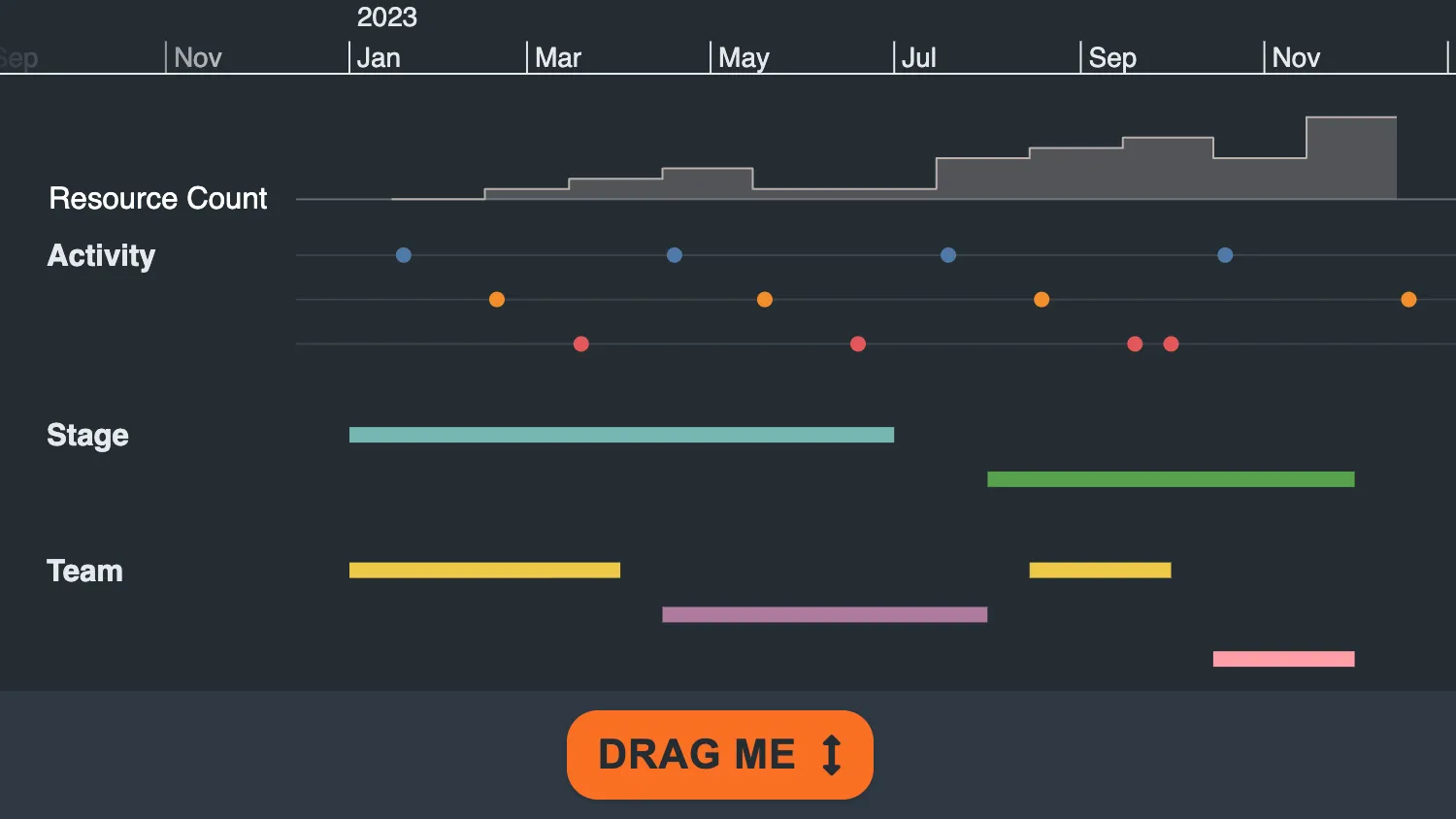
Drag the button below the timeline up and down to see how KronoGraph can adapt when the viewport is resized.
Use timeline.options() to add and remove elements from the timeline.
See also:
import { createTimeline } from "kronograph";
import allData from "./data";

const timelineElement = document.getElementById("my-timeline");
const dragButtonElement = document.getElementById("drag-button");

const minimumTimelineHeight = 80;
const buttonPadding = 10;
const controlAreaHeight = 60;

let maximumTimelineHeight = document.body.scrollHeight - controlAreaHeight;
let mousePosition;

function updateTimeline() {
  const timelineHeight = timelineElement.clientHeight;

  if (timelineHeight < 150) {
    timeline.options({
      timeSeriesCharts: { sizePercent: 0 },
      scales: { showAtTop: false, showAtBottom: false },
    });
  } else if (timelineHeight < 250) {
    timeline.options({
      timeSeriesCharts: { sizePercent: 0 },
      scales: { showAtTop: true, showAtBottom: false },
    });
  } else if (timelineHeight < 600) {
    timeline.options({
      timeSeriesCharts: { sizePercent: 25 },
      scales: { showAtTop: true, showAtBottom: false },
    });
  } else {
    timeline.options({
      timeSeriesCharts: { sizePercent: 25 },
      scales: { showAtTop: true, showAtBottom: true },
    });
  }
}

function resizeTimeline(newHeight) {
  // clamp the height of the timeline between a minimum and maximum value
  const timelineElementHeight = Math.min(
    maximumTimelineHeight,
    Math.max(newHeight, minimumTimelineHeight),
  );

  timelineElement.style.height = `${timelineElementHeight}px`;
  dragButtonElement.style.top = `${timelineElementHeight + buttonPadding}px`;

  updateTimeline();
}

function onMouseDown(mouseDownEvent) {
  mouseDownEvent.preventDefault();
  mousePosition = mouseDownEvent.clientY;
  document.addEventListener("mousemove", onMouseMove);
}

function onMouseMove(event) {
  event.preventDefault();

  const newMousePosition = event.clientY;
  const positionDifference = mousePosition - newMousePosition;
  const newHeight =
    dragButtonElement.offsetTop - buttonPadding - positionDifference;

  resizeTimeline(newHeight);

  mousePosition = newMousePosition;
}

function stopTimelineResize() {
  document.removeEventListener("mousemove", onMouseMove);
}

function onWindowResize() {
  maximumTimelineHeight = document.body.scrollHeight - controlAreaHeight;
  resizeTimeline(timelineElement.clientHeight);
}

// initialise timeline element to the maximum allowed height
timelineElement.style.height = `${maximumTimelineHeight}px`;
timelineElement.style.minHeight = `${minimumTimelineHeight}px`;

window.addEventListener("resize", onWindowResize);
document.addEventListener("mouseup", stopTimelineResize);
document.addEventListener("mouseleave", stopTimelineResize);
dragButtonElement.addEventListener("mousedown", onMouseDown);

const timeline = createTimeline("my-timeline");

timeline.set(allData);
timeline.fit();export default {
entityTypes: {
Activity: {},
Stage: {},
Team: {},
},
entities: {
"Internal Events": { color: "#808080", type: "Activity" },
"External Events": { color: "#808080", type: "Activity" },
"Emails Received": { color: "#808080", type: "Activity" },
Planning: { color: "rgba(0,0,0,0)", type: "Stage" },
Implementation: { color: "rgba(0,0,0,0)", type: "Stage" },
Alpha: { color: "rgba(0,0,0,0)", type: "Team" },
Beta: { color: "rgba(0,0,0,0)", type: "Team" },
Gamma: { color: "rgba(0,0,0,0)", type: "Team" },
},
events: {
1: {
entityIds: ["Internal Events"],
time: Date.UTC(2023, 0, 19),
color: "#4e79a7",
type: "Activity",
},
2: {
entityIds: ["Internal Events"],
time: Date.UTC(2023, 3, 19),
color: "#4e79a7",
type: "Activity",
},
3: {
entityIds: ["Internal Events"],
time: Date.UTC(2023, 6, 19),
color: "#4e79a7",
type: "Activity",
},
5: {
entityIds: ["Internal Events"],
time: Date.UTC(2023, 9, 19),
color: "#4e79a7",
type: "Activity",
},
6: {
entityIds: ["External Events"],
time: Date.UTC(2023, 1, 19),
color: "#f28e2c",
type: "Activity",
},
7: {
entityIds: ["External Events"],
time: Date.UTC(2023, 4, 19),
color: "#f28e2c",
type: "Activity",
},
8: {
entityIds: ["External Events"],
time: Date.UTC(2023, 7, 19),
color: "#f28e2c",
type: "Activity",
},
9: {
entityIds: ["External Events"],
time: Date.UTC(2023, 11, 19),
color: "#f28e2c",
type: "Activity",
},
10: {
entityIds: ["Emails Received"],
time: Date.UTC(2023, 2, 19),
color: "#e15759",
type: "Activity",
},
11: {
entityIds: ["Emails Received"],
time: Date.UTC(2023, 5, 19),
color: "#e15759",
type: "Activity",
},
12: {
entityIds: ["Emails Received"],
time: Date.UTC(2023, 8, 19),
color: "#e15759",
type: "Activity",
},
13: {
entityIds: ["Emails Received"],
time: Date.UTC(2023, 9, 1),
color: "#e15759",
type: "Activity",
},
// Stage Events
14: {
entityIds: ["Planning"],
time: { start: Date.UTC(2023, 0, 1), end: Date.UTC(2023, 6, 1) },
color: "#76b7b2",
},
15: {
entityIds: ["Implementation"],
time: { start: Date.UTC(2023, 7, 1), end: Date.UTC(2023, 11, 1) },
color: "#59a14f",
},
// Team Events
16: {
entityIds: ["Alpha"],
time: { start: Date.UTC(2023, 0, 1), end: Date.UTC(2023, 3, 1) },
color: "#edc949",
},
17: {
entityIds: ["Beta"],
time: { start: Date.UTC(2023, 3, 15), end: Date.UTC(2023, 7, 1) },
color: "#af7aa1",
},
18: {
entityIds: ["Alpha"],
time: { start: Date.UTC(2023, 7, 15), end: Date.UTC(2023, 9, 1) },
color: "#edc949",
},
19: {
entityIds: ["Gamma"],
time: { start: Date.UTC(2023, 9, 15), end: Date.UTC(2023, 11, 1) },
color: "#ff9da7",
},
},
timeSeriesCharts: {
resources: {
color: "#bab0ab",
label: "Resource Count",
labelColor: "white",
type: "step",
data: [
{ time: Date.UTC(2023, 0, 15), value: 10 },
{ time: Date.UTC(2023, 1, 15), value: 20 },
{ time: Date.UTC(2023, 2, 15), value: 30 },
{ time: Date.UTC(2023, 3, 15), value: 40 },
{ time: Date.UTC(2023, 4, 15), value: 20 },
{ time: Date.UTC(2023, 5, 15), value: 20 },
{ time: Date.UTC(2023, 6, 15), value: 50 },
{ time: Date.UTC(2023, 7, 15), value: 60 },
{ time: Date.UTC(2023, 8, 15), value: 70 },
{ time: Date.UTC(2023, 9, 15), value: 50 },
{ time: Date.UTC(2023, 10, 15), value: 90 },
{ time: Date.UTC(2023, 11, 15), value: 90 },
],
},
},
};<!doctype html>
<html>
<head>
<link rel="stylesheet" href="@ci/theme/kg/css/examples.css" />
<link rel="stylesheet" href="./style.css" />
</head>
<body>
<div class="story">
<div id="my-timeline"></div>
<div id="controls">
<button class="button" title="Drag Button" id="drag-button">
Drag Me <i class="fas fa-arrows-alt-v"></i>
</button>
</div>
</div>
<script type="module" src="./code.js"></script>
</body>
</html>#controls {
padding: 10px;
display: flex;
justify-content: center;
}
#drag-button {
position: absolute;
cursor: ns-resize;
}import React, { useCallback, useEffect, useRef, useState } from "react";
import { createRoot } from "react-dom/client";
import Timeline from "kronograph/react/Timeline";
import data from "./data";
const { entities, events, entityTypes, timeSeriesCharts } = data;
const minimumTimelineHeight = 80;
const buttonPadding = 10;
const controlAreaHeight = 60;
let maximumTimelineHeight = document.body.scrollHeight - controlAreaHeight;
export const Demo = () => {
const [mousePosition, setMousePosition] = useState({
previous: null,
current: null,
});
const [timelineHeight, setTimelineHeight] = useState(maximumTimelineHeight);
const [dragButtonTop, setDragButtonTop] = useState(
maximumTimelineHeight + buttonPadding,
);
const [options, setOptions] = useState({});
const timelineContainerRef = useRef(null);
const dragButtonRef = useRef(null);
const onMouseDown = (event) => {
event.preventDefault();
setMousePosition({
previous: event.clientY,
current: event.clientY,
});
document.addEventListener("mousemove", onMouseMove);
};
const onMouseMove = useCallback((event) => {
setMousePosition((state) => {
return {
previous: state.current,
current: event.clientY,
};
});
}, []);
const resizeTimeline = useCallback((newHeight) => {
// clamp the height of the timeline between a minimum and maximum value
const newTimelineHeight = Math.min(
maximumTimelineHeight,
Math.max(newHeight, minimumTimelineHeight),
);
setTimelineHeight(newTimelineHeight);
setDragButtonTop(newTimelineHeight + buttonPadding);
}, []);
useEffect(() => {
const stopTimelineResize = () => {
document.removeEventListener("mousemove", onMouseMove);
};
const onWindowResize = () => {
maximumTimelineHeight = document.body.scrollHeight - controlAreaHeight;
resizeTimeline(timelineContainerRef.current.clientHeight);
};
window.addEventListener("resize", onWindowResize);
document.addEventListener("mouseup", stopTimelineResize);
document.addEventListener("mouseleave", stopTimelineResize);
}, [onMouseMove, resizeTimeline]);
useEffect(() => {
if (timelineHeight < 150) {
setOptions({
timeSeriesCharts: { sizePercent: 0 },
scales: { showAtBottom: false, showAtTop: false },
});
} else if (timelineHeight < 250) {
setOptions({
timeSeriesCharts: { sizePercent: 0 },
scales: { showAtTop: true, showAtBottom: false },
});
} else if (timelineHeight < 600) {
setOptions({
timeSeriesCharts: { sizePercent: 25 },
scales: { showAtTop: true, showAtBottom: false },
});
} else {
setOptions({
timeSeriesCharts: { sizePercent: 25 },
scales: { showAtTop: true, showAtBottom: true },
});
}
}, [timelineHeight]);
useEffect(() => {
const positionDifference = mousePosition.previous - mousePosition.current;
const newHeight =
dragButtonRef.current.offsetTop - buttonPadding - positionDifference;
resizeTimeline(newHeight);
}, [mousePosition, resizeTimeline]);
return (
<div className="story">
<div ref={timelineContainerRef}>
<Timeline
style={{
height: `${timelineHeight}px`,
minHeight: `${minimumTimelineHeight}px`,
}}
entities={entities}
events={events}
entityTypes={entityTypes}
timeSeriesCharts={timeSeriesCharts}
options={options}
/>
</div>
<div id="controls">
<button
style={{ top: `${dragButtonTop}px` }}
className="button"
title="Drag Button"
id="drag-button"
ref={dragButtonRef}
onMouseDown={onMouseDown}
>
Drag Me <i className="fas fa-arrows-alt-v"></i>
</button>
</div>
</div>
);
};
const root = createRoot(document.getElementById("my-timeline"));
root.render(<Demo />);export default {
entityTypes: {
Activity: {},
Stage: {},
Team: {},
},
entities: {
"Internal Events": { color: "#808080", type: "Activity" },
"External Events": { color: "#808080", type: "Activity" },
"Emails Received": { color: "#808080", type: "Activity" },
Planning: { color: "rgba(0,0,0,0)", type: "Stage" },
Implementation: { color: "rgba(0,0,0,0)", type: "Stage" },
Alpha: { color: "rgba(0,0,0,0)", type: "Team" },
Beta: { color: "rgba(0,0,0,0)", type: "Team" },
Gamma: { color: "rgba(0,0,0,0)", type: "Team" },
},
events: {
1: {
entityIds: ["Internal Events"],
time: Date.UTC(2023, 0, 19),
color: "#4e79a7",
type: "Activity",
},
2: {
entityIds: ["Internal Events"],
time: Date.UTC(2023, 3, 19),
color: "#4e79a7",
type: "Activity",
},
3: {
entityIds: ["Internal Events"],
time: Date.UTC(2023, 6, 19),
color: "#4e79a7",
type: "Activity",
},
5: {
entityIds: ["Internal Events"],
time: Date.UTC(2023, 9, 19),
color: "#4e79a7",
type: "Activity",
},
6: {
entityIds: ["External Events"],
time: Date.UTC(2023, 1, 19),
color: "#f28e2c",
type: "Activity",
},
7: {
entityIds: ["External Events"],
time: Date.UTC(2023, 4, 19),
color: "#f28e2c",
type: "Activity",
},
8: {
entityIds: ["External Events"],
time: Date.UTC(2023, 7, 19),
color: "#f28e2c",
type: "Activity",
},
9: {
entityIds: ["External Events"],
time: Date.UTC(2023, 11, 19),
color: "#f28e2c",
type: "Activity",
},
10: {
entityIds: ["Emails Received"],
time: Date.UTC(2023, 2, 19),
color: "#e15759",
type: "Activity",
},
11: {
entityIds: ["Emails Received"],
time: Date.UTC(2023, 5, 19),
color: "#e15759",
type: "Activity",
},
12: {
entityIds: ["Emails Received"],
time: Date.UTC(2023, 8, 19),
color: "#e15759",
type: "Activity",
},
13: {
entityIds: ["Emails Received"],
time: Date.UTC(2023, 9, 1),
color: "#e15759",
type: "Activity",
},
// Stage Events
14: {
entityIds: ["Planning"],
time: { start: Date.UTC(2023, 0, 1), end: Date.UTC(2023, 6, 1) },
color: "#76b7b2",
},
15: {
entityIds: ["Implementation"],
time: { start: Date.UTC(2023, 7, 1), end: Date.UTC(2023, 11, 1) },
color: "#59a14f",
},
// Team Events
16: {
entityIds: ["Alpha"],
time: { start: Date.UTC(2023, 0, 1), end: Date.UTC(2023, 3, 1) },
color: "#edc949",
},
17: {
entityIds: ["Beta"],
time: { start: Date.UTC(2023, 3, 15), end: Date.UTC(2023, 7, 1) },
color: "#af7aa1",
},
18: {
entityIds: ["Alpha"],
time: { start: Date.UTC(2023, 7, 15), end: Date.UTC(2023, 9, 1) },
color: "#edc949",
},
19: {
entityIds: ["Gamma"],
time: { start: Date.UTC(2023, 9, 15), end: Date.UTC(2023, 11, 1) },
color: "#ff9da7",
},
},
timeSeriesCharts: {
resources: {
color: "#bab0ab",
label: "Resource Count",
labelColor: "white",
type: "step",
data: [
{ time: Date.UTC(2023, 0, 15), value: 10 },
{ time: Date.UTC(2023, 1, 15), value: 20 },
{ time: Date.UTC(2023, 2, 15), value: 30 },
{ time: Date.UTC(2023, 3, 15), value: 40 },
{ time: Date.UTC(2023, 4, 15), value: 20 },
{ time: Date.UTC(2023, 5, 15), value: 20 },
{ time: Date.UTC(2023, 6, 15), value: 50 },
{ time: Date.UTC(2023, 7, 15), value: 60 },
{ time: Date.UTC(2023, 8, 15), value: 70 },
{ time: Date.UTC(2023, 9, 15), value: 50 },
{ time: Date.UTC(2023, 10, 15), value: 90 },
{ time: Date.UTC(2023, 11, 15), value: 90 },
],
},
},
};<!doctype html>
<html>
<head>
<link rel="stylesheet" href="@ci/theme/kg/css/examples.css" />
<link rel="stylesheet" href="./style.css" />
</head>
<body>
<div id="my-timeline" style="height: 100vh"></div>
<script type="module" src="./code.jsx"></script>
</body>
</html>#controls {
padding: 10px;
display: flex;
justify-content: center;
}
#drag-button {
position: absolute;
cursor: ns-resize;
}