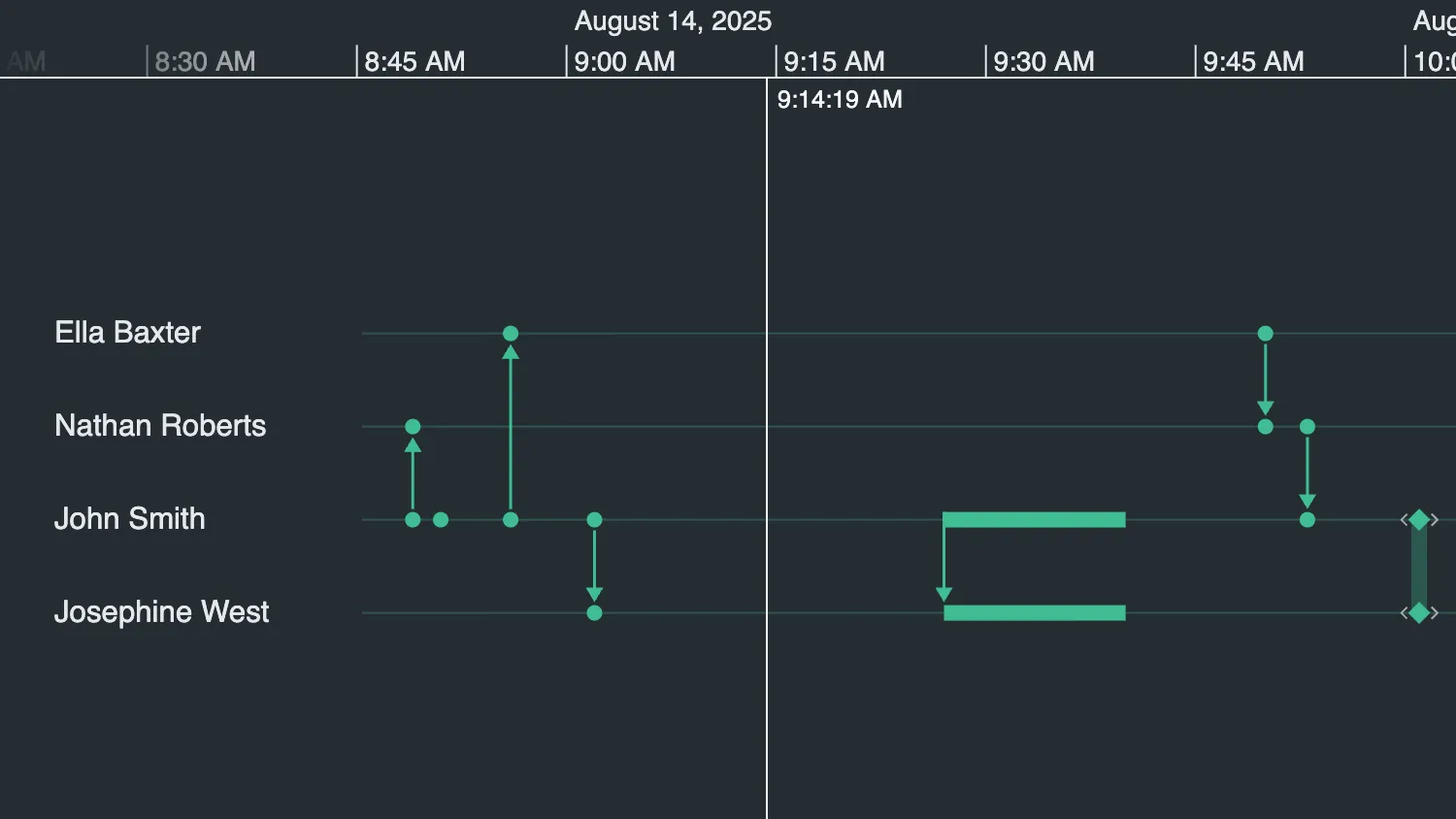
Hover over the timeline to show the scale guide.
Use the controls below the timeline to change the properties of the scale guide.
See also:
import { createTimeline } from "kronograph";
import data from "./data";

const timeline = createTimeline("my-timeline");

timeline.set(data);
timeline.fit();

const timelineOptions = {
  scaleGuide: {
    showAtTop: true,
    showAtBottom: false,
    textColor: "#f5f7fa",
    lineColor: "#f5f7fa",
    textFormat: "auto",
  },
};

timeline.options(timelineOptions);

function handleSelectOption(id, setOptionFn) {
  document.getElementById(id).addEventListener("change", (e) => {
    const { value } = e.target;
    // Update the timelineOptions object with the user's selection and pass it to the Timeline's options function
    setOptionFn(value);
    timeline.options(timelineOptions);
  });
}

handleSelectOption("scaleguide-position-select", (value) => {
  timelineOptions.scaleGuide.showAtBottom =
    value === "bottom" || value === "both";
  timelineOptions.scaleGuide.showAtTop = value === "top" || value === "both";
});

handleSelectOption("scaleguide-format-select", (value) => {
  timelineOptions.scaleGuide.textFormat = value;
});

handleSelectOption("scaleguide-textcolor-select", (value) => {
  timelineOptions.scaleGuide.textColor = value;
});

handleSelectOption("scaleguide-linecolor-select", (value) => {
  timelineOptions.scaleGuide.lineColor = value;
});

handleSelectOption("scaleguide-snapdistance-select", (value) => {
  timelineOptions.scaleGuide.snapDistance = Number(value);
});

handleSelectOption("scaleguide-width-select", (value) => {
  timelineOptions.scaleGuide.width = Number(value);
});export default {
entities: {
"smith-johnathan-151": {
label: "John Smith",
},
"west-josephine-126": {
label: "Josephine West",
},
"roberts-nathaniel-023": {
label: "Nathan Roberts",
},
"baxter-eleanor-004": {
label: "Ella Baxter",
},
},
events: {
"Email 0": {
entityIds: ["smith-johnathan-151", "smith-johnathan-151"],
time: new Date(2025, 7, 14, 8, 51),
},
"Email 1": {
entityIds: ["smith-johnathan-151", "roberts-nathaniel-023"],
time: new Date(2025, 7, 14, 8, 49),
},
"Email 2": {
entityIds: ["smith-johnathan-151", "baxter-eleanor-004"],
time: new Date(2025, 7, 14, 8, 56),
},
"Email 3": {
entityIds: ["smith-johnathan-151", "west-josephine-126"],
time: new Date(2025, 7, 14, 9, 2),
},
"Email 4": {
entityIds: ["smith-johnathan-151", "west-josephine-126"],
time: {
start: new Date(2025, 7, 14, 9, 27),
end: new Date(2025, 7, 14, 9, 40),
},
},
"Email 5": {
entityIds: ["baxter-eleanor-004", "roberts-nathaniel-023"],
time: new Date(2025, 7, 14, 9, 50),
},
"Email 6": {
entityIds: ["roberts-nathaniel-023", "smith-johnathan-151"],
time: new Date(2025, 7, 14, 9, 53),
},
"Email 7": {
entityIds: ["west-josephine-126", "smith-johnathan-151"],
time: new Date(2025, 7, 14, 10, 1),
},
"Email 8": {
entityIds: ["smith-johnathan-151", "west-josephine-126"],
time: new Date(2025, 7, 14, 10, 1),
},
},
};<!doctype html>
<html>
<head>
<link rel="stylesheet" href="@ci/theme/kg/css/examples.css" />
</head>
<body>
<div class="story">
<div class="story__timeline" id="my-timeline"></div>
<div class="story__controls story__controls--row">
<div class="stack">
<div class="story__controls__item">
<label for="scaleguide-position-select">Label Position</label>
<select id="scaleguide-position-select" class="select">
<option value="top" selected>Top</option>
<option value="bottom">Bottom</option>
<option value="both">Both</option>
</select>
</div>
<div class="story__controls__item">
<label for="scaleguide-format-select">Text Format</label>
<select id="scaleguide-format-select" class="select">
<option value="auto">Automatic</option>
<option value="HH:mm">Hours and Minutes</option>
<option value="d MMMM yyyy">Day Month Year</option>
</select>
</div>
</div>
<div class="stack">
<div class="story__controls__item">
<label for="scaleguide-textcolor-select">Text Color</label>
<select id="scaleguide-textcolor-select" class="select">
<option value="#f5f7fa" selected>White</option>
<option value="#68d391">Green</option>
<option value="#90cdf4">Blue</option>
</select>
</div>
<div class="story__controls__item">
<label for="scaleguide-linecolor-select">Line Color</label>
<select id="scaleguide-linecolor-select" class="select">
<option value="#f5f7fa" selected>White</option>
<option value="#68d391">Green</option>
<option value="#90cdf4">Blue</option>
</select>
</div>
</div>
<div class="stack">
<div class="story__controls__item">
<label for="scaleguide-snapdistance-select">Snap Distance</label>
<select id="scaleguide-snapdistance-select" class="select">
<option value="0">0</option>
<option value="10" selected>10</option>
<option value="46">46</option>
</select>
</div>
<div class="story__controls__item">
<label for="scaleguide-width-select">Line Width</label>
<select id="scaleguide-width-select" class="select">
<option value="0" selected>0</option>
<option value="1" selected>1</option>
<option value="4">4</option>
</select>
</div>
</div>
</div>
</div>
<script type="module" src="./code.js"></script>
</body>
</html>import React, { useState } from "react";
import { createRoot } from "react-dom/client";
import Timeline from "kronograph/react/Timeline";
import data from "./data";
const { entities, events } = data;
export const Demo = () => {
const [textColor, setTextColor] = useState("#f5f7fa");
const [lineColor, setLineColor] = useState("#f5f7fa");
const [scaleTop, setScaleTop] = useState(true);
const [scaleBottom, setScaleBottom] = useState(false);
const [textFormat, setTextFormat] = useState("auto");
const [snapDistance, setSnapDistance] = useState(10);
const [width, setWidth] = useState(1);
const options = {
scaleGuide: {
textColor,
lineColor,
showAtBottom: scaleBottom,
showAtTop: scaleTop,
textFormat,
snapDistance,
width,
},
};
return (
<div className="story">
<Timeline
className="story__timeline"
entities={entities}
events={events}
options={options}
/>
<div className="story__controls story__controls--row">
<div className="stack">
<div className="story__controls__item">
<label htmlFor="scaleguide-position-select">Label Position</label>
<select
id="scaleguide-position-select"
className="select"
defaultValue="top"
onChange={(e) => {
const { value } = e.target;
setScaleTop(value === "top" || value === "both");
setScaleBottom(value === "bottom" || value === "both");
}}
>
<option value="top">Top</option>
<option value="bottom">Bottom</option>
<option value="both">Both</option>
</select>
</div>
<div className="story__controls__item">
<label htmlFor="scaleguide-format-select">Label Format</label>
<select
id="scaleguide-format-select"
className="select"
defaultValue="auto"
onChange={(e) => {
setTextFormat(e.target.value);
}}
>
<option value="auto">Automatic</option>
<option value="HH:mm">Hours and Minutes</option>
<option value="d MMMM yyyy">Day Month Year</option>
</select>
</div>
</div>
<div className="stack">
<div className="story__controls__item">
<label htmlFor="scaleguide-textcolor-select">Label Color</label>
<select
id="scaleguide-textcolor-select"
className="select"
defaultValue="#f5f7fa"
onChange={(e) => {
setTextColor(e.target.value);
}}
>
<option value="#f5f7fa">White</option>
<option value="#68d391">Green</option>
<option value="#90cdf4">Blue</option>
</select>
</div>
<div className="story__controls__item">
<label htmlFor="scaleguide-linecolor-select">Line Color</label>
<select
id="scaleguide-linecolor-select"
className="select"
defaultValue="#f5f7fa"
onChange={(e) => {
setLineColor(e.target.value);
}}
>
<option value="#f5f7fa">White</option>
<option value="#68d391">Green</option>
<option value="#90cdf4">Blue</option>
</select>
</div>
</div>
<div className="stack">
<div className="story__controls__item">
<label htmlFor="scaleguide-snapdistance-select">
Snap Distance
</label>
<select
id="scaleguide-snapdistance-select"
className="select"
defaultValue="10"
onChange={(e) => {
setSnapDistance(Number(e.target.value));
}}
>
<option value="0">0</option>
<option value="10">10</option>
<option value="46">46</option>
</select>
</div>
<div className="story__controls__item">
<label htmlFor="scaleguide-width-select">Line Width</label>
<select
id="scaleguide-width-select"
className="select"
defaultValue="1"
onChange={(e) => {
setWidth(Number(e.target.value));
}}
>
<option value="0">0</option>
<option value="1">1</option>
<option value="4">4</option>
</select>
</div>
</div>
</div>
</div>
);
};
const root = createRoot(document.getElementById("my-timeline"));
root.render(<Demo />);export default {
entities: {
"smith-johnathan-151": {
label: "John Smith",
},
"west-josephine-126": {
label: "Josephine West",
},
"roberts-nathaniel-023": {
label: "Nathan Roberts",
},
"baxter-eleanor-004": {
label: "Ella Baxter",
},
},
events: {
"Email 0": {
entityIds: ["smith-johnathan-151", "smith-johnathan-151"],
time: new Date(2025, 7, 14, 8, 51),
},
"Email 1": {
entityIds: ["smith-johnathan-151", "roberts-nathaniel-023"],
time: new Date(2025, 7, 14, 8, 49),
},
"Email 2": {
entityIds: ["smith-johnathan-151", "baxter-eleanor-004"],
time: new Date(2025, 7, 14, 8, 56),
},
"Email 3": {
entityIds: ["smith-johnathan-151", "west-josephine-126"],
time: new Date(2025, 7, 14, 9, 2),
},
"Email 4": {
entityIds: ["smith-johnathan-151", "west-josephine-126"],
time: {
start: new Date(2025, 7, 14, 9, 27),
end: new Date(2025, 7, 14, 9, 40),
},
},
"Email 5": {
entityIds: ["baxter-eleanor-004", "roberts-nathaniel-023"],
time: new Date(2025, 7, 14, 9, 50),
},
"Email 6": {
entityIds: ["roberts-nathaniel-023", "smith-johnathan-151"],
time: new Date(2025, 7, 14, 9, 53),
},
"Email 7": {
entityIds: ["west-josephine-126", "smith-johnathan-151"],
time: new Date(2025, 7, 14, 10, 1),
},
"Email 8": {
entityIds: ["smith-johnathan-151", "west-josephine-126"],
time: new Date(2025, 7, 14, 10, 1),
},
},
};<!doctype html>
<html>
<head>
<link rel="stylesheet" href="@ci/theme/kg/css/examples.css" />
</head>
<body>
<div id="my-timeline" style="height: 100vh"></div>
<script type="module" src="./code.jsx"></script>
</body>
</html>