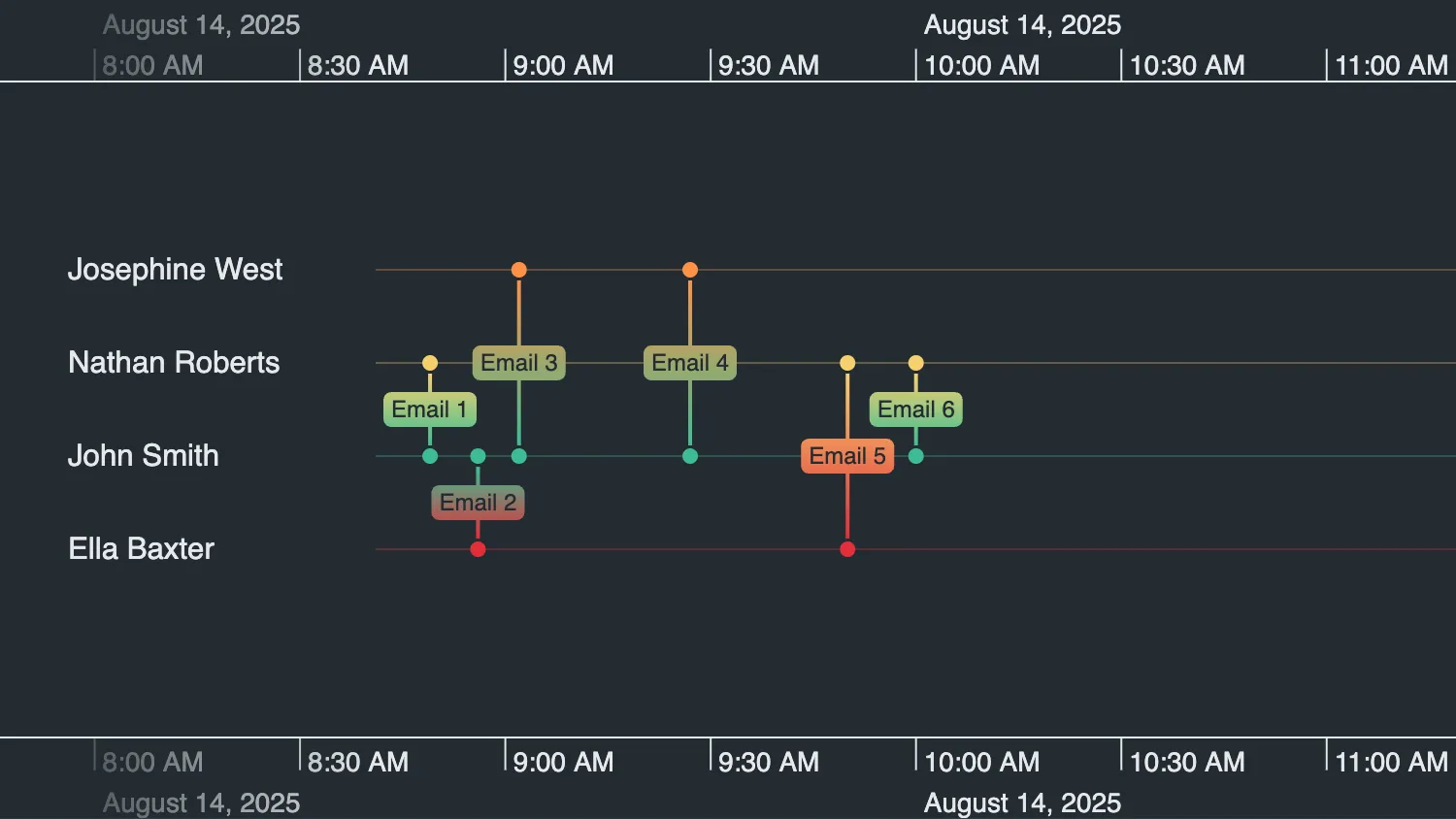
Hover over a tile in the control panel to highlight the associated email event in the timeline.
Event handlers attached to the control panel tiles use the overrideStyles() API to update the event's style properties. The color is updated to orange, the lineWidth is increased and the direction of the event is shown by enabling showArrows.
See also:
Hover over a tile in the control panel to highlight the associated email event in the timeline.
Event handlers attached to the control panel tiles use the overrideStyles API to update the event's style properties. The color is updated to orange, the lineWidth is increased and the direction of the event is shown by enabling showArrows.
See also:
import { createTimeline } from "kronograph";
import { entities, events, eventTypes } from "./data";

function restyleEvents() {
  const hoveredTableEventCell = document.querySelector(
    ".event-table__cell:hover",
  );

  timeline.overrideStyles(
    hoveredTableEventCell
      ? [
          {
            ids: hoveredTableEventCell.dataset.eventId,
            style: {
              color: "rgb(255, 145, 71)",
              lineWidth: 6,
              showArrows: true,
            },
          },
        ]
      : [],
  );
}

document.querySelectorAll(".event-table__cell").forEach((cell) => {
  cell.addEventListener("mouseenter", restyleEvents);
  cell.addEventListener("mouseleave", restyleEvents);
});

const timeline = createTimeline("my-timeline");

timeline.set({
  entities,
  events,
  eventTypes,
});

timeline.fit();export const entities = {
"smith-johnathan-151": {
label: "John Smith",
},
"west-josephine-126": {
label: "Josephine West",
color: "#ff9147",
},
"roberts-nathaniel-023": {
label: "Nathan Roberts",
color: "#f7d06e",
},
"baxter-eleanor-004": {
label: "Ella Baxter",
color: "#e12d39",
},
};
export const eventTypes = {
default: {
color: "entity",
lineWidth: 2,
showArrows: false,
},
};
export const events = {
"Email 1": {
entityIds: ["smith-johnathan-151", "roberts-nathaniel-023"],
time: new Date(2025, 7, 14, 8, 49),
label: {
text: "Email 1",
},
},
"Email 2": {
entityIds: ["smith-johnathan-151", "baxter-eleanor-004"],
time: new Date(2025, 7, 14, 8, 56),
label: {
text: "Email 2",
},
},
"Email 3": {
entityIds: ["smith-johnathan-151", "west-josephine-126"],
time: new Date(2025, 7, 14, 9, 2),
label: {
text: "Email 3",
},
},
"Email 4": {
entityIds: ["smith-johnathan-151", "west-josephine-126"],
time: new Date(2025, 7, 14, 9, 27),
label: {
text: "Email 4",
},
},
"Email 5": {
entityIds: ["baxter-eleanor-004", "roberts-nathaniel-023"],
time: new Date(2025, 7, 14, 9, 50),
label: {
text: "Email 5",
},
},
"Email 6": {
entityIds: ["roberts-nathaniel-023", "smith-johnathan-151"],
time: new Date(2025, 7, 14, 10, 0),
label: {
text: "Email 6",
},
},
};
export const tableEventIds = [
"Email 1",
"Email 2",
"Email 3",
"Email 4",
"Email 5",
"Email 6",
];<!doctype html>
<html>
<head>
<link rel="stylesheet" href="@ci/theme/kg/css/examples.css" />
<link rel="stylesheet" href="./style.css" />
</head>
<body>
<div class="story">
<div class="story__timeline" id="my-timeline"></div>
<div class="story__controls--row">
<div class="story__controls__heading controls-title">Control Panel</div>
</div>
<div class="story__controls story__controls--row">
<div class="event-table">
<div class="event-table__cell" data-event-id="Email 1">Email 1</div>
<div class="event-table__cell" data-event-id="Email 2">Email 2</div>
<div class="event-table__cell" data-event-id="Email 3">Email 3</div>
<div class="event-table__cell" data-event-id="Email 4">Email 4</div>
<div class="event-table__cell" data-event-id="Email 5">Email 5</div>
<div class="event-table__cell" data-event-id="Email 6">Email 6</div>
</div>
</div>
</div>
<script type="module" src="./code.js"></script>
</body>
</html>.controls-title {
padding-top: 1rem;
padding-left: 1rem;
}
.event-table {
display: grid;
grid-template-columns: repeat(6, max-content);
gap: 8px;
}
.event-table__cell {
padding: 8px 12px;
border: 1px solid #999;
border-radius: 4px;
background: white;
color: black;
cursor: pointer;
text-align: center;
}
.event-table__cell:hover {
background-color: rgb(255, 145, 71);
}import React, { useState } from "react";
import { createRoot } from "react-dom/client";
import Timeline from "kronograph/react/Timeline";
import { entities, events, eventTypes, tableEventIds } from "./data";
export const Demo = () => {
const [hoveredEventId, setHoveredEventId] = useState(null);
return (
<div className="story">
<Timeline
className="story__timeline"
id="my-timeline"
events={events}
entities={entities}
eventTypes={eventTypes}
overrideStyles={
hoveredEventId
? [
{
ids: hoveredEventId,
style: {
color: "rgb(255, 145, 71)",
lineWidth: 6,
showArrows: true,
},
},
]
: []
}
/>
<div className="story__controls--row">
<div className="story__controls__heading controls-title">
Control Panel
</div>
</div>
<div className="story__controls story__controls--row">
<div className="event-table">
{tableEventIds.map((eventId) => (
<div
key={eventId}
className="event-table__cell"
onMouseEnter={() => {
setHoveredEventId(eventId);
}}
onMouseLeave={() => {
setHoveredEventId(null);
}}
>
{eventId}
</div>
))}
</div>
</div>
</div>
);
};
const root = createRoot(document.getElementById("my-timeline"));
root.render(<Demo />);export const entities = {
"smith-johnathan-151": {
label: "John Smith",
},
"west-josephine-126": {
label: "Josephine West",
color: "#ff9147",
},
"roberts-nathaniel-023": {
label: "Nathan Roberts",
color: "#f7d06e",
},
"baxter-eleanor-004": {
label: "Ella Baxter",
color: "#e12d39",
},
};
export const eventTypes = {
default: {
color: "entity",
lineWidth: 2,
showArrows: false,
},
};
export const events = {
"Email 1": {
entityIds: ["smith-johnathan-151", "roberts-nathaniel-023"],
time: new Date(2025, 7, 14, 8, 49),
label: {
text: "Email 1",
},
},
"Email 2": {
entityIds: ["smith-johnathan-151", "baxter-eleanor-004"],
time: new Date(2025, 7, 14, 8, 56),
label: {
text: "Email 2",
},
},
"Email 3": {
entityIds: ["smith-johnathan-151", "west-josephine-126"],
time: new Date(2025, 7, 14, 9, 2),
label: {
text: "Email 3",
},
},
"Email 4": {
entityIds: ["smith-johnathan-151", "west-josephine-126"],
time: new Date(2025, 7, 14, 9, 27),
label: {
text: "Email 4",
},
},
"Email 5": {
entityIds: ["baxter-eleanor-004", "roberts-nathaniel-023"],
time: new Date(2025, 7, 14, 9, 50),
label: {
text: "Email 5",
},
},
"Email 6": {
entityIds: ["roberts-nathaniel-023", "smith-johnathan-151"],
time: new Date(2025, 7, 14, 10, 0),
label: {
text: "Email 6",
},
},
};
export const tableEventIds = [
"Email 1",
"Email 2",
"Email 3",
"Email 4",
"Email 5",
"Email 6",
];<!doctype html>
<html>
<head>
<link rel="stylesheet" href="@ci/theme/kg/css/examples.css" />
<link rel="stylesheet" href="./style.css" />
</head>
<body>
<div id="my-timeline" style="height: 100vh"></div>
<script type="module" src="./code.jsx"></script>
</body>
</html>.controls-title {
padding-top: 1rem;
padding-left: 1rem;
}
.event-table {
display: grid;
grid-template-columns: repeat(6, max-content);
gap: 8px;
}
.event-table__cell {
padding: 8px 12px;
border: 1px solid #999;
border-radius: 4px;
background: white;
color: black;
cursor: pointer;
text-align: center;
}
.event-table__cell:hover {
background-color: rgb(255, 145, 71);
}