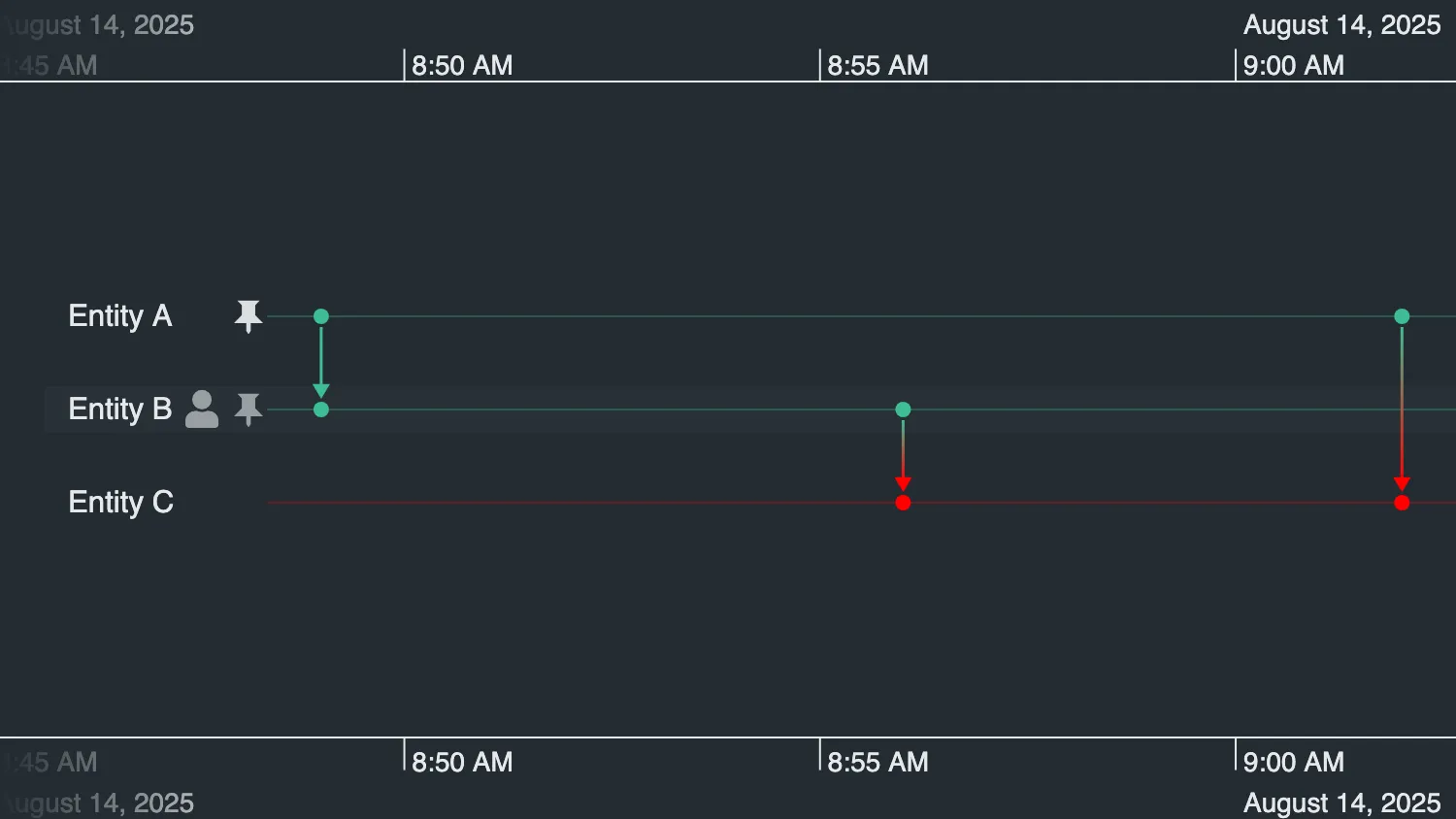
Use the controls below the timeline to customize the appearance and behavior of entity row controls.
While focus is hidden, pin shows how native controls can be restyled or completely repurposed by listening for the control's corresponding targetType when responding to user interactions on the controls.
In addition, you can also add and customize a customEntityControl.
See Also
import { createTimeline } from "kronograph";

import { entities as initialEntities, events } from "./data";

await document.fonts.load('900 16px "Font Awesome 5 Free"');
await document.fonts.ready;

const timeline = createTimeline("my-timeline");
const entities = initialEntities;

let pinSelection = "default";
let pinOnClickSelection = "default";
let customSelection = "default";
let iconScale = 1;
let customOnClickSelection = "entity-color";

function createFontIcon(text, color) {
  return {
    fontFamily: "Font Awesome 5 Free",
    text,
    fontWeight: 900,
    ...(color === undefined ? {} : { color }),
    scale: iconScale,
  };
}

function updateControls() {
  timeline.options({
    controls: {
      focus: { show: false },
      pin:
        pinSelection === "default"
          ? {}
          : {
              fontIcon: createFontIcon(
                pinSelection === "eye" ? "\u{F06E}" : "\u{F129}",
                pinSelection === "eye" ? undefined : "orange",
              ),
            },
      customEntityControl: {
        fontIcon: createFontIcon(
          customSelection === "default" ? "\u{F007}" : "\u{F019}",
          customSelection === "default" ? undefined : "green",
        ),
      },
    },
  });
}

updateControls();
timeline.set({ entities, events });
timeline.fit();

timeline.on("click", (event) => {
  const { targetType, id } = event;

  if (id === null || !Object.hasOwn(entities, id)) {
    return;
  }

  const entity = entities[id];

  if (targetType === "customEntityControl") {
    if (customOnClickSelection === "entity-color") {
      if (entity.color === "red") {
        delete entity.color;
      } else {
        entity.color = "red";
      }
    } else if (entity.lineWidth === 8) {
      delete entity.lineWidth;
    } else {
      entity.lineWidth = 8;
    }
  } else if (targetType === "pin" && pinOnClickSelection === "glyph") {
    event.preventDefault(); // overrides pinning so the glyph change can take over
    entity.glyph = !entity.glyph;
  } else {
    return;
  }

  timeline.set({ entities, events });
});

const controls = document.querySelector(".story__controls");
const iconScaleOutput = document.getElementById("icon-scale-value");

controls?.addEventListener("input", (event) => {
  const target = event.target;

  if (
    !(target instanceof HTMLInputElement || target instanceof HTMLSelectElement)
  ) {
    return;
  }

  switch (target.id) {
    case "pin":
      pinSelection = target.value;
      break;
    case "custom":
      customSelection = target.value;
      break;
    case "icon-scale":
      iconScale = Number(target.value);
      iconScaleOutput?.replaceChildren(target.value);
      break;
    case "custom-onclick":
      customOnClickSelection = target.value;
      return;
    case "pin-onclick":
      pinOnClickSelection = target.value;
      return;
    default:
      return;
  }

  updateControls();
});export const entities = {
a: {
label: "Entity A",
},
b: {
label: "Entity B",
},
c: {
label: "Entity C",
},
};
export const events = {
"a-b": {
entityIds: ["a", "b"],
time: new Date(2025, 7, 14, 8, 49),
},
"b-c": {
entityIds: ["b", "c"],
time: new Date(2025, 7, 14, 8, 56),
},
"a-c": {
entityIds: ["a", "c"],
time: new Date(2025, 7, 14, 9, 2),
},
};<!doctype html>
<html>
<head>
<link rel="stylesheet" href="@ci/theme/kg/css/examples.css">
<link
rel="stylesheet"
href="@fortawesome/[email protected]/css/fontawesome.css"
>
<link
rel="stylesheet"
href="@fortawesome/[email protected]/css/solid.css"
>
</head>
<body>
<div class="story">
<div class="story__timeline" id="my-timeline"></div>
<div class="story__controls story__controls--row">
<div class="stack">
<div class="story__controls__item">
<div class="label-select">
<label for="pin">Pin control</label>
<select class="select" id="pin">
<option value="default" selected>Default icon</option>
<option value="eye">Eye (default color)</option>
<option value="info">Info (orange)</option>
</select>
</div>
</div>
<div class="story__controls__item">
<div class="label-select">
<label for="pin-onclick">Pin on click</label>
<select class="select" id="pin-onclick">
<option value="default" selected>Default behavior</option>
<option value="glyph">Add entity glyph</option>
</select>
</div>
</div>
</div>
<div class="stack">
<div class="story__controls__item">
<div class="label-select">
<label for="custom">Custom control</label>
<select class="select" id="custom">
<option value="default" selected>User (default color)</option>
<option value="download">Download (green)</option>
</select>
</div>
</div>
<div class="story__controls__item">
<div class="label-select">
<label for="custom-onclick">Custom on click</label>
<select class="select" id="custom-onclick">
<option value="entity-color" selected>
Change entity color
</option>
<option value="line-width">Change entity line width</option>
</select>
</div>
</div>
</div>
<div class="stack">
<div class="story__controls__item">
<div class="label-select">
<label for="icon-scale">Icon scale</label>
<input
type="range"
id="icon-scale"
min="1"
max="2.5"
step="0.1"
value="1"
>
<output id="icon-scale-value" for="icon-scale">1</output>
</div>
</div>
</div>
</div>
</div>
<script type="module" src="./code.js"></script>
</body>
</html>import React, { useState } from "react";
import { createRoot } from "react-dom/client";
import Timeline from "kronograph/react/Timeline";
import { entities, events } from "./data";
await document.fonts.load('900 16px "Font Awesome 5 Free"');
await document.fonts.ready;
function fontIcon(text, color, scale) {
return {
fontFamily: "Font Awesome 5 Free",
text,
fontWeight: 900,
...(color === undefined ? {} : { color }),
scale,
};
}
export function Demo() {
const [currentEntities, setCurrentEntities] = useState(entities);
const [pin, setPin] = useState("default");
const [custom, setCustom] = useState("default");
const [pinOnClick, setPinOnClick] = useState("default");
const [customOnClick, setCustomOnClick] = useState("entity-color");
const [iconScale, setIconScale] = useState(1);
const options = {
controls: {
focus: { show: false },
pin:
pin === "default"
? {}
: {
fontIcon: fontIcon(
pin === "eye" ? "\u{F06E}" : "\u{F129}",
pin === "eye" ? undefined : "orange",
iconScale,
),
},
customEntityControl: {
fontIcon: fontIcon(
custom === "default" ? "\u{F007}" : "\u{F019}",
custom === "default" ? undefined : "green",
iconScale,
),
},
},
};
function handleTimelineClick(event) {
const { id, targetType } = event;
if (id === null || !Object.hasOwn(currentEntities, id)) {
return;
}
if (targetType === "pin" && pinOnClick === "glyph") {
event.preventDefault(); // overrides pinning so the glyph change can take over
} else if (targetType !== "customEntityControl") {
return;
}
setCurrentEntities((current) => {
const entity = { ...current[id] };
if (targetType === "customEntityControl") {
if (customOnClick === "entity-color") {
if (entity.color === "red") {
delete entity.color;
} else {
entity.color = "red";
}
} else if (entity.lineWidth === 8) {
delete entity.lineWidth;
} else {
entity.lineWidth = 8;
}
} else if (entity.glyph === true) {
delete entity.glyph;
} else {
entity.glyph = true;
}
return { ...current, [id]: entity };
});
}
return (
<div className="story">
<Timeline
className="story__timeline"
entities={currentEntities}
events={events}
options={options}
onTimelineClick={handleTimelineClick}
/>
<div className="story__controls story__controls--row">
<div className="stack">
<div className="story__controls__item">
<div className="label-select">
<label htmlFor="pin">Pin control</label>
<select
className="select"
id="pin"
value={pin}
onChange={(event) => {
setPin(event.target.value);
}}
>
<option value="default">Default icon</option>
<option value="eye">Eye (default color)</option>
<option value="info">Info (orange)</option>
</select>
</div>
</div>
<div className="story__controls__item">
<div className="label-select">
<label htmlFor="pin-onclick">Pin on click</label>
<select
className="select"
id="pin-onclick"
value={pinOnClick}
onChange={(event) => {
setPinOnClick(event.target.value);
}}
>
<option value="default">Default behavior</option>
<option value="glyph">Add entity glyph</option>
</select>
</div>
</div>
</div>
<div className="stack">
<div className="story__controls__item">
<div className="label-select">
<label htmlFor="custom">Custom control</label>
<select
className="select"
id="custom"
value={custom}
onChange={(event) => {
setCustom(event.target.value);
}}
>
<option value="default">User (default color)</option>
<option value="download">Download (green)</option>
</select>
</div>
</div>
<div className="story__controls__item">
<div className="label-select">
<label htmlFor="custom-onclick">Custom on click</label>
<select
className="select"
id="custom-onclick"
value={customOnClick}
onChange={(event) => {
setCustomOnClick(event.target.value);
}}
>
<option value="entity-color">Change entity color</option>
<option value="line-width">Change entity line width</option>
</select>
</div>
</div>
</div>
<div className="stack">
<div className="story__controls__item">
<div className="label-select">
<label htmlFor="icon-scale">Icon scale</label>
<input
type="range"
id="icon-scale"
min="1"
max="2.5"
step="0.1"
value={iconScale}
onChange={(event) => {
setIconScale(Number(event.target.value));
}}
/>
<output htmlFor="icon-scale">{iconScale}</output>
</div>
</div>
</div>
</div>
</div>
);
}
const rootElement = document.getElementById("my-timeline");
if (rootElement === null) {
throw new Error("The timeline root element was not found");
}
createRoot(rootElement).render(<Demo />);export const entities = {
a: {
label: "Entity A",
},
b: {
label: "Entity B",
},
c: {
label: "Entity C",
},
};
export const events = {
"a-b": {
entityIds: ["a", "b"],
time: new Date(2025, 7, 14, 8, 49),
},
"b-c": {
entityIds: ["b", "c"],
time: new Date(2025, 7, 14, 8, 56),
},
"a-c": {
entityIds: ["a", "c"],
time: new Date(2025, 7, 14, 9, 2),
},
};<!doctype html>
<html>
<head>
<link rel="stylesheet" href="@ci/theme/kg/css/examples.css">
<link
rel="stylesheet"
href="@fortawesome/[email protected]/css/fontawesome.css"
>
<link
rel="stylesheet"
href="@fortawesome/[email protected]/css/solid.css"
>
</head>
<body>
<div id="my-timeline" style="height: 100vh"></div>
<script type="module" src="./code.jsx"></script>
</body>
</html>