MapWeave is a library for geospatial visualization of connected data and events. It provides an API for both React and plain JavaScript.
You can use MapWeave to visualize complex networks on a map, track and observe movements of entities, highlight interesting patterns and behaviors, filter and analyze your data and much more. Thanks to its open architecture, MapWeave can be integrated with a wide range of tiles, assets and third-party basemap libraries.
To use MapWeave, there are adapters available for a number of selected third-party basemap libraries, or a standalone adapter, which doesn't require a basemap library as a dependency.
MapWeave offers different visualization layers which have been designed for a particular type of data and use case, and which can be overlaid on the basemap.
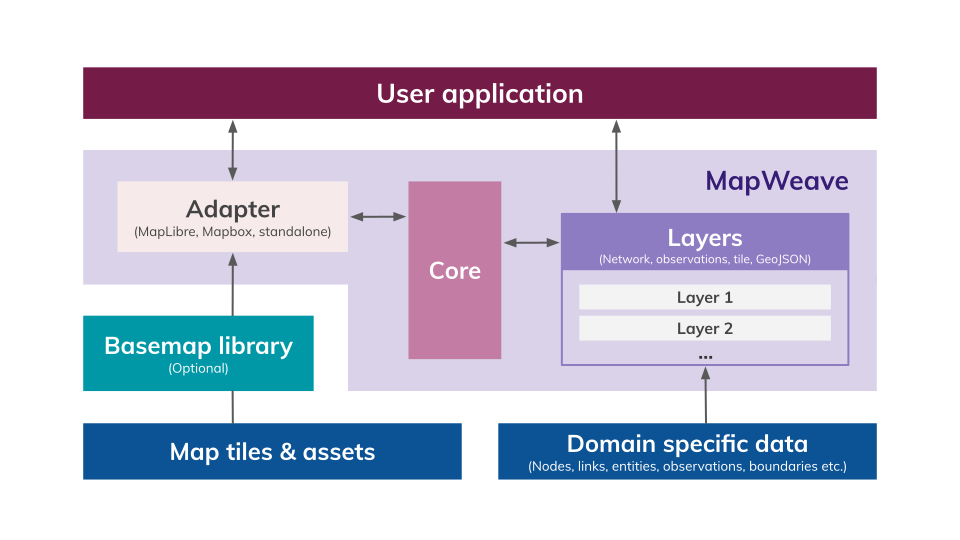
Adapters
MapWeave offers three adapters:
- MapLibre - for the open-source MapLibre basemap library. Uses the https://demotiles.maplibre.org/style.json tileset by default.
- Mapbox - for the commercial Mapbox basemap library. Uses the
mapbox://styles/mapbox/dark-v11tileset by default. - Standalone - for adding raster tiles from a tile server.
- Google Maps - coming soon! Please contact support for more information.
Only one adapter can be used in a MapWeave application at a time.
Layers
There are four visualization layers available:
- Network Layer - to visualize connected data as nodes and links.
- Observations Layer - to visualize observations of entities at particular points in time.
- GeoJSON Layer - to draw GeoJSON data as geometric objects over the map.
- Tile Layer - to display map tiles for the standalone adapter.
You can use multiple layers in your application at the same time, including multiple layers of the same type.
Layers are stacked in the order they are added, with the first layer at the bottom. To add, remove or reorder layers, you can pass an array of layer references to layers(). If multiple layers overlap, the top layer is picked during user interactions.
In the following code, the GeoJSON layer is rendered first, then the observations layer, and finally the network layer at the top.
const myGeoLayer = new GeoJsonLayer({
  data: geojsonData,
});
const myObsLayer = new ObservationsLayer({
  data: observationsData,
});
const myNetworkLayer = new NetworkLayer({
  data: networkData,
});

mapweave.layers([myGeoLayer, myObsLayer, myNetworkLayer]);The stacking order of layers is defined by their order in the parent React component from bottom to top. If multiple layers overlap, the top layer is picked during user interactions.
In the following code, the GeoJSON layer would be rendered first, then the observations layer and finally, the network layer at the top.
function Demo() {
  return (
    <MapWeave>
      <GeoJsonLayer data={geojsonData} />
      <ObservationsLayer data={observationData} />
      <NetworkLayer data={networkData} />
    </MapWeave>
  );
}